The first red flag in this scam is that the email doesn’t come from an official Instagram domain. Instead, the message is sent via an unfamiliar email address that is clearly not affiliated with Instagram. A legitimate email from Instagram will come from an official domain like @mail.instagram.com or similar. If you notice the sender’s email address is strange or not even remotely related to Instagram, it’s a phishing attempt.
Email Body: Suspicious Links and No Mention of Account Details
This phishing email didn’t mention Instagram username, the location of the alleged login, or any details expected from a real alert.
Moreover, the email typically contains links urging you to “Send Password Request” and “Not My Request“. Instead of leading to Instagram’s official site, the link is a mailto: link with several email addresses, which is highly suspicious. No legitimate company, let alone Instagram, would handle account security issues this way.
Upon reviewing the email header, I noticed that it was sent from 144 . 76 . 133 . 106 (Germany).
And all the email addresses were listed in the mailto: field.
Key Red Flags of the Phishing Email
Unfamiliar Email Address: Always check the sender’s email address. Phishing emails usually come from random addresses that don’t resemble official Instagram domains.
No Mention of Your Account: The email fails to specify which Instagram account is affected. A legitimate alert would always include details such as your account username, device, or location of the suspicious activity.
Suspicious Links: The email includes odd links (often mailto: links with multiple email addresses) instead of leading to Instagram’s official help page or security center.
Generic Greeting: Phishing emails often use non-personal greetings like “Dear User” or “Hello Instagram User” instead of addressing you by your actual name or username.
Pressure Tactics: The email urges immediate action to “secure your account,” but provides no credible way to verify the login attempt through legitimate channels.
Conclusion
The “We detected a new login into your Instagram account” phishing email is an obvious scam, particularly when you notice that it doesn’t mention which account was compromised. The lack of details, unfamiliar sender, and suspicious links make it easy to identify as a phishing attempt. Stay vigilant, verify any unusual emails, and always prioritize your online security.
Have you ever encountered an email like this? Share your experience and help others stay safe online!
Phishing scams are becoming increasingly sophisticated, and one of the more recent and alarming tactics involves an email with the subject line “Hey, You Have a Problem.” The body of the email is brief but ominous:
Subject: Hey, you have Problem Body: Hi! You have a problem. Details here You have very little time. Don’t you dare share this info with any of your friends.
The email contains a link to a website that supposedly contains more information about the so-called “problem.” However, this link is a trap designed to exploit your fear and curiosity.
How the Scam Works
The Hook: The email’s vague and alarming message is designed to create a sense of urgency. The phrase “You have very little time” triggers panic, pushing you to click on the link without thinking.
The Deception: Once you click the link, you’re taken to a website that claims you’ve been hacked. The site may impersonate a hacker, threatening that they have gained control of your device, taken screenshots of you through your camera, or recorded your browsing activity.
The Demand: To avoid these fabricated consequences, the “hacker” demands a ransom payment in Bitcoin, a popular cryptocurrency known for its anonymity. The site might also include a countdown timer, adding further pressure to comply quickly.
Email header
The email sent by id rafaelgarciays@buhuchetnko.ru client IP: 92.53.96.143
Redirection link
The link given in email redirects to domain https :// 59exp . ru and the VirusTotal score for this URL is 1/96
What Happens When You Click the Link?
If you click on the link provided in the email, here’s what typically happens next:
Personalized Attack: The link contains a parameter specific to the victim’s email address, allowing the scammer to track which email recipient clicked on the link. This personalization adds a layer of authenticity to the scam, making it more convincing.
Fake Ransom Demands: Once on the phishing site, you’ll be presented with a message from an alleged hacker claiming that they have compromised your device. The message might say that they have deployed a script on a website you visited, which allegedly allowed them to take screenshots of you using your camera.
Bitcoin Ransom: The scammer then demands a ransom, usually in Bitcoin, to prevent the release of these “screenshots” or other fabricated evidence of wrongdoing. The demand is typically accompanied by threats and a tight deadline to create a sense of urgency.
Opening Phishing Site
The phishing site links a security incident to the victim’s email ID and the Bitcoin address 1CWTFeMfPCG1Q6uVLSpHUmQ1J1i6hxj1LK, where the scammer demands a transfer of USD $699.
After reviewing the blockchain transactions associated with the Bitcoin address 1CWTFeMfPCG1Q6uVLSpHUmQ1J1i6hxj1LK, no transaction for the amount of USD $699 has been found to date.
How to Protect Yourself
Don’t Click on Suspicious Links: If you receive an unexpected email with a link, especially one that makes alarming claims, don’t click on it. Instead, verify the sender’s identity through other means.
Check the URL: Before clicking any link, hover over it to see the actual URL. If it looks suspicious or unfamiliar, don’t click it.
Be Skeptical of Urgent Requests: Scammers often create a false sense of urgency to pressure you into acting quickly. Take a moment to think before responding to any urgent requests, especially those involving money.
Use Strong, Updated Security Measures: Ensure your devices are protected with up-to-date antivirus software, and consider using a password manager to help secure your accounts.
Report Phishing Attempts: If you receive a phishing email, report it to your email provider and any relevant authorities. This helps protect others from falling victim to the same scam.
Educate Yourself and Others: Stay informed about the latest phishing tactics and share this information with friends, family, and colleagues to help them avoid similar scams.
Conclusion
Phishing scams like the “Hey, You Have a Problem” email are designed to exploit your fears and pressure you into making hasty decisions. By staying informed and following best practices for online security, you can protect yourself from these malicious schemes. Remember, when in doubt, it’s always better to be cautious and verify before taking action.
In the ever-evolving landscape of cybersecurity threats, one name has increasingly become synonymous with stealth and precision: RedLine Stealer. This malicious software, often referred to as a Trojan, is designed to infiltrate systems, silently siphoning off valuable data while remaining largely undetected by its victims. In this blog, we’ll delve into what RedLine Stealer is, how it operates, and what you can do to protect yourself from this insidious threat.
How Does RedLine Stealer Work?
RedLine Stealer typically enters a system through phishing emails, malicious websites, or bundled software downloads. Once installed, it quickly gets to work, scouring the system for valuable information. Here’s a closer look at what it targets:
Login Credentials: RedLine can harvest usernames and passwords stored in web browsers, FTP clients, and other software.
Autofill Data: Information like addresses, phone numbers, and credit card details saved in browser autofill forms are also at risk.
Cryptocurrency Wallets: The Stealer targets cryptocurrency wallets, potentially stealing private keys or wallet credentials.
System Information: It gathers detailed information about the infected system, including the operating system, hardware specifications, installed software, and even security measures.
Files and Documents: RedLine can search for specific file types, such as documents or spreadsheets, and exfiltrate them to the attacker.
I have downloaded this sample from Any.run. The link is given to download the sample at the end of article.
Get the hash of the file using PowerShell command to confirm its same sample.
Infection Process
The downloaded executable once executed, it will exit immediately and the new process starts as MSBuild.exe’. Malicious code is injected into it.
MSBuild.exe PID is 8160
The sample I have downloaded is obfuscated using Intellilock software.
To deobfuscate the code I have used pe-sieve tool. Its really easy and helpful. To perform this, we need to run executable file and run >pe-sieve /pid <pid> command like below.
deobfuscate file using pe-sieve command.
This will create the folder name PID and will copy the exe file.
400000.MSBuild.exe is deobfuscated file.
I am using dnSpyEx for debugging the executable file 400000.MSBuild.exe. The assembly name of this file is “Forgiving.exe”
Built in configuration
After deobfuscation of code, below are all the modules used in code.
IP address in config file is C2 server IP. Key is used for decoding the data. This is has been initialised in class Arguments. Its in Base64 format.
Built in configuration
While debugging executable, can see the IP address of C2 server is 185.215.113.25 and port 13686
The IP address lookup shows it is from Baie Lazare, Seychelles.
RedLine stealer check regions it is executing in, if the victim is located in one of Commonwealth of Independent States, it exits execution.
Once confirmed the victim is located our of CIS country, its starts collecting all different kind data from victims machine and send to C2 server.
Browser data
It looks for different browsers whether installed on machine and starts collecting browser login data, cookies and browser history.
Browser List:
Google Chrome
Microsoft Edge
Opera
Maple Studio, Chrome Plus
Iridium
7Star
CentBrowser
Chedot
Vivaldi
Kometa
Elements Browser
Epic Privacy Browser
Uran
Sleipnir
Citrio
Coowon
liebao
QIP Surf
Orbitum
Comodo
Amigo
Torch
Yandex
360 Browser
Maxthon
k-melon
Sputnik
Nichrome
CocCoc
Chromodo
Atom
Brave browser
Ghost Browser
Baidu Browser
CryptoTab Browser
Lulumi Browser
Mozilla
QQBrowser
WaterFox
Ghostery Browser
Netscape
Flashpeak
Crypto Wallets
Stealer looks for different wallets installed on victims machine.
Armory
Atomic
Binance
Coinomi
Electrum
Etherium
Exodus
Garuda
com.liberty.jaxx
Monero
File Collector
It search for different files with extensions on Desktop, Documents folders and upload to C2.
File Types:
.txt
.doc
.key
seed
wallet
Screen Capture
RedLine stealer captures user screen resolution and takes screenshots and send to C2 server.
System Information
It also collects information from the compromised system.
Username
hostname
Input language and date time
Installed antivirus program
Running process
OS version
Monitor size
Download and Execute payload
Redline stealer has classes DownloadUpdate and DownloadAndExecuteUpdate. DownloadUpdate download data using webclient and DownloadAndExecuteUpdate download data using webclient and execute it.
Discord& Telegram
It looks for Discord data and telegram data on victims machine.
NordVPN OpenVPN and ProtonVPN
It looks for configuration files of all three VPN applications.
Filezilla FTP Application
Stealer look for sitemanager.xml file which stores username and password and recentservers.xml which stores information about which FTM servers you have connected to. If its available on victims machines, it will extract and send to C2.
Antivirus
Stealer collect the information about installed anti malware program installed on machine and send it to C2.
Redline stealer use http[:]//tempuri[.]org/Entity/Id[1-24] to communicate to C2 server. When access this URL in browser it redirects to bing.com
VirusTotal score for this RedLine stealer is 60/75
Given the sophisticated nature of the RedLine Stealer, it’s essential to adopt robust security measures to protect yourself and your organization. Here are some key steps to consider:
Use Up-to-Date Security Software: Ensure that your antivirus and anti-malware software are regularly updated to detect and block the latest threats.
Be Cautious with Emails: Avoid opening attachments or clicking on links in emails from unknown or suspicious sources. Always verify the sender’s identity before taking any action.
Avoid Downloading Software from Untrusted Sources: Only download software from reputable websites or official app stores. Be cautious of freeware or shareware sites, which may bundle malicious software with legitimate applications.
Regularly Update Your Systems: Keep your operating system, software, and applications up to date with the latest security patches to close vulnerabilities that could be exploited by Trojans like RedLine.
Use Strong, Unique Passwords: Utilize strong, unique passwords for different accounts, and consider using a password manager to store them securely.
Enable Two-Factor Authentication (2FA): Wherever possible, enable 2FA for your online accounts to add an extra layer of security, even if your credentials are compromised.
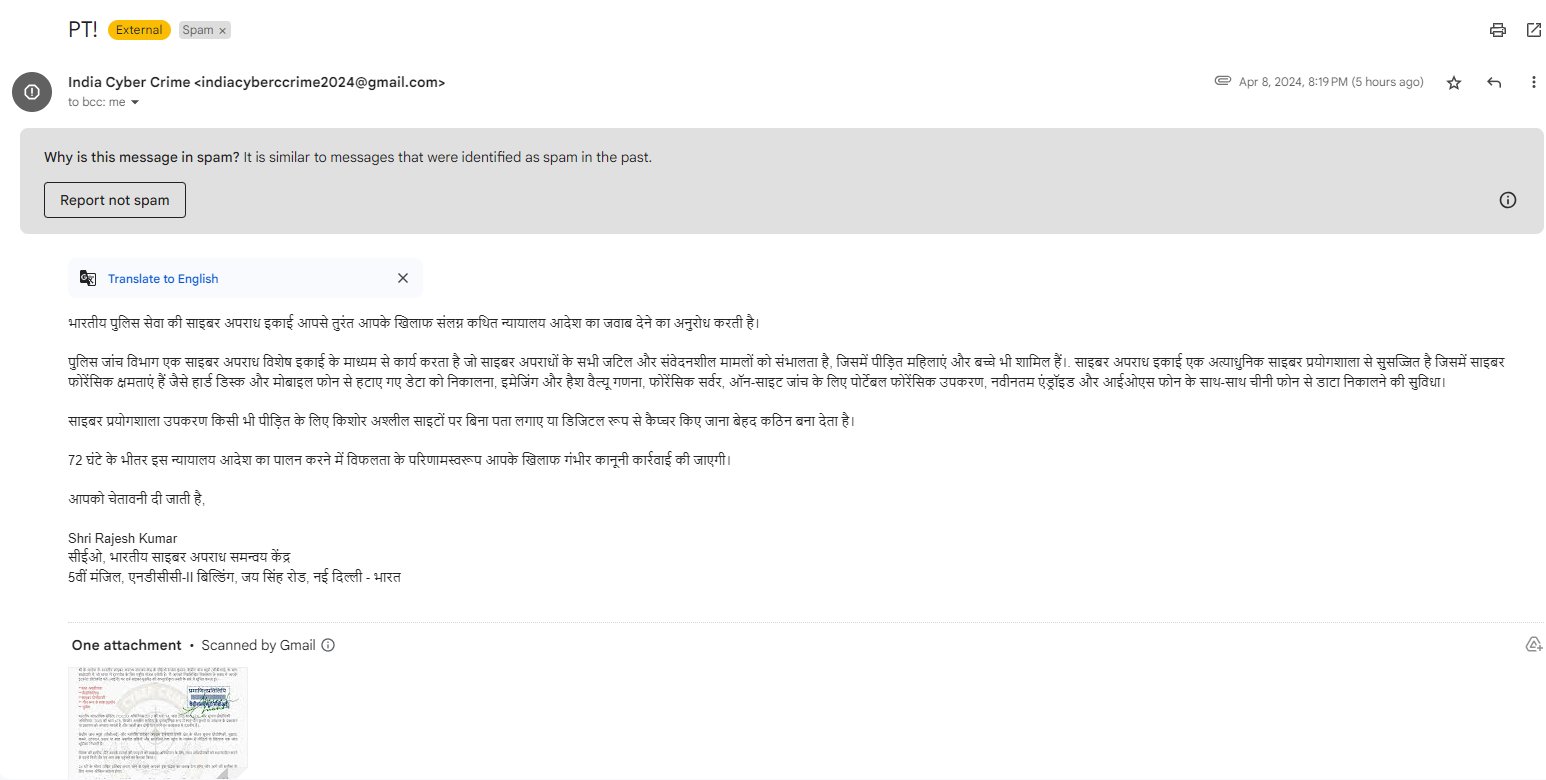
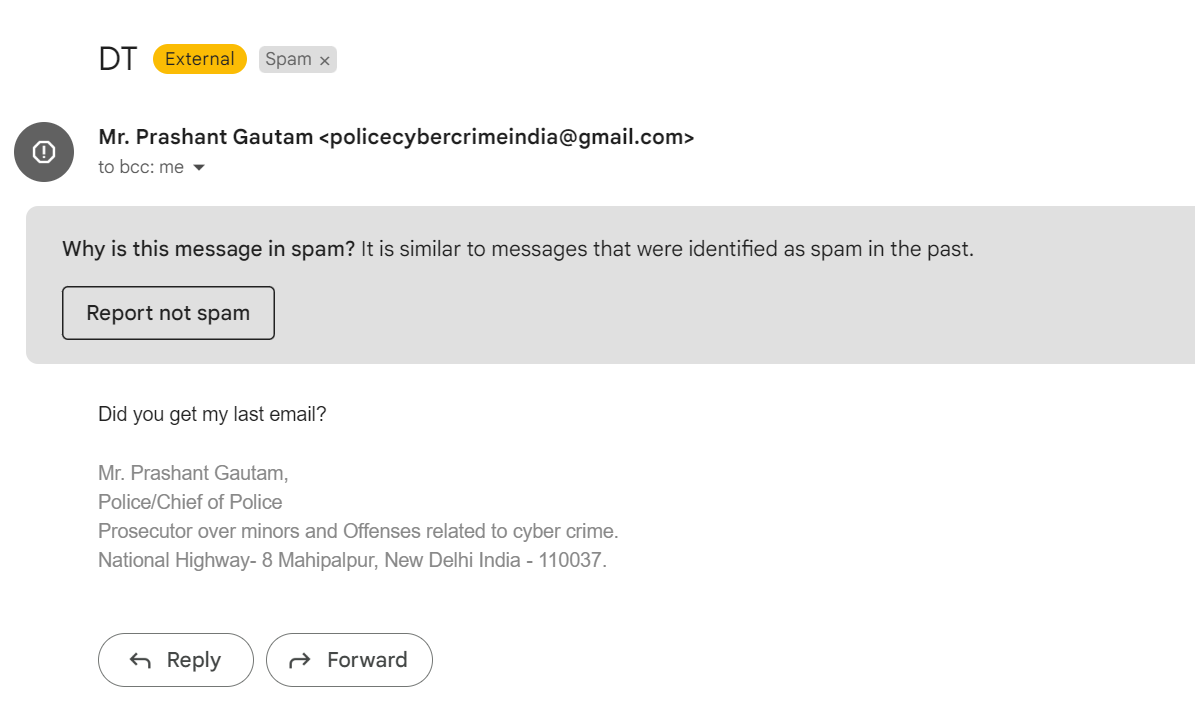
I have been recently receiving phishing emails impersonating as Indian Cyber Crime Coordination Centre (I4C). Upon investigating, multiple users had reported these scams on twitter/X and reddit.
1st phishing email received on April 8, 2024:
Its also been tweeted by @Cyberdost which is an X account for Cyber-safety and Cybersecurity awareness handle maintained by Ministry of Home Affairs, Government of India
Beware !! A fake letter in the name of CEO, Indian Cyber Crime Coordination Centre (I4C) and CBI is under circulation. Please verify authenticity of source before believing on such letters/ emails/ messages. They may be part of phishing attacks.#I4C#MHA#Cyberdost#Cybercrimepic.twitter.com/pX1jera09x
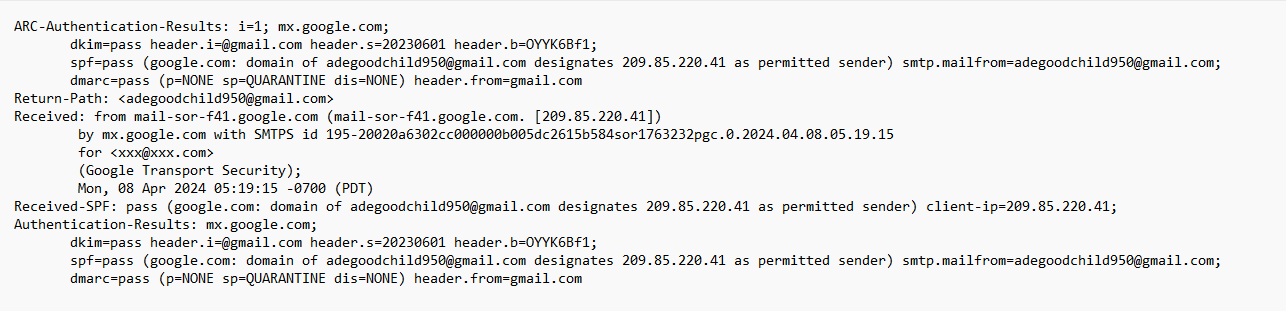
Certainly this is phishing email and I checked email header of this email and this was sent by mrstheresarolland7@gmail.com
To check whether both emails have been sent by same person or group:
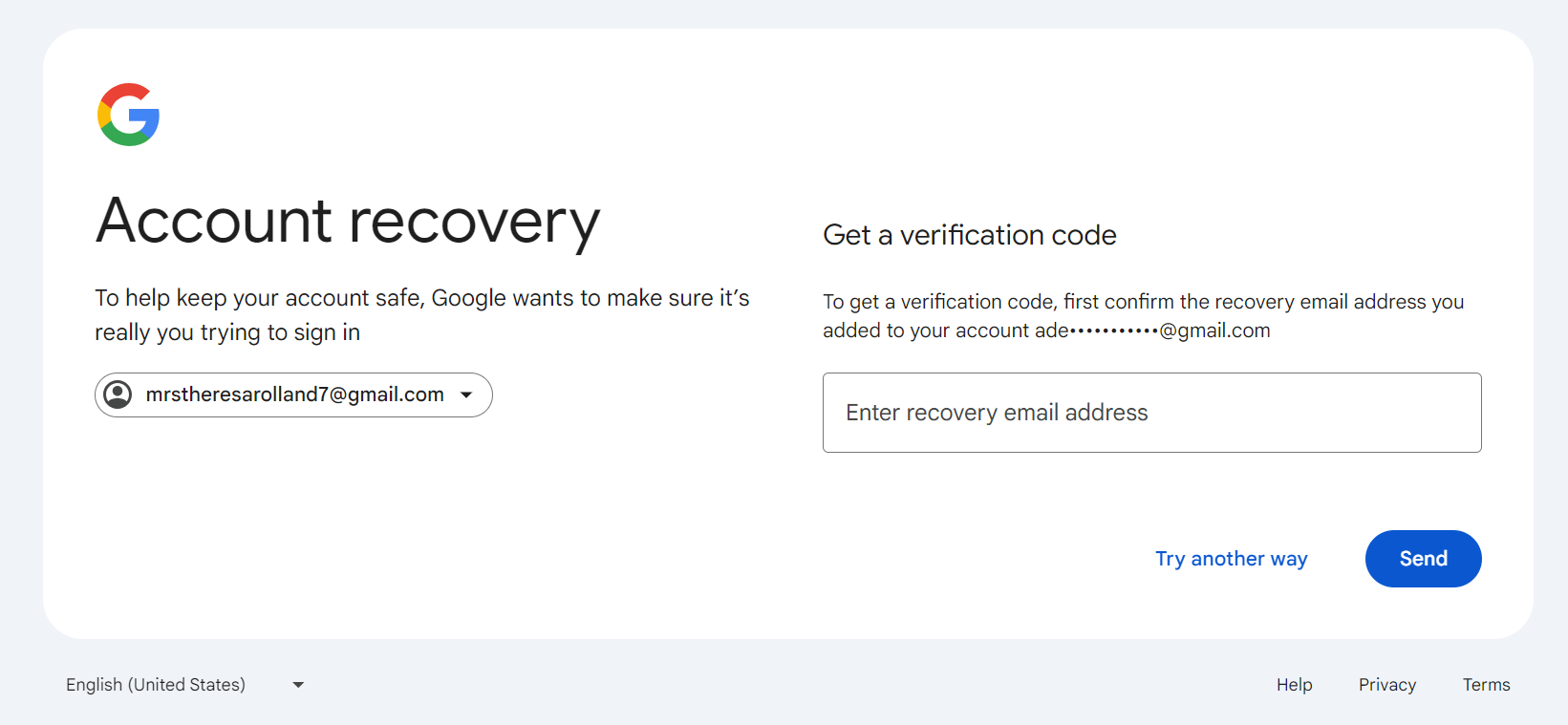
I put login email as mrstheresarolland7@gmail.com on Gmail and clicked on forgot password. It gave me Account recovery option sending verification code on alternative email id.
The recovery email id is matching to earlier email sender ids first three letters adegoodchild950@gmail.com. Though this could be a coincidence.
Subject:For your own safety, I highly recommend reading this email
Hello <name>,
You are in big trouble.
However, don't panic right away. Listen to me first, because there is always a way out.
You are now on the radar of an international group of hackers, and such things never end well for anyone.
I'm sure you've heard of Anonymous. Well, compared to us, they are a bunch of schoolboys.
We are a worldwide network of several thousand professionals, each with their own role.
Someone hacks corporate and government networks, someone cooperates with intelligence agencies on the most delicate tasks,
and someone (including me) deals with people like you to maintain the infrastructure of our group.
"What kind of people like me?" - that is the question you are probably asking yourself now.
The answer is simple: people who like to watch highly controversial and, shall we say,
unconventional pornography on the internet that most normal people would consider perverted.
But not you!
In order to leave you without any doubts, I'll explain how I found it out.
Two months ago, my colleagues and I installed spyware software on your computer and then gained access to all of your devices, including your phone.
It was easy - one of those many pop-ups on porn sites was our work.
I think you already understand that we would not write to an ordinary man who watches "vanilla" and even hardcore porn - there is nothing special about that.
But the things you're watching are beyond good and evil.
So after accessing your phone and computer cameras, we recorded you masturbating to extremely controversial videos.
There is a close-up footage of you and a little square on the right with the videos you're pleasing yourself.
However, as I said earlier, there is always a way out, because even the most degraded sinner deserves leniency.
You are lucky today because I am not a sadist who enjoys other people's suffering.
Only money matters to me.
Here is your salvation: you must transfer $1490 in Bitcoin to this BTC cryptocurrency wallet: 19VQ4UwfrMskCbRLPrzsaL6TUCYomNdvKt
You have exactly 48 hours to make the payment, so think less, and do more.
As soon as I receive confirmation of the transaction, I will delete all compromising content and permanently disable our computer worm.
Believe me, I always abide by gentleman's agreements. Even with people who are hardly gentlemen. Because it's nothing personal, just business.
If I do not receive a payment, I will send all videos of you to every person in your contact list, messengers and email.
Relatives, loved ones, colleagues, friends-everyone you've ever been in contact with will receive them.
You understand perfectly well that you will never be able to wash this stain on your reputation.
Everyone will remember you as sick as fuck.
Your life will be completely ruined, and, most likely, only a tightened noose around your neck will be able to save the day.
If you haven't dealt with crypto before, I suppose it won't be difficult for you to figure it all out.
Simply type in the "crypto exchange" into the search bar and pay with a credit card. Besides, based on your browser history, you are a savvy user.
When you want to, you can dig into the darkest depths of the Internet, so I'm sure you will be able to find out what is what.
Here is what my colleagues and I should warn you against:
...Do not reply to this email. Do you really think we are so stupid to be tracked by an email address? This is a temporary disposable email.
As soon as I clicked "Send", it was gone for good.
...Forget about law-enforcement authorities. As soon as I see that you are trying to contact them, the compromising material will be published.
Remember, I have access to all your devices, and I can even track your movements.
...Do not reset your devices to factory settings and do not try to get rid of your devices.
It won't help in any way. Look above - my All-seeing eye is watching all your actions. It is easy to hunt you down.
I am sorry that we met in such circumstances. Probably, everything could be different if you had been more careful about what you are doing on the Internet.
Watch yourself from now on, because even such things that you previously considered insignificant can destroy your life in the future like a butterfly effect.
I hope this is goodbye forever. However, it depends on you.
P.S. The countdown is on. The choice is yours.
This is a phishing sextortion email scam spreading in last few days. I came across few blog posts and tweets mentioning same email content.
A phishing sextortion email is a specific type of malicious email that combines elements of both phishing and sextortion. In such emails, the sender typically claims to have compromising or explicit material of the recipient, often obtained through a supposed hack or malware installed on the recipient’s device. The email usually includes threats to release this material unless a ransom is paid, typically in cryptocurrency.
These emails often employ psychological manipulation and intimidation tactics to coerce the recipient into complying with the demands. They may include personal information about the recipient, such as their name, username, or password (which may have been obtained from previous data breaches), to make the threats seem more credible.
Email header:
Received: from CH3PR14MB6324.namprd14.prod.outlook.com (2603:10b6:610:14d::22)
 by MW4PR14MB5997.namprd14.prod.outlook.com with HTTPS; Tue, 26 Mar 2024
 20:58:35 +0000
Received: from MW4PR04CA0203.namprd04.prod.outlook.com (2603:10b6:303:86::28)
 by CH3PR14MB6324.namprd14.prod.outlook.com (2603:10b6:610:14d::22) with
 Microsoft SMTP Server (version=TLS1_2,
 cipher=TLS_ECDHE_RSA_WITH_AES_256_GCM_SHA384) id 15.20.7409.32; Tue, 26 Mar
 2024 20:58:34 +0000
Received: from CO1NAM11FT116.eop-nam11.prod.protection.outlook.com
 (2603:10b6:303:86:cafe::ee) by MW4PR04CA0203.outlook.office365.com
 (2603:10b6:303:86::28) with Microsoft SMTP Server (version=TLS1_2,
 cipher=TLS_ECDHE_RSA_WITH_AES_256_GCM_SHA384) id 15.20.7409.13 via Frontend
 Transport; Tue, 26 Mar 2024 20:58:33 +0000
Authentication-Results: spf=fail (sender IP is 45.233.98.42)
 smtp.mailfrom=hotmail.com; dkim=none (message not signed)
 header.d=none;dmarc=fail action=none header.from=hotmail.com;compauth=fail
 reason=001
Received-SPF: Fail (protection.outlook.com: domain of hotmail.com does not
 designate 45.233.98.42 as permitted sender) receiver=protection.outlook.com;
 client-ip=45.233.98.42; helo=[45.233.98.42];
Received: from [45.233.98.42] (45.233.98.42) by
 CO1NAM11FT116.mail.protection.outlook.com (10.13.174.243) with Microsoft SMTP
 Server id 15.20.7430.22 via Frontend Transport; Tue, 26 Mar 2024 20:58:32
 +0000
Email header shows this email has been sent from IP 45.233.98.22 from Brazil.
When searched on Mxtoolbox, found this IP address is already in blacklist on “s5h.net” and “SORBS SPAM“.
Scammers have demanded $1490 bitcoin to transfer to Crypto wallet 19VQ4UwfrMskCbRLPrzsaL6TUCYomNdvKt and when I have received this email I checked for this wallet, there were no transactions but unfortunately now I see 2 transactions that means 2 victims fell for it.
link to check transaction for this wallet: Blockchair
If you receive a phishing sextortion email, it’s essential to:
Stay calm: Remember that the sender’s threats may not be legitimate.
Avoid responding or engaging: Do not reply to the email or attempt to contact the sender.
Do not pay the ransom: Paying the ransom encourages further criminal activity and does not guarantee that the threats will stop.
Report the email: Report the email to your email provider as spam or phishing. You can also report it to law enforcement agencies or relevant authorities.