Understanding and Identifying a Common Phishing Scam: “Your Device is Hacked”

Phishing emails continue to be a common and sophisticated way for cybercriminals to extort money and sensitive information from unsuspecting individuals. A recent example is an alarming email with the subject line “Your device is hacked,” which tries to create panic, demanding a Bitcoin payment to avoid further consequences.

Subject: Your device is hacked
 
Good day!

I have to bring something urgent to your notice - you are facing a major challenge. However do not worry just yet; I want you to hear me out, because there's invariably a way to resolution.

Right at this moment, you are subject to the examination of an global web of intruders, and that is a condition that infrequently ends favorably for anyone participating. You may have been informed of groups like Anonymous, nevertheless I guarantee you, we're working on an completely different scale - far beyond what they can offer. Our vast global community comprises countless of proficient experts, each playing a critical role.

Some of our team concentrate on breaching corporate and state systems, while others work stealthily with security agencies on classified missions. My role involves addressing issues tied to clients like you, which is why I am reaching out now.

You might be pondering, "Who are these individuals?" The response is clear: we're concentrated on those with a penchant for alternative and contentious mature content - material that many would deem unsuitable. Nevertheless evidently, you don't fit that type, right?

Allow me to elucidate how I found out this circumstance. A few of weeks ago, we installed stealthy spyware on your device, allowing us access to each your gadgets, including your cellular device. It was straightforward; one of those seemingly harmless pop-ups on private sites served as our entry point.

The good news is you still have a chance to take command of this issue. Let's discuss how you can guard yourself and regain your mental tranquility. Your next moves matter - act intelligently.

We both understand that many people engage in common or even more severe adult content - nothing uniquely unique about that. Nevertheless, the content you've decided to watch transcends a threshold into troubling area.

We've accessed your mobile device and laptop cameras and captured footage of you engaging in acts that are quite debatable. This includes intimate images of you along with the explicit material you were observing.

But remember, there's invariably a path to redemption, including for those who've wandered far. Today, you are blessed because my purpose isn't to inflict pain; I'm simply concentrated on a financial resolution.

This is an opportunity for you to assert control of the situation. Let's talk about how we can resolve this issue cordially.

Here is your rescue: you need to convey $1300 USD in Bitcoin to this digital currency address:
1JxQSshVKAqB9JxuUjmdEDrPN6TM7PzK9D

Let's confront it, that's a fairly insignificant sum in today's society.

I'm reaching out you with an urgent communication that demands your swift attention. You have just 12 hours to complete the payment. Do not delay - act now to safeguard yourself.

As soon as I receive of your transaction, I'll without delay remove all compromising content and fully turn off our computer system. I guarantee you, I honor my promises, even with those who may not fully earn confidence; this is strictly professional.

Nevertheless, if compensation is not received, I will be forced with no choice however to share the damaging videos with everyone in your network - companions, kin, coworkers, associates - everybody. Imagine the unrecoverable damage to your image. This is a blemish that can not ever be fully removed.

The outcomes of doing nothing will not only blemish your identity but could bring you to a point of hopelessness. It is essential to act swiftly.

If you're unfamiliar with digital currency, don't fret - it is easy. A quick search for "cryptocurrency marketplace" will show you how to complete a payment using your credit card. Given your virtual presence, you seem able of handling this with simplicity. Keep in mind, if you've competently traversed the depths of the online world before, this will be no hurdle for you.

Some key reminiscents to reflect on:

- Don't reply to this e-mail. This address is disposable, and any feedback will serve no function.

- Forget about law enforcement. The moment I detect any communication to the police, I will release the data without hesitation.

- Do not attempt to restore or dispose of your gadgets. Such steps are ineffective. My monitoring capabilities mean that I can track your all step.

- It's unfortunate that conditions have brought us here; you could have prevented this situation with more caution online. Be mindful in the future - what seems trivial today can have disastrous consequences tomorrow.

This message is intended as a last notification. Your response in the next 12 hours will determine the consequence of this situation.

Remember, the countdown is running, and the decision is in your control.


Postscript:

If your friends and colleagues were to discover the unethical things you engage in, it could severely harm your relationships and standing. Faith, once damaged, is hard to rebuild, and you might be viewed through a filter of criticism and confusion. This exposure could lead to social isolation, as people may distance themselves from you, being concerned about connection with your behaviors. The taint associated with atypical actions may cause isolation, misinterpretations, or even a damaged image that could hinder your profession possibilities. It is essential to think about the long-term effect this could have on your existence and the connections you value.

In this blog, let’s break down this email and highlight key indicators that mark it as a phishing scam. Recognizing these elements can help you identify similar threats and protect your digital safety.

1. Emotional Manipulation and Psychological Triggers

The first tactic cybercriminals employ is fear. By threatening exposure or embarrassment, they manipulate emotions to push victims into hurried actions. This email opens with an intimidating statement: “you are facing a major challenge.” It follows up with false claims about an elaborate network of hackers monitoring your devices, pushing the recipient into a state of urgency and vulnerability.

2. Specific, Yet General Accusations

The email insinuates that it has incriminating content recorded from the victim’s devices, which could be used for public exposure. However, no specific details or personal information are provided, a common tactic in phishing schemes to keep the accusation vague but ominous. The email accuses the recipient of accessing “controversial mature content” without citing any actual details, casting a wide net to increase its chances of striking fear in potential victims.

3. Unverifiable Technical Claims

Phishing scams often include technical jargon or exaggerated claims to make the message sound more credible. This email alleges that “spyware” was installed through “harmless pop-ups” and implies constant monitoring of all devices. In reality, no malicious software can be this all-encompassing or omniscient. Malware usually requires direct or indirect user permission, such as through a fake download or link, to infiltrate systems.

4. Demand for Payment in Bitcoin

Most phishing emails demand payment in Bitcoin, as cryptocurrency transactions are anonymous and difficult to trace. Here, the email demands $1,300 in Bitcoin within 12 hours, setting a time frame that plays on urgency and limits a recipient’s chances to think critically or consult others.

The specified BTC address has not shown any transactions to date, which thankfully indicates no victims so far.

5. Warnings Against Law Enforcement and No Replies

The sender advises against contacting the police or even responding to the email. By isolating the victim from potential help, the scammer creates a psychological barrier, further increasing the chances of compliance. Additionally, they specify that the email is from a “disposable address,” which reinforces that any reply will be futile.

6. Technical Red Flags in the Email Header and Sender Information

A quick analysis of the email header and sender address reveals additional signs of phishing. Although the sender appears as “Lewis Ray info[@]pdparis.com,” the header details a different server (hostglobal.plus) and an untrustworthy IP address with a VirusTotal score of 10/94. This indicates that the IP has previously been associated with malicious activity, solidifying suspicions that this email is not legitimate.

The email header above indicates that the message was received from IP address 78[.]153[.]140[.]175, which has a VirusTotal score of 10/94.

Protective Steps to Take

  • Do Not Reply or Pay: Responding or paying emboldens attackers and makes you a potential target for future scams.
  • Check Your Security: Ensure that your antivirus and software updates are current. Run scans to ensure no malware or spyware is on your devices.
  • Educate and Stay Vigilant: Familiarize yourself with common phishing tactics and educate family or colleagues who may be less aware of cybersecurity risks.

Final Thoughts

Emails like this serve as a reminder of the importance of staying informed about phishing tactics and practicing good cyber hygiene. By recognizing the tactics outlined in this scam email, you can better protect yourself and avoid falling victim to extortion attempts. Remember, if something feels suspicious, it probably is—take a moment to verify, breathe, and never rush to respond to threats like these.

Beware of the “India Post 170th Anniversary” WhatsApp Scam

Recently, a new phishing scam has been circulating on WhatsApp, claiming to celebrate the “India Post 170th Anniversary.” The message includes a shortened URL, such as https://tinyurl.com/lndiaPost-1164

which redirects unsuspecting users to a fraudulent website: https://indiapost37.pages.dev/22602976.

This website impersonates India Post, one of India’s largest postal networks, in an attempt to steal users’ personal information. Here’s a breakdown of how the scam works and how to stay protected:

How the Scam Works

  1. The Message: It starts with a WhatsApp message claiming that India Post is celebrating its 170th anniversary with special prizes. This message contains a shortened link that appears legitimate at first glance, using the name “India Post” to gain trust.
  2. The Phishing Website: Once the link is opened, it redirects to a webpage mimicking the official India Post website, complete with logos and branding. However, this page is hosted on a suspicious domain (pages.dev), which is a clear red flag that it is not an official India Post site.
  3. Fake Questionnaire: The page presents users with simple questions such as:
    • What is your age?
    • What is your gender?
    • Do you know about India Post?

The goal here is to keep the user engaged while also making the scam seem more legitimate.

4. “Prize” Announcement: After answering the questions, users are prompted with a pop-up claiming they have won a large amount of money—typically in the range of INR 62,478.55. This is an attempt to excite users and push them to the next step, which involves sharing more sensitive information.

5. Request for Personal Information: To claim the so-called prize, users are then asked to provide personal details such as their email address and mobile number. This is the final stage where the scammers collect information that could be used for future phishing attacks, identity theft, or selling the data to other cybercriminals.

Key Red Flags to Recognize the Scam

  • Unfamiliar Domain Name: The genuine India Post website domain is indiapost.gov.in. Any other domain should be considered suspicious.
  • Requests for Personal Information: Government institutions rarely ask for personal details through unsolicited messages or unverified websites.
  • Too Good to Be True Prizes: Randomly winning large sums of money without prior participation is a classic sign of a scam.

To further investigate the legitimacy of these URLs, we can utilize VirusTotal, an online tool for checking websites and files for potential threats. Upon submitting both URLs

https://tinyurl.com/lndiaPost-1164 and https://indiapost37.pages.dev/2260297 VirusTotal scans them against multiple security databases and provides a report with detailed insights. In this case, the report reveals that both URLs have been flagged by several security vendors as malicious or phishing sites. Screenshots from VirusTotal show clear warnings of suspicious behavior, confirming that these URLs are designed to deceive users into revealing personal information. This evidence underscores the importance of checking untrusted links on reputable scanning platforms before clicking them.

How to Stay Safe

  1. Avoid Clicking Suspicious Links: Never click on links sent from unknown numbers, especially those that seem promotional or too good to be true.
  2. Verify with Official Sources: Go directly to the official India Post website (indiapost.gov.in) or contact them directly to confirm any offers.
  3. Report Phishing Attempts: If you receive such a message, report it on WhatsApp and avoid forwarding it to others.
  4. Educate Others: Share this information with friends and family to prevent them from falling victim to similar scams.

Conclusion

Phishing scams like these take advantage of people’s trust and curiosity. By staying alert and following best practices online, you can avoid falling prey to such fraudulent schemes. Always verify links and offers directly with official organizations and be cautious of any request for personal information from unverified sources.

Stay safe and share awareness—your vigilance is your best defense!

Reference:

Any.run Report on the analysis

Instagram Phishing Email: We detected a new login into your Instagram account

How to Spot the Phishing Email Right Away

The first red flag in this scam is that the email doesn’t come from an official Instagram domain. Instead, the message is sent via an unfamiliar email address that is clearly not affiliated with Instagram. A legitimate email from Instagram will come from an official domain like @mail.instagram.com or similar. If you notice the sender’s email address is strange or not even remotely related to Instagram, it’s a phishing attempt.

Email Body: Suspicious Links and No Mention of Account Details

This phishing email didn’t mention Instagram username, the location of the alleged login, or any details expected from a real alert.

Moreover, the email typically contains links urging you to “Send Password Request” and “Not My Request“. Instead of leading to Instagram’s official site, the link is a mailto: link with several email addresses, which is highly suspicious. No legitimate company, let alone Instagram, would handle account security issues this way.

Upon reviewing the email header, I noticed that it was sent from 144 . 76 . 133 . 106 (Germany).

And all the email addresses were listed in the mailto: field.

Key Red Flags of the Phishing Email

  • Unfamiliar Email Address: Always check the sender’s email address. Phishing emails usually come from random addresses that don’t resemble official Instagram domains.
  • No Mention of Your Account: The email fails to specify which Instagram account is affected. A legitimate alert would always include details such as your account username, device, or location of the suspicious activity.
  • Suspicious Links: The email includes odd links (often mailto: links with multiple email addresses) instead of leading to Instagram’s official help page or security center.
  • Generic Greeting: Phishing emails often use non-personal greetings like “Dear User” or “Hello Instagram User” instead of addressing you by your actual name or username.
  • Pressure Tactics: The email urges immediate action to “secure your account,” but provides no credible way to verify the login attempt through legitimate channels.

Conclusion

The “We detected a new login into your Instagram account” phishing email is an obvious scam, particularly when you notice that it doesn’t mention which account was compromised. The lack of details, unfamiliar sender, and suspicious links make it easy to identify as a phishing attempt. Stay vigilant, verify any unusual emails, and always prioritize your online security.

Have you ever encountered an email like this? Share your experience and help others stay safe online!

Beware of Phishing Emails: “Hey, You Have a Problem” Scam

Phishing scams are becoming increasingly sophisticated, and one of the more recent and alarming tactics involves an email with the subject line “Hey, You Have a Problem.” The body of the email is brief but ominous:

Subject: Hey, you have Problem
Body: Hi! You have a problem.
Details here
You have very little time.
Don’t you dare share this info with any of your friends.

The email contains a link to a website that supposedly contains more information about the so-called “problem.” However, this link is a trap designed to exploit your fear and curiosity.

How the Scam Works

  1. The Hook: The email’s vague and alarming message is designed to create a sense of urgency. The phrase “You have very little time” triggers panic, pushing you to click on the link without thinking.
  2. The Deception: Once you click the link, you’re taken to a website that claims you’ve been hacked. The site may impersonate a hacker, threatening that they have gained control of your device, taken screenshots of you through your camera, or recorded your browsing activity.
  3. The Demand: To avoid these fabricated consequences, the “hacker” demands a ransom payment in Bitcoin, a popular cryptocurrency known for its anonymity. The site might also include a countdown timer, adding further pressure to comply quickly.

Email header

The email sent by id rafaelgarciays@buhuchetnko.ru client IP: 92.53.96.143

Redirection link

The link given in email redirects to domain https :// 59exp . ru and the VirusTotal score for this URL is 1/96

What Happens When You Click the Link?

If you click on the link provided in the email, here’s what typically happens next:

  1. Personalized Attack: The link contains a parameter specific to the victim’s email address, allowing the scammer to track which email recipient clicked on the link. This personalization adds a layer of authenticity to the scam, making it more convincing.
  2. Fake Ransom Demands: Once on the phishing site, you’ll be presented with a message from an alleged hacker claiming that they have compromised your device. The message might say that they have deployed a script on a website you visited, which allegedly allowed them to take screenshots of you using your camera.
  3. Bitcoin Ransom: The scammer then demands a ransom, usually in Bitcoin, to prevent the release of these “screenshots” or other fabricated evidence of wrongdoing. The demand is typically accompanied by threats and a tight deadline to create a sense of urgency.

Opening Phishing Site

The phishing site links a security incident to the victim’s email ID and the Bitcoin address 1CWTFeMfPCG1Q6uVLSpHUmQ1J1i6hxj1LK, where the scammer demands a transfer of USD $699.

After reviewing the blockchain transactions associated with the Bitcoin address 1CWTFeMfPCG1Q6uVLSpHUmQ1J1i6hxj1LK, no transaction for the amount of USD $699 has been found to date.

How to Protect Yourself

  1. Don’t Click on Suspicious Links: If you receive an unexpected email with a link, especially one that makes alarming claims, don’t click on it. Instead, verify the sender’s identity through other means.
  2. Check the URL: Before clicking any link, hover over it to see the actual URL. If it looks suspicious or unfamiliar, don’t click it.
  3. Be Skeptical of Urgent Requests: Scammers often create a false sense of urgency to pressure you into acting quickly. Take a moment to think before responding to any urgent requests, especially those involving money.
  4. Use Strong, Updated Security Measures: Ensure your devices are protected with up-to-date antivirus software, and consider using a password manager to help secure your accounts.
  5. Report Phishing Attempts: If you receive a phishing email, report it to your email provider and any relevant authorities. This helps protect others from falling victim to the same scam.
  6. Educate Yourself and Others: Stay informed about the latest phishing tactics and share this information with friends, family, and colleagues to help them avoid similar scams.

Conclusion

Phishing scams like the “Hey, You Have a Problem” email are designed to exploit your fears and pressure you into making hasty decisions. By staying informed and following best practices for online security, you can protect yourself from these malicious schemes. Remember, when in doubt, it’s always better to be cautious and verify before taking action.

Phishing email impersonating as CEO of Indian Cyber Crime Coordination Centre (I4C)

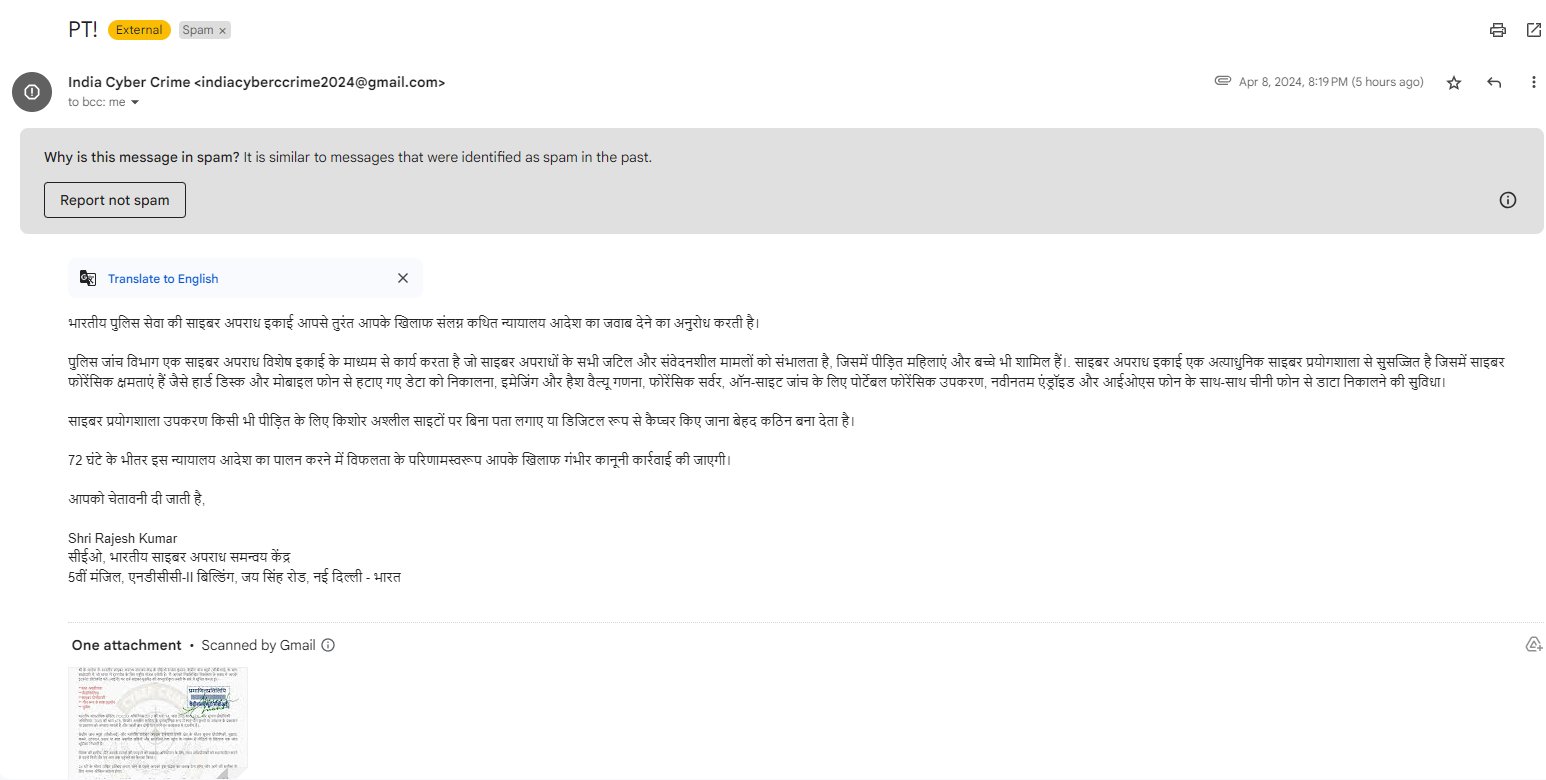
I have been recently receiving phishing emails impersonating as Indian Cyber Crime Coordination Centre (I4C). Upon investigating, multiple users had reported these scams on twitter/X and reddit.

1st phishing email received on April 8, 2024:

Its also been tweeted by @Cyberdost which is an X account for Cyber-safety and Cybersecurity awareness handle maintained by Ministry of Home Affairs, Government of India

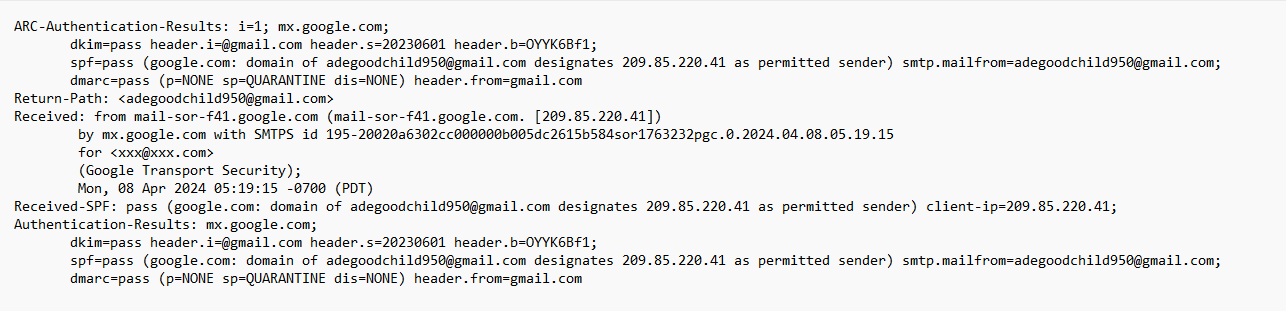
I tried to dig in and checked email header. This email has been received from id: adegoodchild950@gmail.com

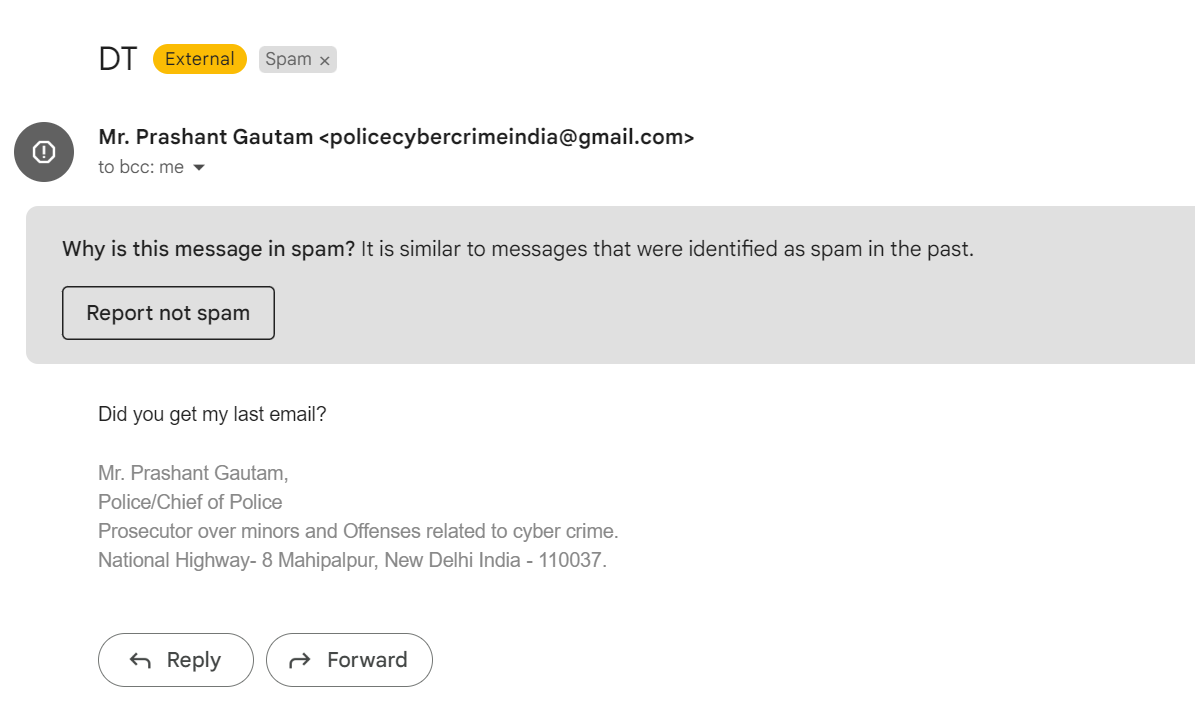
2nd phishing email received on: May 18, 2024

Received another email impersonating as “Mr. Prashant Gautam policecybercrimeindia@gmail.com

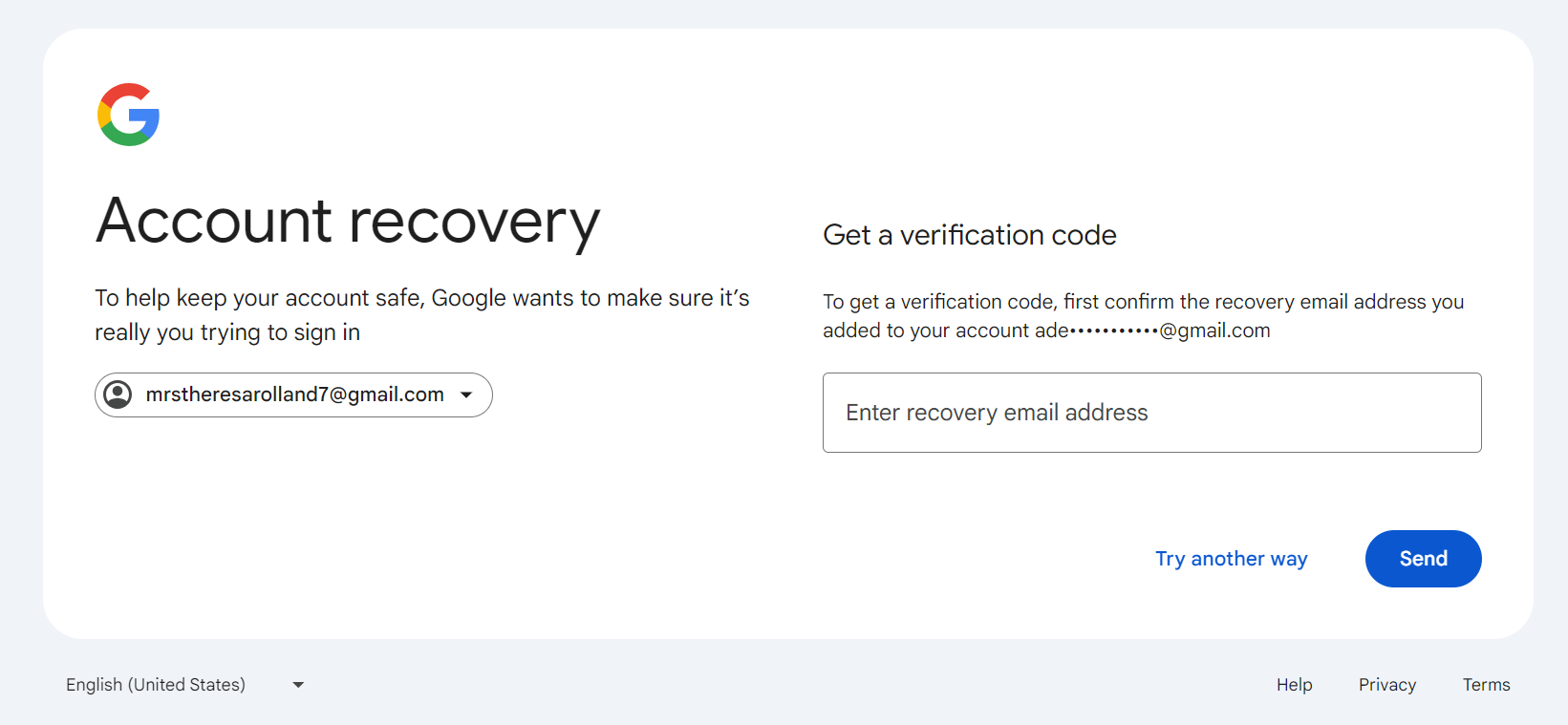
Certainly this is phishing email and I checked email header of this email and this was sent by mrstheresarolland7@gmail.com

To check whether both emails have been sent by same person or group:

I put login email as mrstheresarolland7@gmail.com on Gmail and clicked on forgot password. It gave me Account recovery option sending verification code on alternative email id.

The recovery email id is matching to earlier email sender ids first three letters adegoodchild950@gmail.com. Though this could be a coincidence.