
Overview
While reviewing submissions received through the WordPress feedback form on my website, I came across a URL that initially appeared unremarkable. Such submissions are common and often contain benign questions or comments, but this particular link stood out enough to warrant closer inspection.
I opened the URL in a controlled analysis environment, and almost immediately it became clear that it was not legitimate. What followed was a carefully staged sequence of browser based deception designed to convince users that their Windows system was infected and about to fail.
This blog documents the full behavior of the page, the redirection flow, and how simple yet aggressive JavaScript techniques are abused to convincingly imitate Windows system failures. Although no actual malware is dropped, the psychological manipulation is significant. The attack is clearly designed to exploit fear and urgency, making it especially effective against non technical users and older individuals who may not be familiar with how modern browsers can convincingly mimic system level alerts.
Initial Entry Point and Redirect Chain
hxxps://www.acrossthesea[.]it/?75k3n4
Sender IP: 64.190.76.4
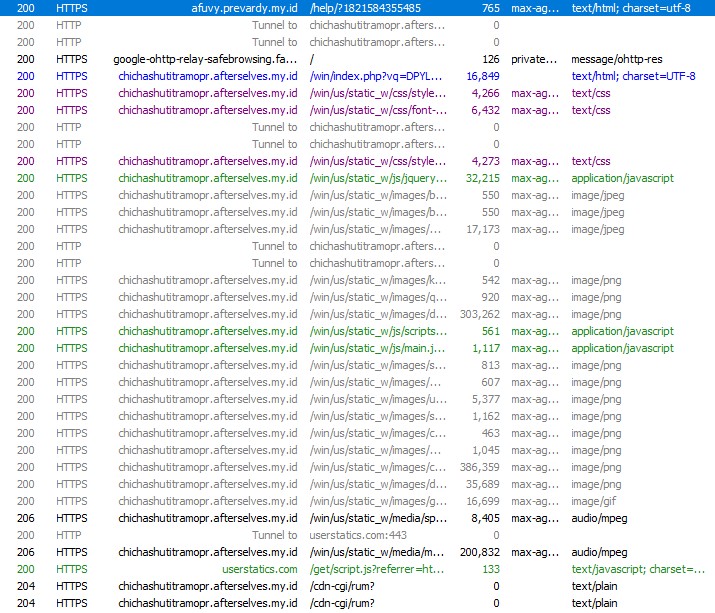
Opening this link immediately triggered a series of automatic redirects across multiple domains. Each hop appeared intentional, either to fingerprint the visitor or to prepare the final scam payload.
The traffic was first redirected to a .my.id domain, followed by another redirect to a randomly generated subdomain hosted under afterselves.my.id. From there, the browser was briefly sent to ipwho.org, a legitimate IP intelligence service, where information such as IP address, browser type, operating system, and user-agent was collected. After fingerprinting, the user was redirected again to the final landing page.
The last page loaded a /win/index.php endpoint with a long Base64-encoded parameter. This encoded value likely controls dynamic behavior such as scam messaging, phone numbers, or localization logic.
At no point during this flow was user interaction required, which makes this attack particularly effective against unsuspecting users.
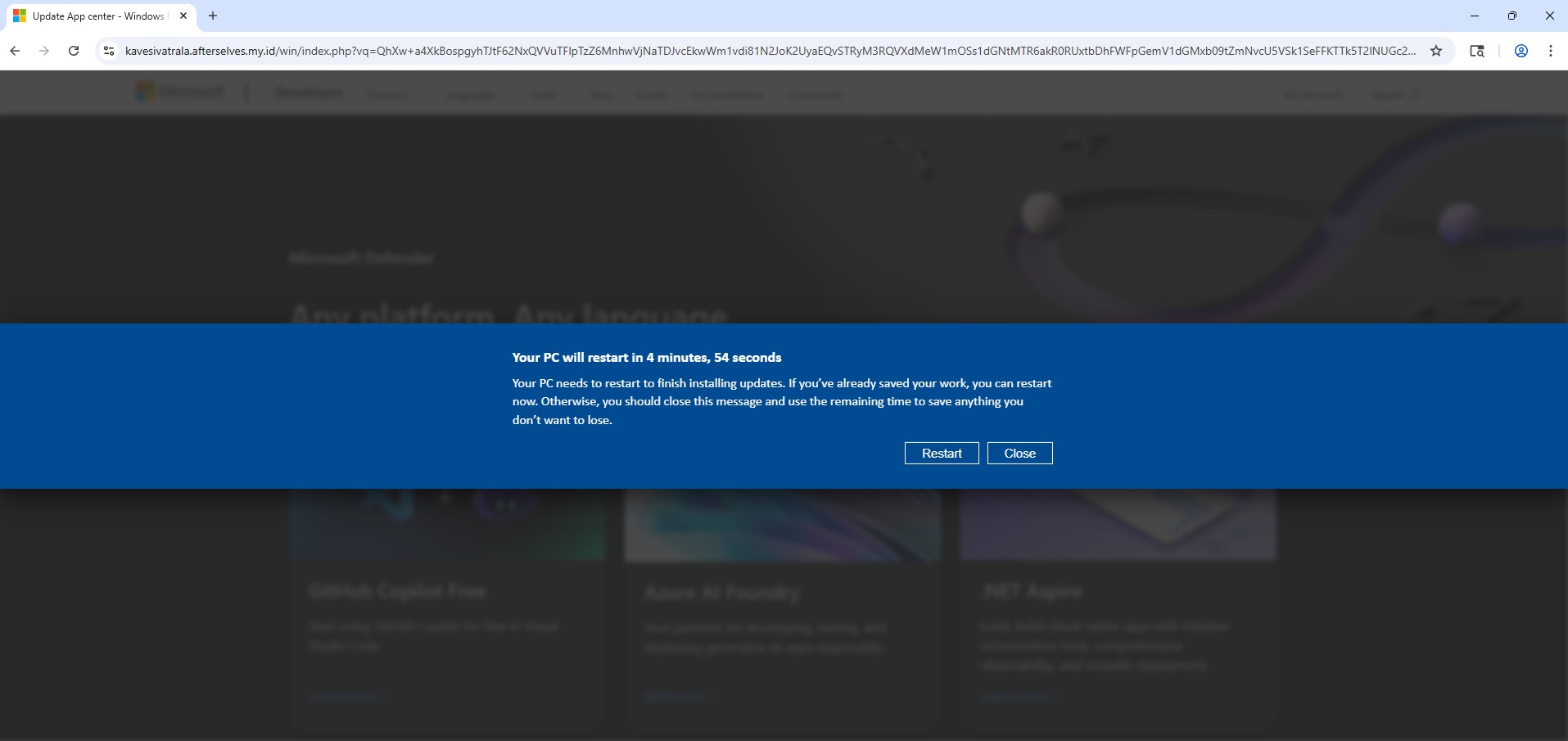
Landing Page Behavior and Visual Deception
Once the final page loads, the scam begins immediately. The user is presented with a screen that closely resembles a legitimate Windows Update notification. A dialog appears stating that the system will restart in five minutes to complete updates, complete with a live countdown timer.
For many users, especially older or less technical individuals, this looks completely normal. Years of exposure to genuine Windows update prompts have conditioned users to trust this type of messaging without question.
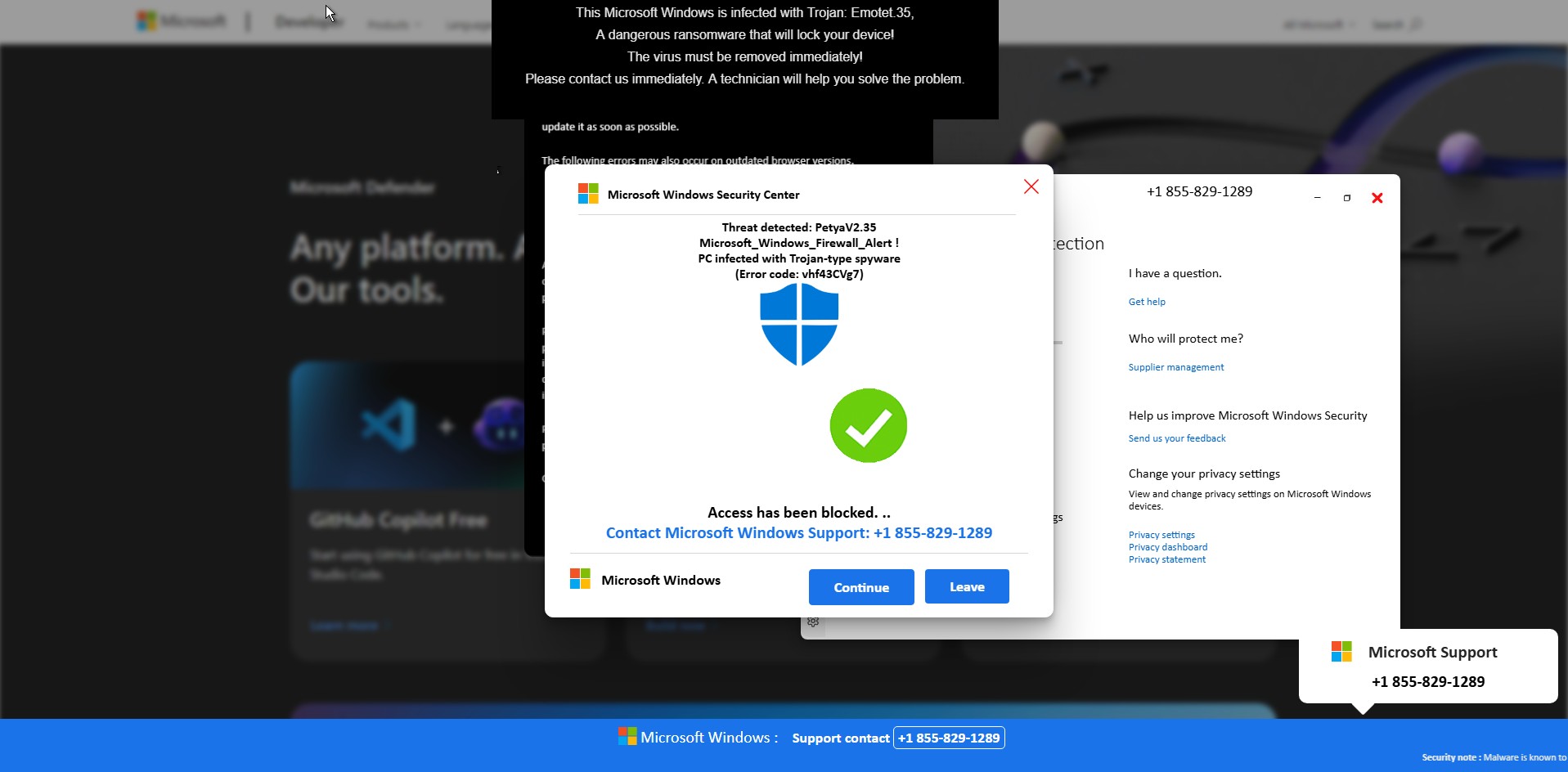
Fake Microsoft Security Alert and Phone Scam
Before any visible “scan” begins, a Windows Security themed popup suddenly appears on top of the page. It claims that serious threats such as Petya and Emotet have been detected on the system and that access has been blocked for security reasons.
The message urges the user to immediately contact “Microsoft Windows Support” using a prominently displayed phone number (+1 855-829-1289). At the same time, the browser becomes increasingly difficult to close or navigate away from.
This is the most critical stage of the scam. The attackers are attempting to push the victim into immediate action while fear is still fresh. Non-technical users and elderly individuals are especially vulnerable here, as the alert looks authoritative and urgent, and many are unaware that Microsoft does not issue security alerts or support instructions via browser popups.
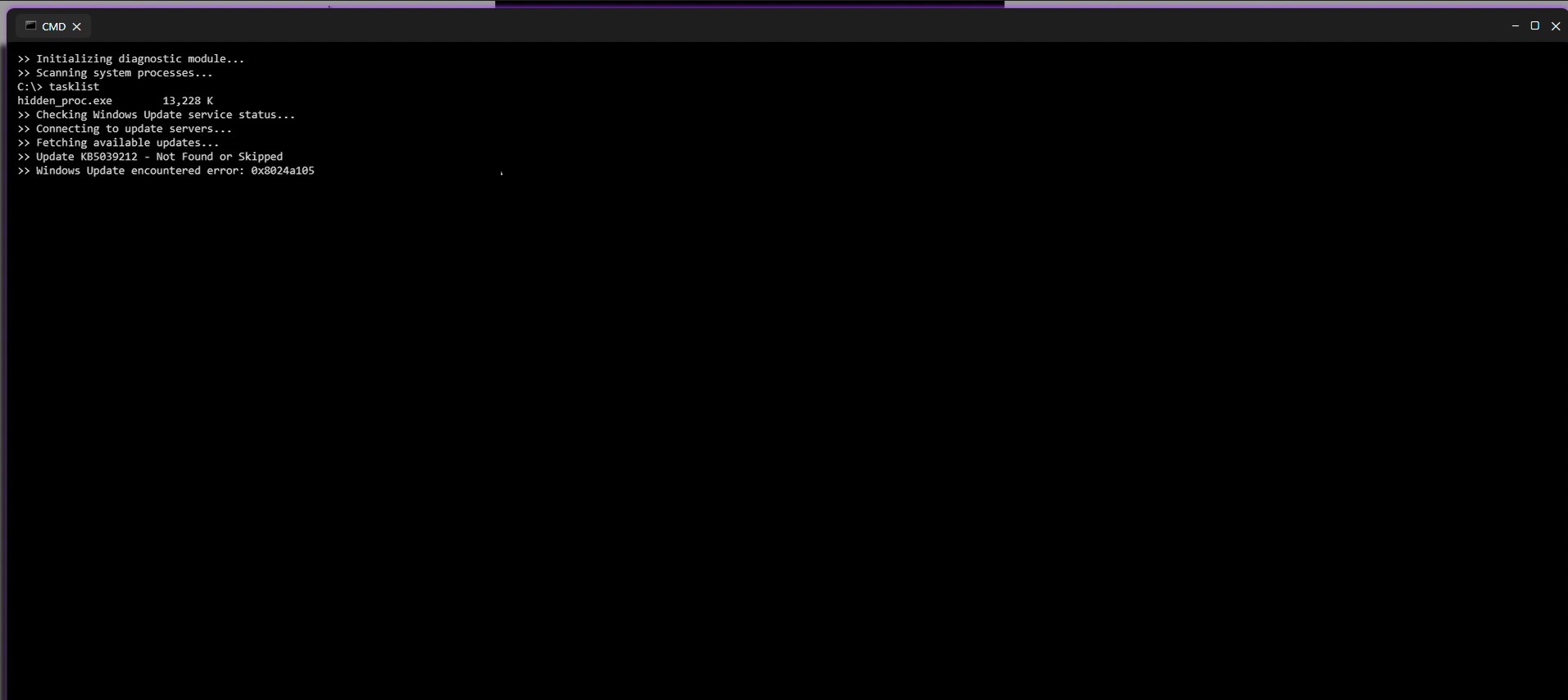
Fake Command Prompt Malware Scan
Shortly after the security alert appears, the page transitions into what looks like a Windows Command Prompt window. Text begins scrolling automatically, claiming that a diagnostic scan is running. Messages such as “Initializing diagnostic module,” “Scanning system processes,” and “Checking Windows Update” are displayed alongside fake process names and memory usage values.
Although nothing is actually being scanned, the timing and presentation make it appear as though the system is actively analyzing a severe infection. This step is designed to reinforce the legitimacy of the earlier security alert and convince the user that the threat is real and ongoing.
Simulated Blue Screen of Death (BSOD)
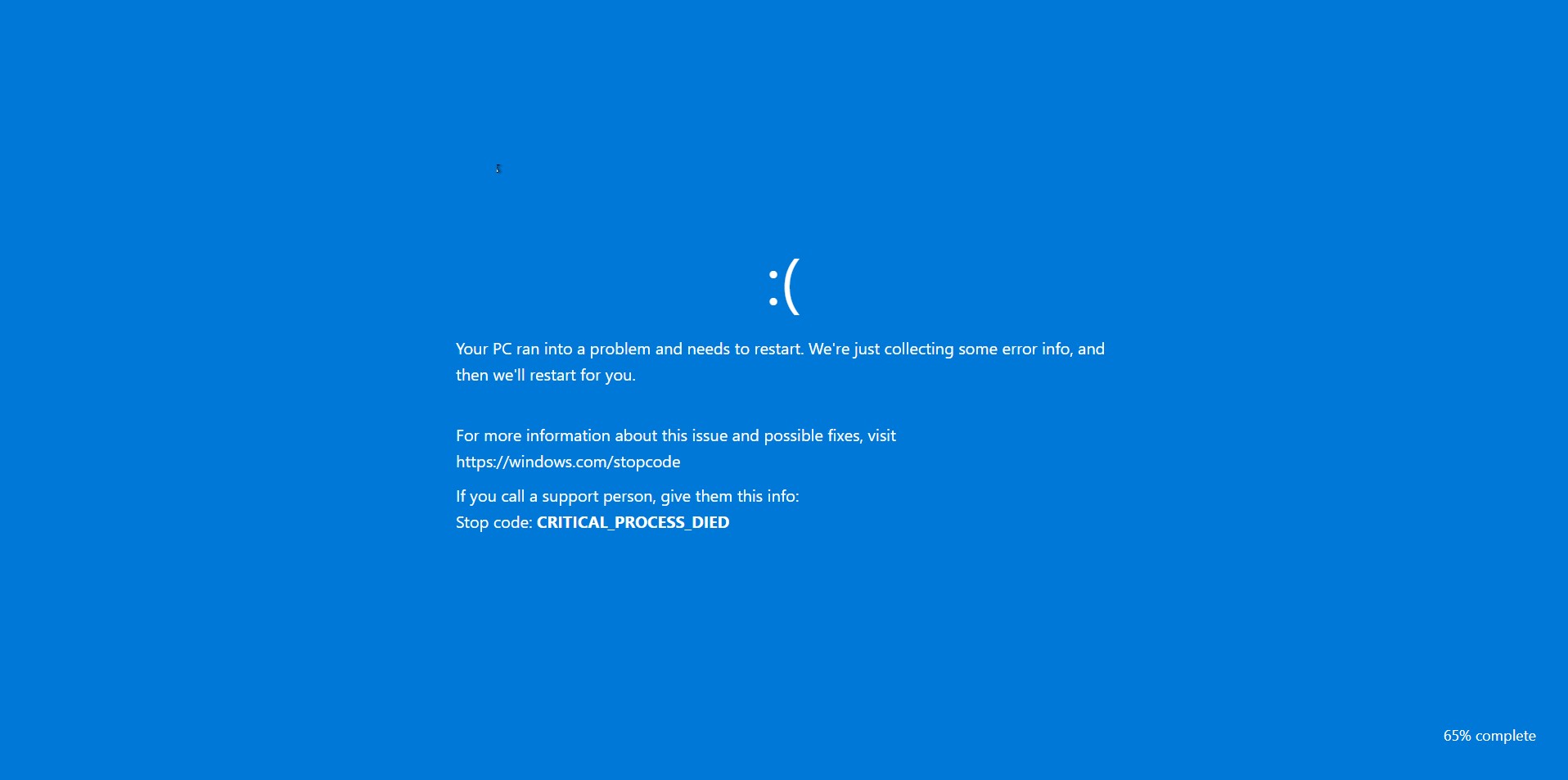
As the fake scan concludes, the browser abruptly switches to a full screen Blue Screen of Death. The screen displays a familiar Windows-style error message along with a stop code such as CRITICAL_PROCESS_DIED.
At this point, many users believe their system has fully crashed. The BSOD serves as the final confirmation in the victim’s mind that the threat is real and severe. Panic often peaks here, making victims far more likely to follow the instructions they were shown earlier, including calling the fake support number.
Full Walkthrough Video of the Scam Behavior
To provide a complete and transparent view of how this scam operates in real time, I have recorded a full walkthrough video capturing the entire sequence from the initial URL access and redirect chain to the fake security alerts, command prompt scan, and final BSOD.
This video shows how quickly the page escalates from a seemingly harmless link into an aggressive and convincing system-failure scenario. Watching the full flow helps illustrate why non-technical users and older individuals are particularly vulnerable, as the page leaves very little room to pause or think critically once the process begins.
Browser Lock-In and JavaScript Abuse
What makes this scam effective isn’t a vulnerability exploit it’s how aggressively it traps the user in the browser and makes the experience feel “system level”. The JavaScript focuses on three high impact goals, force full screen, restrict user input, and block escape/navigation, while adding audio pressure to increase panic.
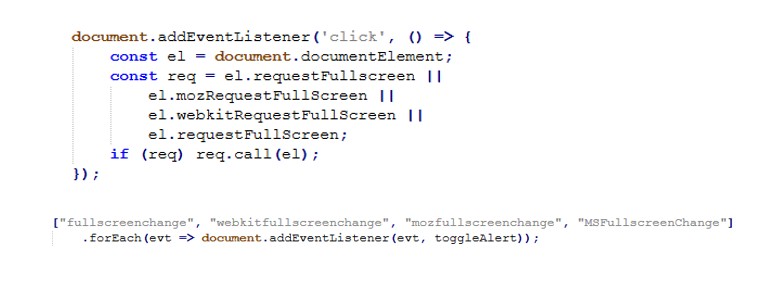
Fullscreen hijack
The page repeatedly requests full screen as soon as the user clicks, and monitors full screen state to keep the scam overlay behavior consistent.
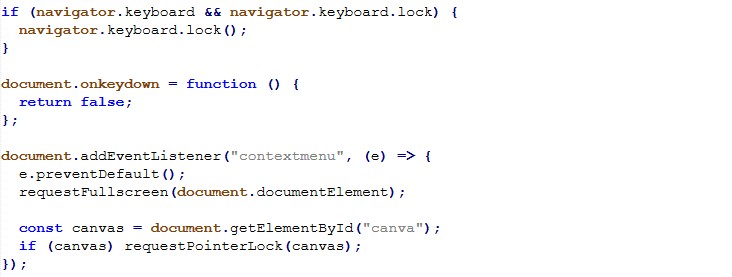
Input restriction
To reduce the victim’s ability to regain control, the script disables keyboard input broadly and blocks right-click/context menu.
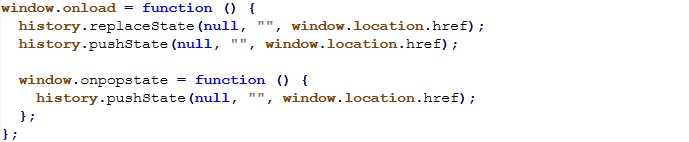
Back-button / navigation trap
The page manipulates history to make the back button ineffective an especially effective trap for non-technical users who instinctively try “Back” to escape.
Script cleanup / evasion
This short script searches loaded <script> tags and removes any whose src matches a Base64 decoded pattern. It’s consistent with “cleaning” unwanted third party scripts (or selectively disabling components) during runtime.

This activity represents a confirmed tech support scam using modern browser based deception techniques. It demonstrates how convincingly attackers can simulate Windows failures using nothing more than HTML, JavaScript, and social engineering.
The absence of malware does not reduce the threat. The intent is clearly fraudulent, and the potential impact on victims especially non technical and older users is severe.
Indicators of Compromise (IOCs)
Initial Access & Redirect Infrastructure
- acrossthesea/.it
- afuvy.prevardy/.my/.id
- rekimalosheblomoglub/.afterselves/.my/.id
- kavesivatrala/.afterselves.my/.id
Fingerprinting / Geo-IP Service
- ipwho.org
Phone Scam Indicator
- +1 855-829-1289
Interesting Strings
These strings were observed in page content and scripts and may be useful for content based detection, sandboxing, or threat hunting.
Fake Security Messaging
- Microsoft Windows Security Alert
- Your PC is infected
- Access to this PC has been blocked
- Trojan detected
- Petya
- Emotet
- Call Microsoft Support
Fake System Activity Indicators
- Scanning system files
- Initializing diagnostic module
- Checking Windows Update
- Threat detected
JavaScript
- requestFullscreen
- requestPointerLock
- navigator.keyboard.lock
- document.onkeydown = function(){ return false }
- history.pushState
- onpopstate

[…] Article Link: Fake Windows Update and BSOD Alerts Used in a Tech Support Scam – Malware Analysis, Phishing, and … […]
LikeLike