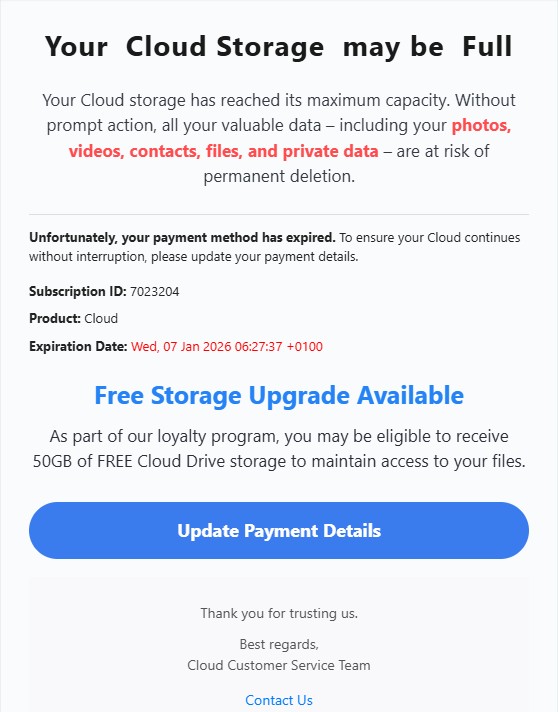
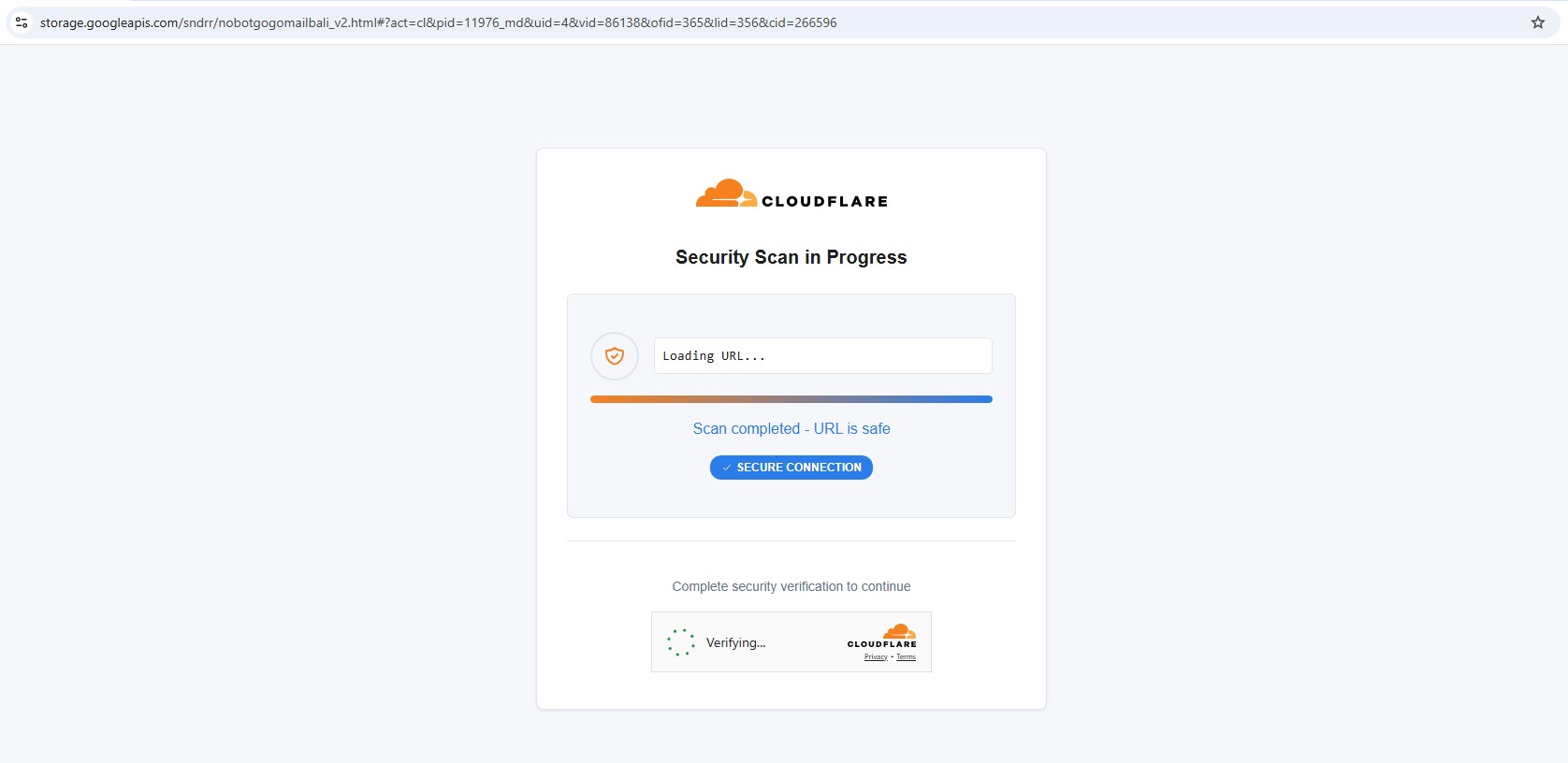
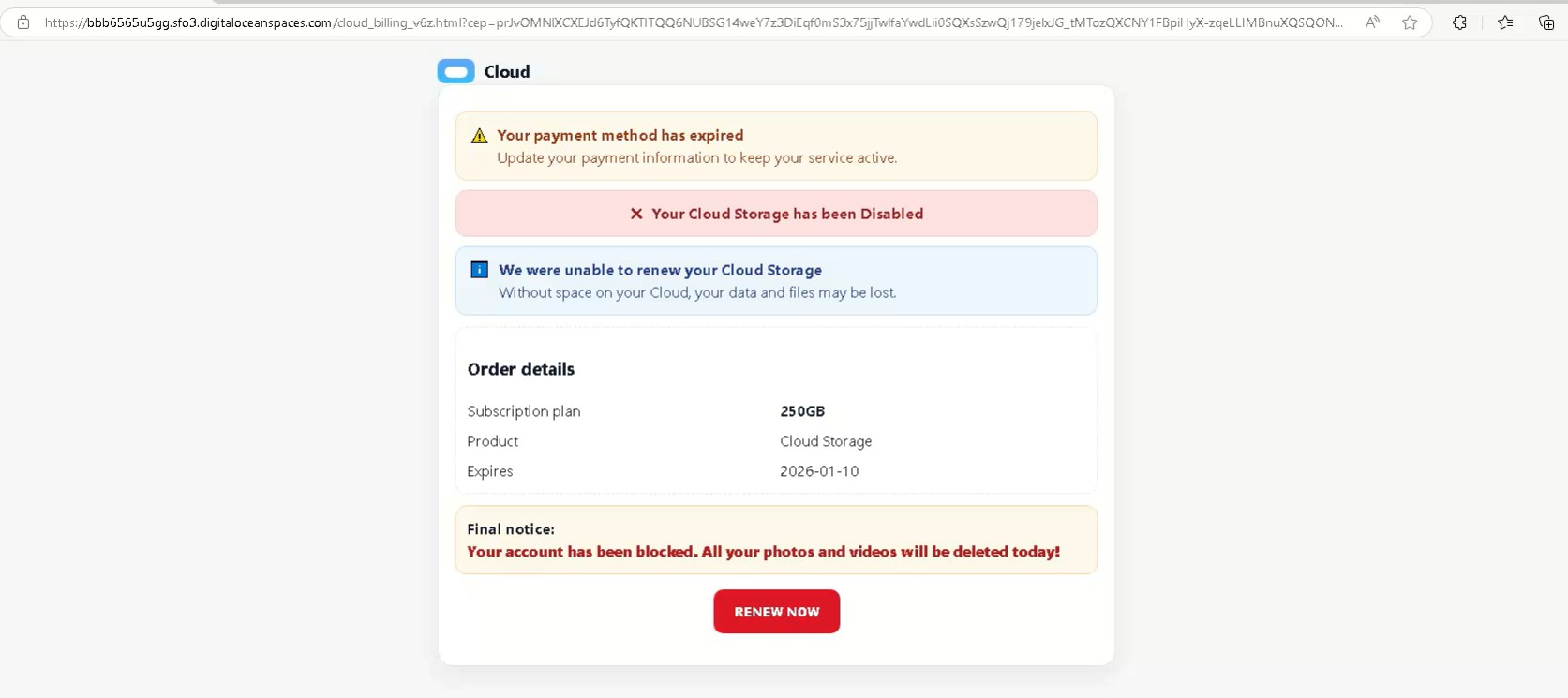
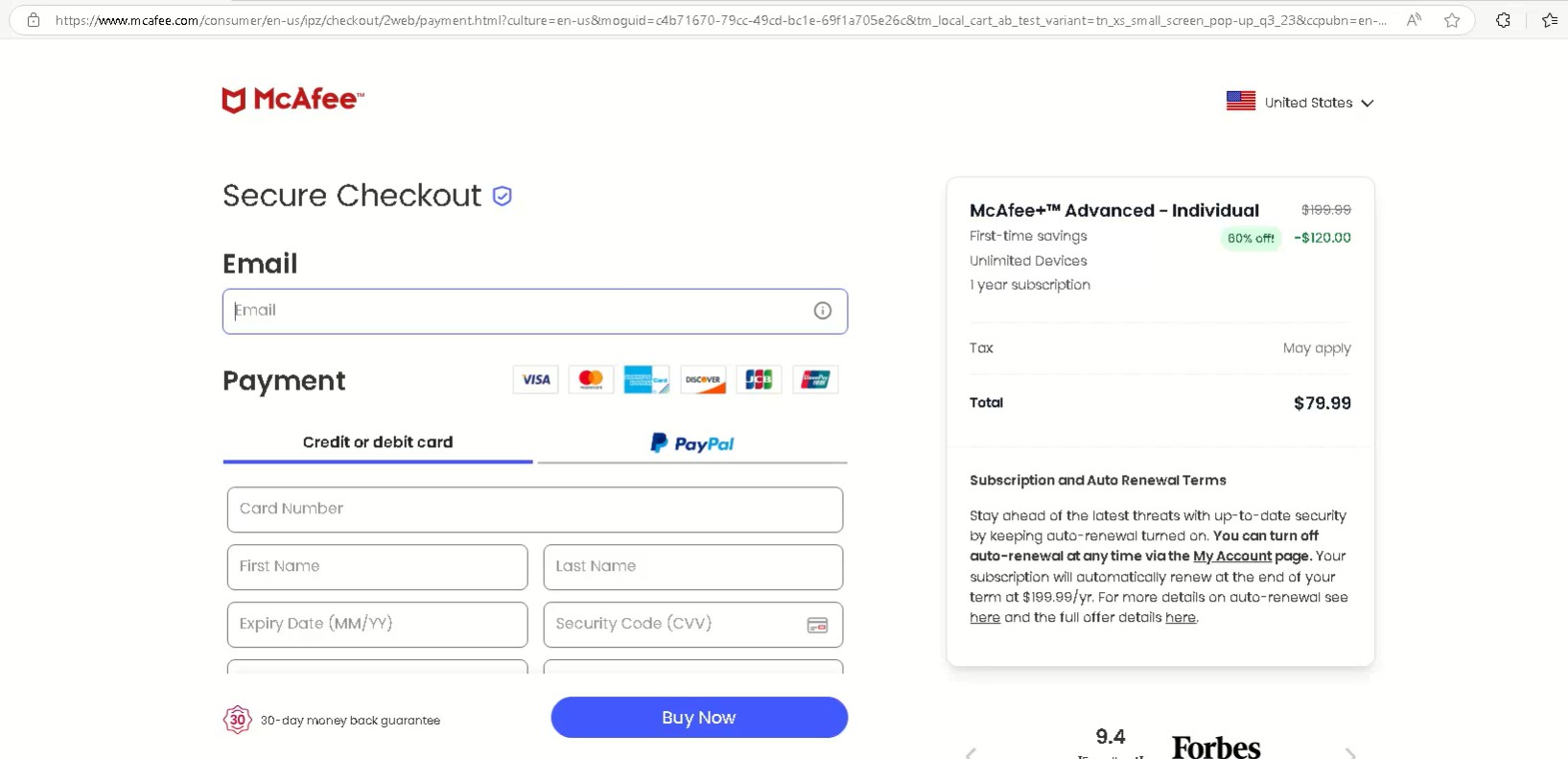
Analysis of a Fake Cloudflare Turnstile Used as a Traffic Filtering Gate

Overview

During analysis of a phishing URL chain, I observed a fake Cloudflare Turnstile verification page acting as an intelligent traffic filtering gate. Rather than protecting a website, this page selectively blocks, redirects, or allows access based on geolocation, proxy usage, and browser fingerprinting.

This phishing infrastructure demonstrates Traffic Distribution System like behavior commonly used in modern phishing and scam operations to evade security researchers, sandboxes, and automated crawlers while delivering payloads only to high-confidence victims.

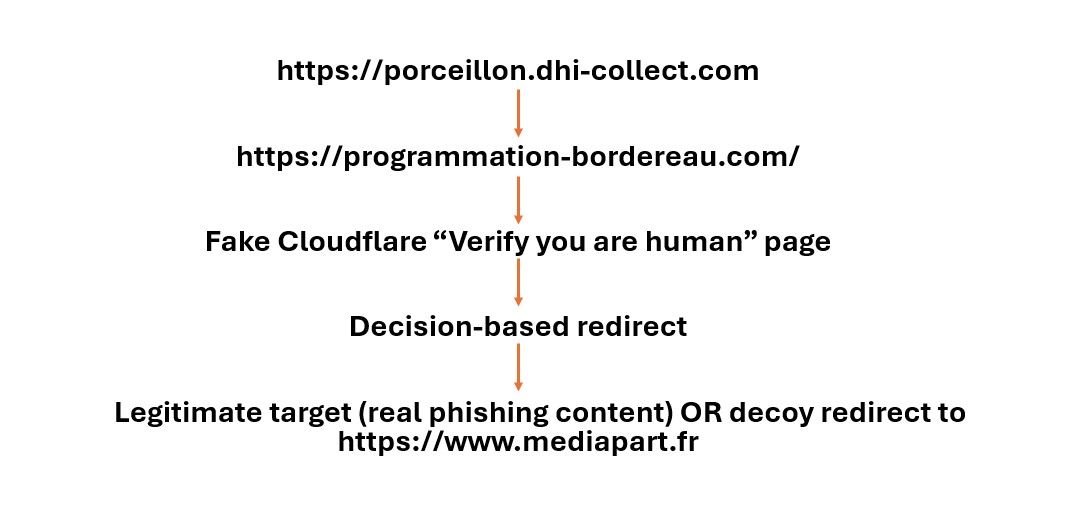
Redirection Chain

The Cloudflare page is not legitimate and does not load any official Turnstile JavaScript. Instead, it is a static imitation combined with heavy client side fingerprinting.

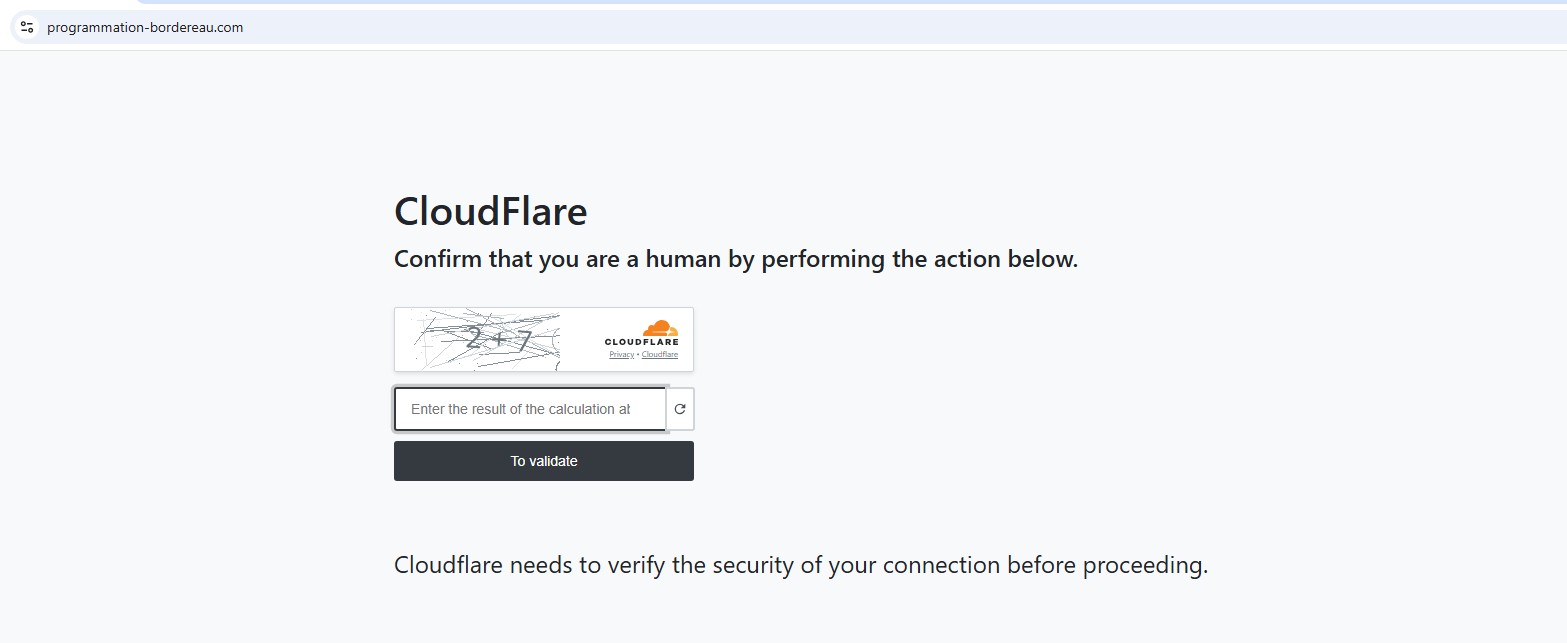
Fake Cloudflare Verification Page

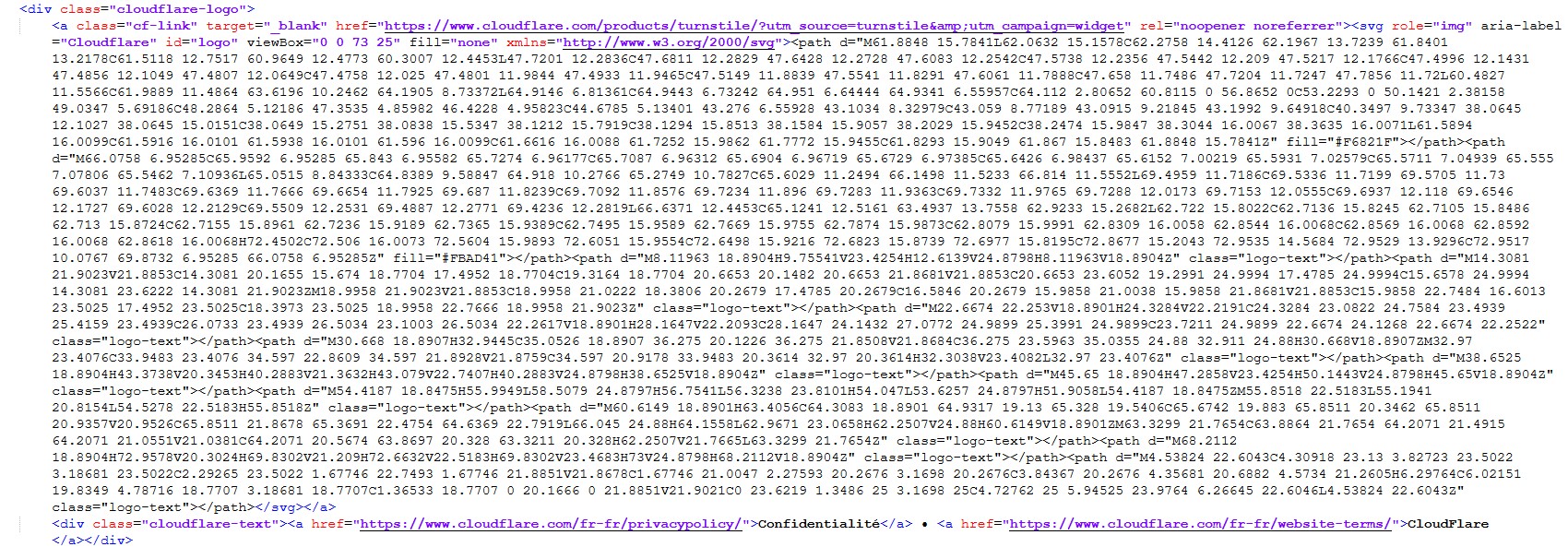
The landing page is designed to closely mimic a legitimate Cloudflare interstitial, creating a false sense of trust for the victim. It displays the French language title “Un instant…“, along with Cloudflare style branding and logos to appear authentic. A fake human verification checkbox labeled “Vérifiez que vous êtes humain” is presented, imitating Cloudflare’s Turnstile challenge, despite performing no real validation. The page also shows a fabricated Ray ID, a detail commonly associated with genuine Cloudflare error or verification pages. To further reinforce legitimacy, the attackers include links pointing to real Cloudflare policy and documentation pages, a tactic intended to reduce suspicion and bypass casual scrutiny by users and automated scanners alike.

However, no real Turnstile challenge exists. All logic is client side JavaScript + server side decision APIs, not Cloudflare infrastructure.

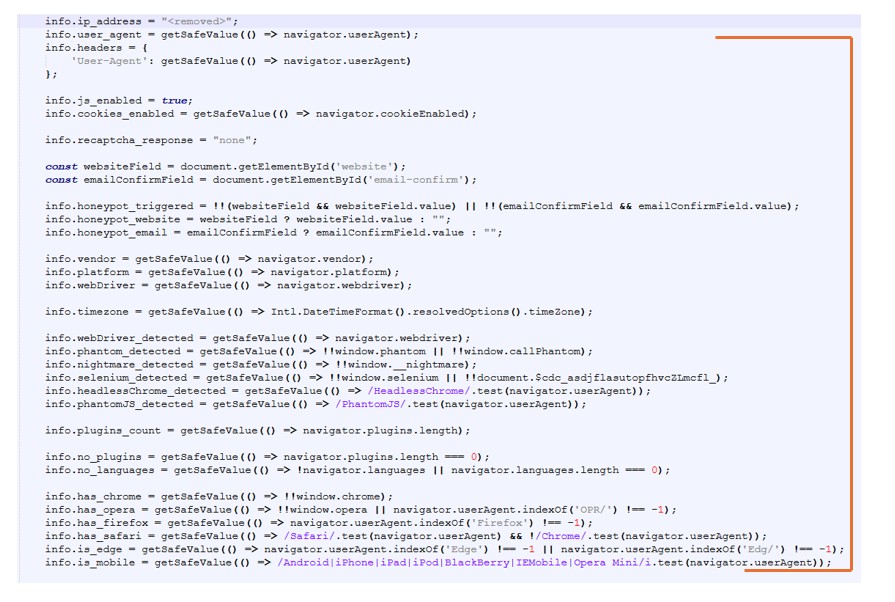
Browser Fingerprinting & Bot Detection

Once the page loads, the script silently collects a detailed browser fingerprint, including:

  • navigator.userAgent
  • navigator.webdriver (Selenium / automation detection)
  • Headless browser indicators
  • Plugin count and language settings
  • WebGL vendor and renderer (VM / sandbox detection)
  • LocalStorage and SessionStorage availability
  • Timezone information
  • Honeypot fields (website, email-confirm) to detect autofill bots

All of this data is packaged and exfiltrated to backend endpoints such as:

/_internal/base/validation/collect_info.php
/_internal/api/dashboard.php

Geo Blocking and Proxy Detection

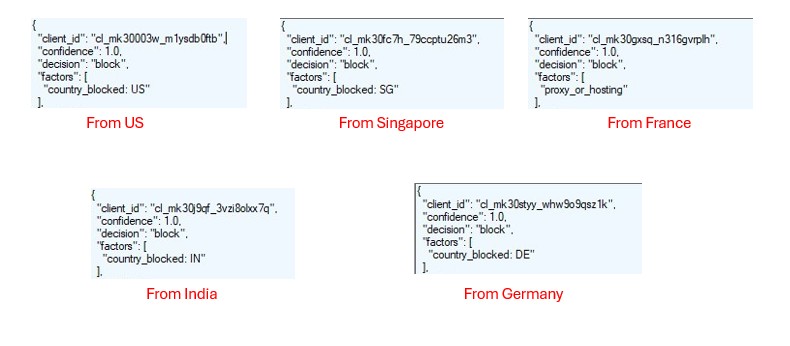
Using Fiddler with different exit locations, the server’s decision engine responses were captured. These responses clearly show country based blocking and proxy detection logic.

This confirms explicit detection of hosting providers, VPNs, and proxy infrastructure, even when traffic originates from France.

Decoy Redirect Behavior

If a visitor is classified as blocked or suspicious, the page redirects to:

hxxps://www.mediapart.fr

This serves multiple purposes:

  • Makes the site appear benign during casual inspection
  • Misleads analysts and automated scanners
  • Prevents security tools from accessing the real phishing content

Only approved traffic (likely residential French IPs, real browsers) proceeds to the malicious landing page.

Why France?

Several indicators strongly suggest that this phishing infrastructure is specifically oriented toward French users. The landing page content and interface are fully localized in French (fr_FR), indicating deliberate language targeting rather than generic reuse. Access behavior appears to follow a country based allow list model, where visitors from non-French regions are blocked or redirected. When access conditions are not met, the site redirects to a well-known French news outlet as a decoy, helping the infrastructure appear benign during casual checks. Additionally, all CAPTCHA elements and user interface text are presented entirely in French, reinforcing the assessment that this setup is designed to blend seamlessly into a French browsing context and evade suspicion among local users.

Infrastructure Observations

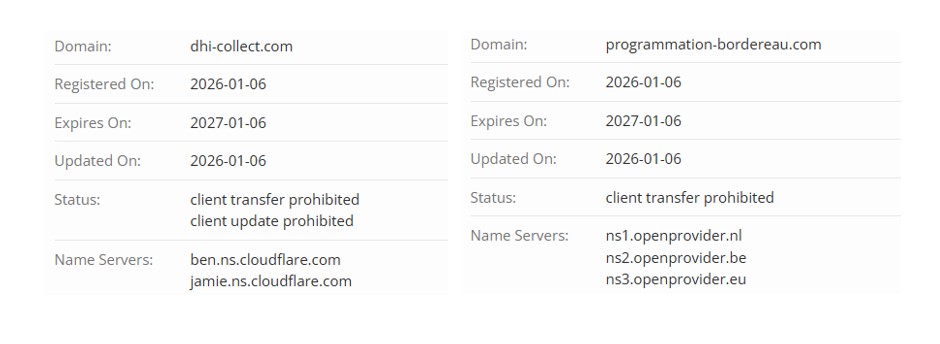
Both domains involved in the redirect chain were newly registered on 2026-01-06.

Detection And Hunting Notes

Defenders should look for:

  • Fake Cloudflare Turnstile pages without official Cloudflare JS
  • Hidden honeypot form fields
  • /collect_info.php or /dashboard.php?action=visit patterns
  • Conditional redirects to legitimate news sites
  • Different behavior between residential vs proxy IPs

Confirmed malicious phishing traffic distribution system.

This is not a Cloudflare protection page.
It is a selective traffic gate designed to evade analysis and deliver phishing content only to real victims.

Source

Arechclient2 Malware Analysis (sectopRAT)

Overview

Arechclient2, also known as sectopRAT, is a Remote Access Trojan (RAT) written in .NET. This malware is highly obfuscated using the calli obfuscator, making its analysis challenging. Despite attempting deobfuscation using calliFixer, the code remained obfuscated but was still somewhat readable using dnSpy.

The sample analyzed has the following characteristics:

File Hash: EED3542190002FFB5AE2764B3BA7393B
File Size: 768KB
Original File Name: Bluefin.exe
File Type: .Net
Obfuscation Technique: calli obfuscator
Mutex Name: 49c5e6d7577e447ba2f4d6747f56c473
VT Detection: 61/72
File Download: any.run

Static Analysis

Obfuscation Technique

The malware is obfuscated using the calli obfuscator, as identified using Detect It Easy (DIE).

Attempts to deobfuscate the code using CalliFixer were unsuccessful, as shown below:

Extracted Strings

Extracting strings from the executable revealed significant indicators of the malware’s capabilities. Some of the key strings found include:

  • Browser Data Extraction: URL, User, Password0, AccountT, BrowserExtension, AutofillT, Logins, Cookies7, os_crypt, LocalState, encrypted_key
  • System and Hardware Information: HardwareType, OSVersion, Machine, ReleaseID, Language, ScreenSize, TimeZone, IPv4, Monitor
  • Installed Software and Processes: AvailableLanguages, Softwares, Processes, SystemHardwares
  • Targeted Applications and Services: Nord, Open, Proton (VPNs), Steam, Discord, Telegram, FTP, ScanBrowsers, ScanFiles, ScanFTP, ScanWallets, ScanScreen
  • Data Exfiltration and Storage: FileLocation, SeenBefore3, FileScannerArgT, OfApplication, Directory, Pattern, Recoursive7

Observed Functionalities

Upon analyzing the decompiled code, several key functionalities were observed:

  • Scanning and gathering information about installed web browsers, including browser extensions and stored credentials.
  • Extracting cookies, usernames, passwords, and autofill data.
  • Scanning the system for installed VPN services such as NordVPN and ProtonVPN.
  • Collecting system information, including hardware details and OS specifications.
  • Looking for installed game launchers, Telegram, and Discord configurations.
  • Scanning for FTP connections and stored credentials.
  • Searching for wallet configurations, indicating potential interest in cryptocurrency theft.

Dynamic Analysis

Upon execution in a controlled environment, the malware exhibited network-based behaviors, connecting to a remote Command and Control (C2) server:

  • C2 Server IP: 91.202.233.18
  • Port: 9000
  • Port:15647

  • Downloaded Files:
    • manifest.json (Defines the extension’s name, permissions, and scripts)
    • content.js (Core malicious script for keylogging and data theft)
    • background.js (Bypasses security restrictions and transmits stolen data)

Malicious Chrome Extension Disguised as “Google Docs”

The downloaded files are part of a Google Chrome extension masquerading as “Google Docs.” This extension is a stealthy data-stealing tool designed to exfiltrate user input across all websites. The files were retrieved from the following URL:

  • Download URL: http://91.202.233[.]18:9000/wbinjget?q=9A7A4DFA51C1DFA51C1DFC689A43860F0BECA70

Its functionality is split across three key files:

  • manifest.json
    • Declares the extension’s name and description (misleading claim of Google Docs offline editing)
    • Grants broad permissions, including , allowing script injection across all web pages
  • content.js
    • Injects event listeners into every webpage
    • Monitors and captures all user input fields (textboxes, checkboxes, dropdowns, buttons, text areas)
    • Sends recorded data, including usernames, passwords, credit card details, and form data, along with the URL to the attacker’s server
  • background.js
    • Acts as a middleman to bypass browser security policies
    • Uses browser permissions to make unauthorized HTTP requests to an external attacker-controlled server
    • Relays stolen data from content.js to the remote server
Installed Google Chrome Extension
Dropped JavaScript code and Json file.

Additionally, during debugging, it was observed that the malware connects to an external URL:

  • URL: https://pastebin.com/raw/wikwTRQc
  • Sandbox Analysis: The webpage at this URL contains the same IP (91.202.233.18)

Further Payload Analysis

During analysis, no additional payloads were observed being dropped or executed. However, given the RAT’s capabilities and network behavior, it is possible that further payloads may be delivered dynamically by the C2 server depending on the victim’s environment.

Indicators of Compromise (IoCs)

File Hashes

  • EED3542190002FFB5AE2764B3BA7393B

C2 Servers

  • 91.202.233.18:9000
  • 91.202.233.18:15647

Malicious URLs

Mutex

  • 49c5e6d7577e447ba2f4d6747f56c473

Security Implications

This malicious extension operates as a coordinated data-harvesting tool, capturing nearly all user input and exfiltrating it to a remote C2 server. The misleading name, broad web access, and ability to evade browser security make it a severe threat.

Recommendations:

  • Block network traffic to 91.202.233.18:9000 and 91.202.233.18:15647.
  • Monitor %AppData%/Local/llg for suspicious file creations.
  • Remove any unknown Chrome extensions, particularly those masquerading as Google Docs.
  • Use behavioral-based threat detection to identify suspicious activities.
  • Restrict execution of untrusted .NET applications.

This analysis highlights the evolving threats posed by obfuscated RATs and malicious browser extensions, emphasizing the need for enhanced security monitoring and strict browser extension controls.

If you found this analysis helpful, consider following my blog for more in-depth malware research and cybersecurity insights!

NanoCore RAT Malware Analysis

NanoCore is a well-known Remote Access Trojan (RAT) used by threat actors for espionage, data theft, and system control. In this post, I will analyze a NanoCore RAT sample with the hash 18B476D37244CB0B435D7B06912E9193 and explore its behavior, obfuscation techniques, and deobfuscation process.

File Hash MD5: 18B476D37244CB0B435D7B06912E9193
Filename: Sigmanly_0bbff62a45fc9776575ed143af2d7db332e2781d7e3de56eb3ff48c25d0c7b46
File size: 203.00 KB
NanoCore Client Version: 1.2.2.0
VirusTotal Detection Score: 64/72
File download: any.run

Static Analysis

Initial Inspection

Using Detect It Easy (DIE), I identified that the sample is a .NET executable and employs Eazfuscator obfuscation to hinder analysis.

Deobfuscation

To analyze the code effectively, I used de4dot to deobfuscate the executable. de4dot successfully restored readable class and method names, making it easier to understand the malware’s logic.

Below is how the deobfuscated code appears now.

Strings Analysis

Using SysInternals Strings, I extracted various strings from the binary and found the following indicators:

  • “Connecting to {0}:{1}..”
  • “/create /f /tn “{0}” /xml “{1}””
  • “schtasks.exe”
  • “CreateScheduledTask”
  • “/run /tn “{0}””
  • “RunScheduledTask”
  • “Host: {0}”

These strings indicate that the malware uses Windows Task Scheduler for persistence and C2 communication.

Dynamic Analysis

To gain deeper insights, I used dnSpy to debug the code and analyze its behavior in a controlled environment.

Execution Flow Analysis

Startup Routine: NanoCore attempts to achieve persistence by copying itself to a hidden directory and creating a registry entry.

  • During dynamic analysis, I found that it adds saasmon.exe under the HKCU\Software\Microsoft\Windows\CurrentVersion\Run registry key.
  • It also creates a folder at C:\Program Files (x86)\SAAS Monitor to store its components.
  • Another folder is created at C:\Users\User\AppData\Roaming\81E42A3A-6BA0-4784-B7EC-E653E9E1A8ED, where the SAAS Monitor folder is placed, and saasmon.exe is dropped.

C2 Communication: The RAT connects to a remote Command-and-Control (C2) server, enabling an attacker to issue commands.

  • Wireshark Analysis: The malware attempts to establish connections to:
    • simpletest.ddns.net (Potential C2 domain)
    • 8.8.8.8 (Google DNS, likely used for connectivity checks)
    • Uses port 9632 to communicate with the given IP.
  • Plugin System: NanoCore features a modular plugin system, allowing attackers to load additional capabilities dynamically.
  • Installed Plugins: During dynamic analysis, I found that NanoCore installed the SurveillanceEx plugin, which enhances its spying capabilities.

  • Data Exfiltration: Captures keystrokes, screenshots, and clipboard data, sending them to the attacker.
  • It stores keylogs and clipboard data in C:\Users\User\AppData\Roaming\81E42A3A-6BA0-4784-B7EC-E653E9E1A8ED\logs\users\kbxxxxx.dat.

In the image above, you can see that it is storing clipboard data along with the commands and text I was entering in applications.

Task Scheduler Analysis: The code contains functions to create a scheduled task using schtasks.exe, but during dynamic analysis, no scheduled task was actually created. Below is an image of the relevant code snippet that shows its intent to use Task Scheduler for persistence.

Indicators of Compromise (IOCs)

  • File Hash: 18B476D37244CB0B435D7B06912E9193
  • Network Indicators: (Extracted from dynamic analysis)
    • C2 Domain: simpletest.ddns.net
    • IP Contacted: 8.8.8.8 (Google DNS, may be used for connectivity checks)
    • Port: 9632
  • Registry Changes:
    • HKCU\Software\Microsoft\Windows\CurrentVersion\Run\saasmon.exe
  • File System Changes:
    • C:\Program Files (x86)\SAAS Monitor\saasmon.exe
    • C:\Users\User\AppData\Roaming\81E42A3A-6BA0-4784-B7EC-E653E9E1A8ED\SAAS Monitor\saasmon.exe
    • C:\Users\User\AppData\Roaming\81E42A3A-6BA0-4784-B7EC-E653E9E1A8ED\logs\users\kbxxxxx.dat (Stores keylogs and clipboard data)

Conclusion

NanoCore RAT remains a persistent threat due to its modularity and extensive feature set. Through deobfuscation with de4dot and debugging with dnSpy, I was able to uncover its core functionalities. Defenders should stay vigilant by leveraging threat intelligence, monitoring network traffic, and applying proactive security controls.

If you found this analysis helpful, feel free to share and stay tuned for more in-depth malware research!