Fake Windows Update and BSOD Alerts Used in a Tech Support Scam

Overview

While reviewing submissions received through the WordPress feedback form on my website, I came across a URL that initially appeared unremarkable. Such submissions are common and often contain benign questions or comments, but this particular link stood out enough to warrant closer inspection.

I opened the URL in a controlled analysis environment, and almost immediately it became clear that it was not legitimate. What followed was a carefully staged sequence of browser based deception designed to convince users that their Windows system was infected and about to fail.

This blog documents the full behavior of the page, the redirection flow, and how simple yet aggressive JavaScript techniques are abused to convincingly imitate Windows system failures. Although no actual malware is dropped, the psychological manipulation is significant. The attack is clearly designed to exploit fear and urgency, making it especially effective against non technical users and older individuals who may not be familiar with how modern browsers can convincingly mimic system level alerts.

Initial Entry Point and Redirect Chain

hxxps://www.acrossthesea[.]it/?75k3n4
Sender IP: 64.190.76.4

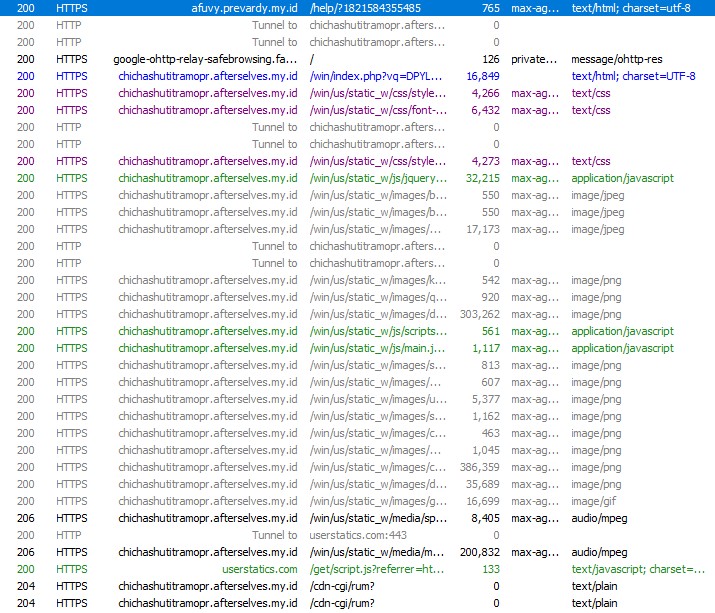
Opening this link immediately triggered a series of automatic redirects across multiple domains. Each hop appeared intentional, either to fingerprint the visitor or to prepare the final scam payload.

The traffic was first redirected to a .my.id domain, followed by another redirect to a randomly generated subdomain hosted under afterselves.my.id. From there, the browser was briefly sent to ipwho.org, a legitimate IP intelligence service, where information such as IP address, browser type, operating system, and user-agent was collected. After fingerprinting, the user was redirected again to the final landing page.

The last page loaded a /win/index.php endpoint with a long Base64-encoded parameter. This encoded value likely controls dynamic behavior such as scam messaging, phone numbers, or localization logic.

At no point during this flow was user interaction required, which makes this attack particularly effective against unsuspecting users.
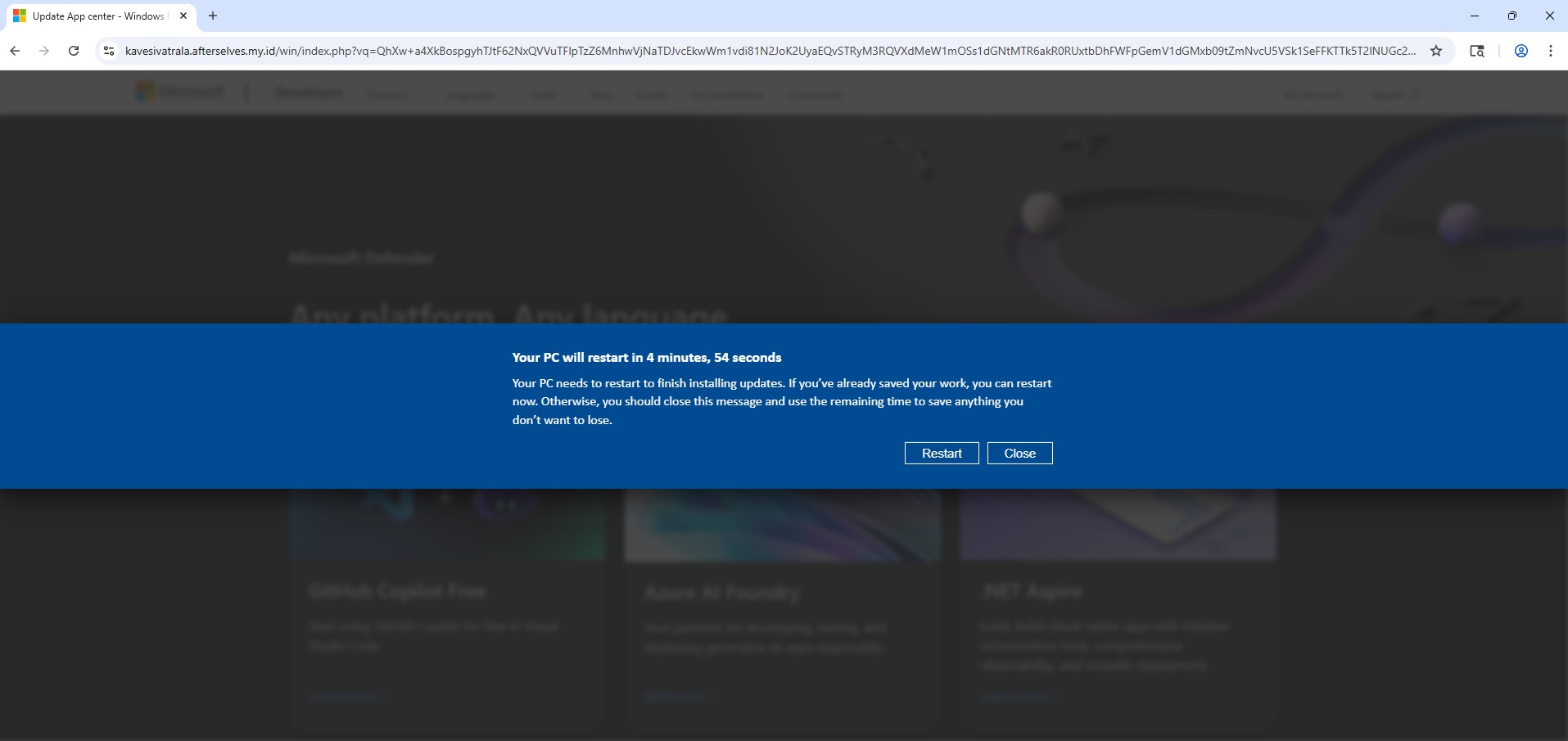
Landing Page Behavior and Visual Deception

Once the final page loads, the scam begins immediately. The user is presented with a screen that closely resembles a legitimate Windows Update notification. A dialog appears stating that the system will restart in five minutes to complete updates, complete with a live countdown timer.

For many users, especially older or less technical individuals, this looks completely normal. Years of exposure to genuine Windows update prompts have conditioned users to trust this type of messaging without question.
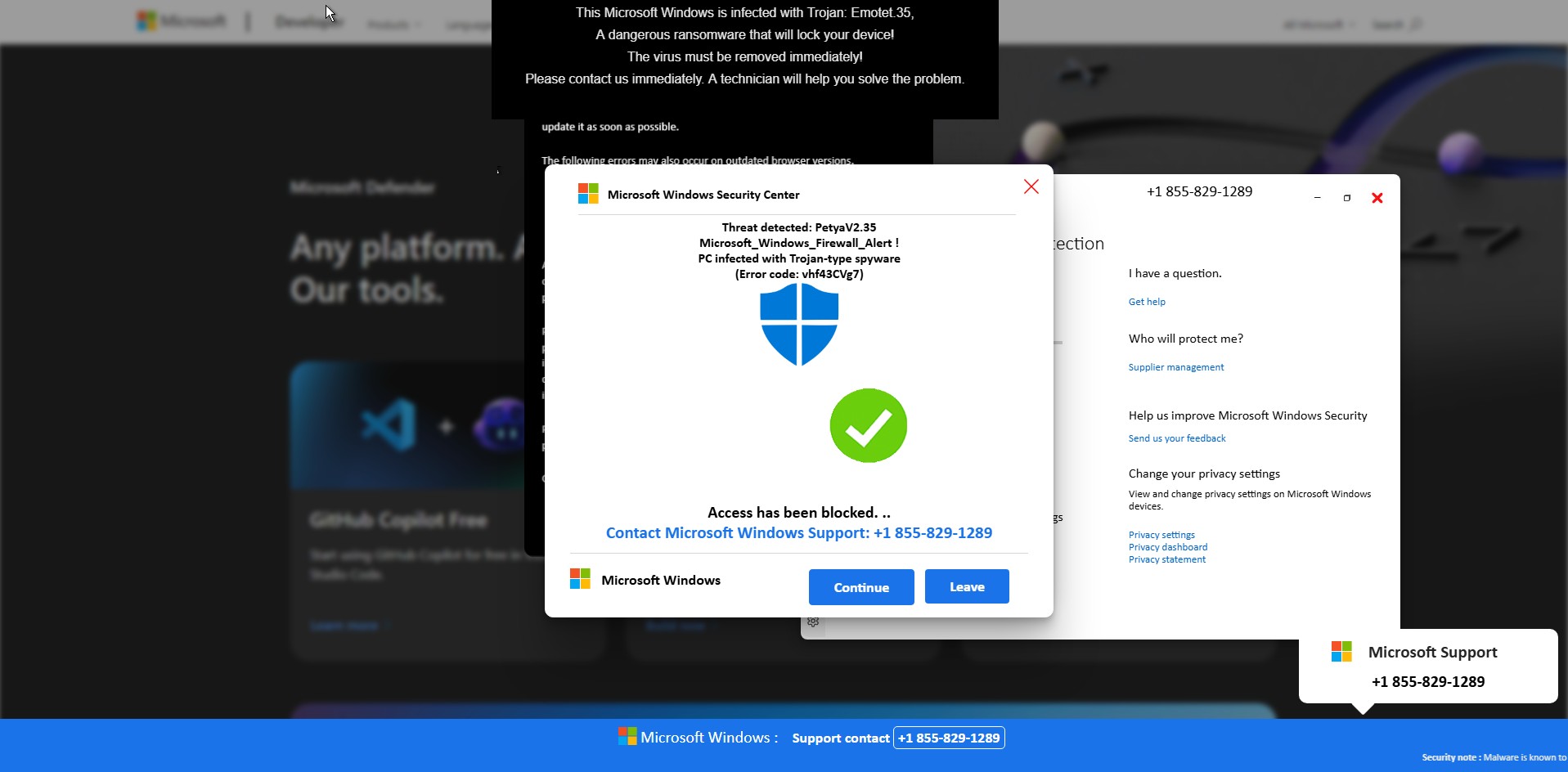
Fake Microsoft Security Alert and Phone Scam

Before any visible “scan” begins, a Windows Security themed popup suddenly appears on top of the page. It claims that serious threats such as Petya and Emotet have been detected on the system and that access has been blocked for security reasons.

The message urges the user to immediately contact “Microsoft Windows Support” using a prominently displayed phone number (+1 855-829-1289). At the same time, the browser becomes increasingly difficult to close or navigate away from.

This is the most critical stage of the scam. The attackers are attempting to push the victim into immediate action while fear is still fresh. Non-technical users and elderly individuals are especially vulnerable here, as the alert looks authoritative and urgent, and many are unaware that Microsoft does not issue security alerts or support instructions via browser popups.
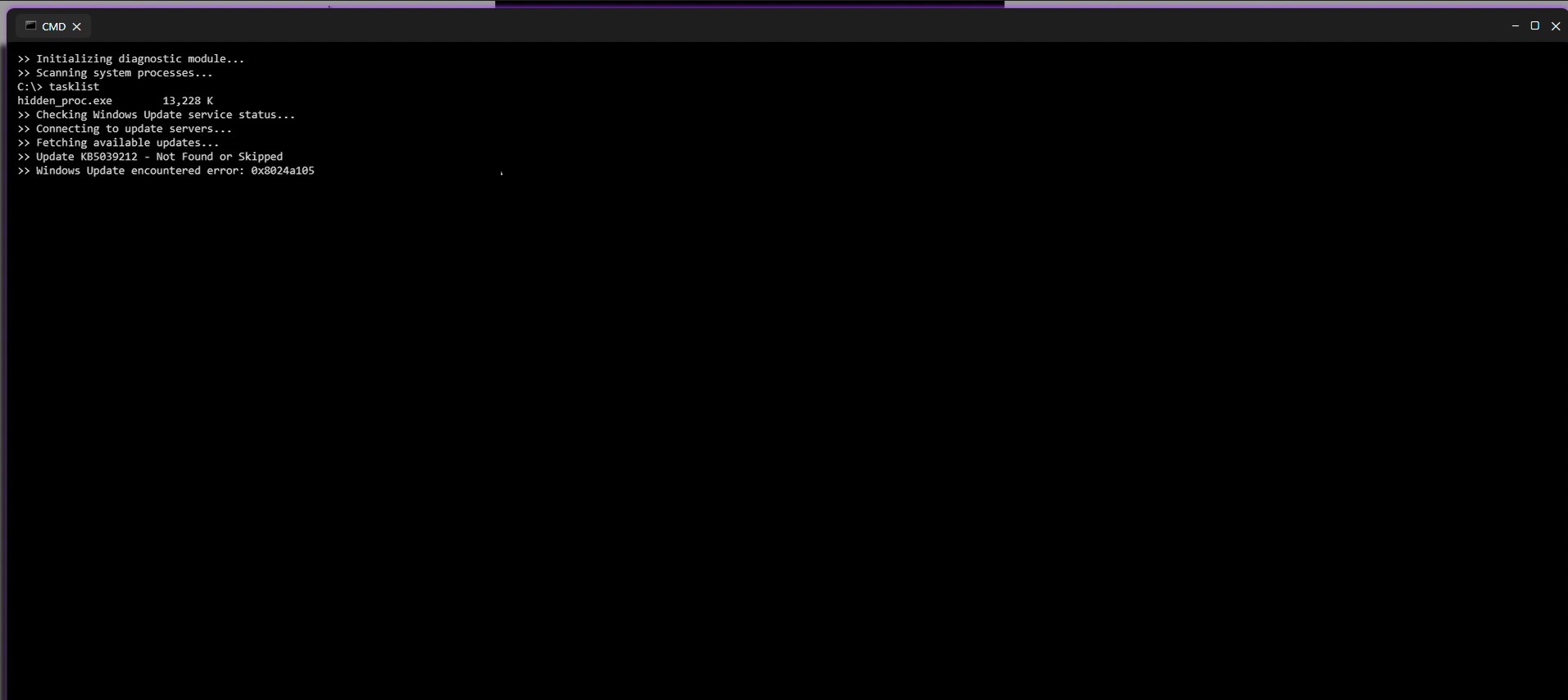
Fake Command Prompt Malware Scan

Shortly after the security alert appears, the page transitions into what looks like a Windows Command Prompt window. Text begins scrolling automatically, claiming that a diagnostic scan is running. Messages such as “Initializing diagnostic module,” “Scanning system processes,” and “Checking Windows Update” are displayed alongside fake process names and memory usage values.

Although nothing is actually being scanned, the timing and presentation make it appear as though the system is actively analyzing a severe infection. This step is designed to reinforce the legitimacy of the earlier security alert and convince the user that the threat is real and ongoing.
Simulated Blue Screen of Death (BSOD)

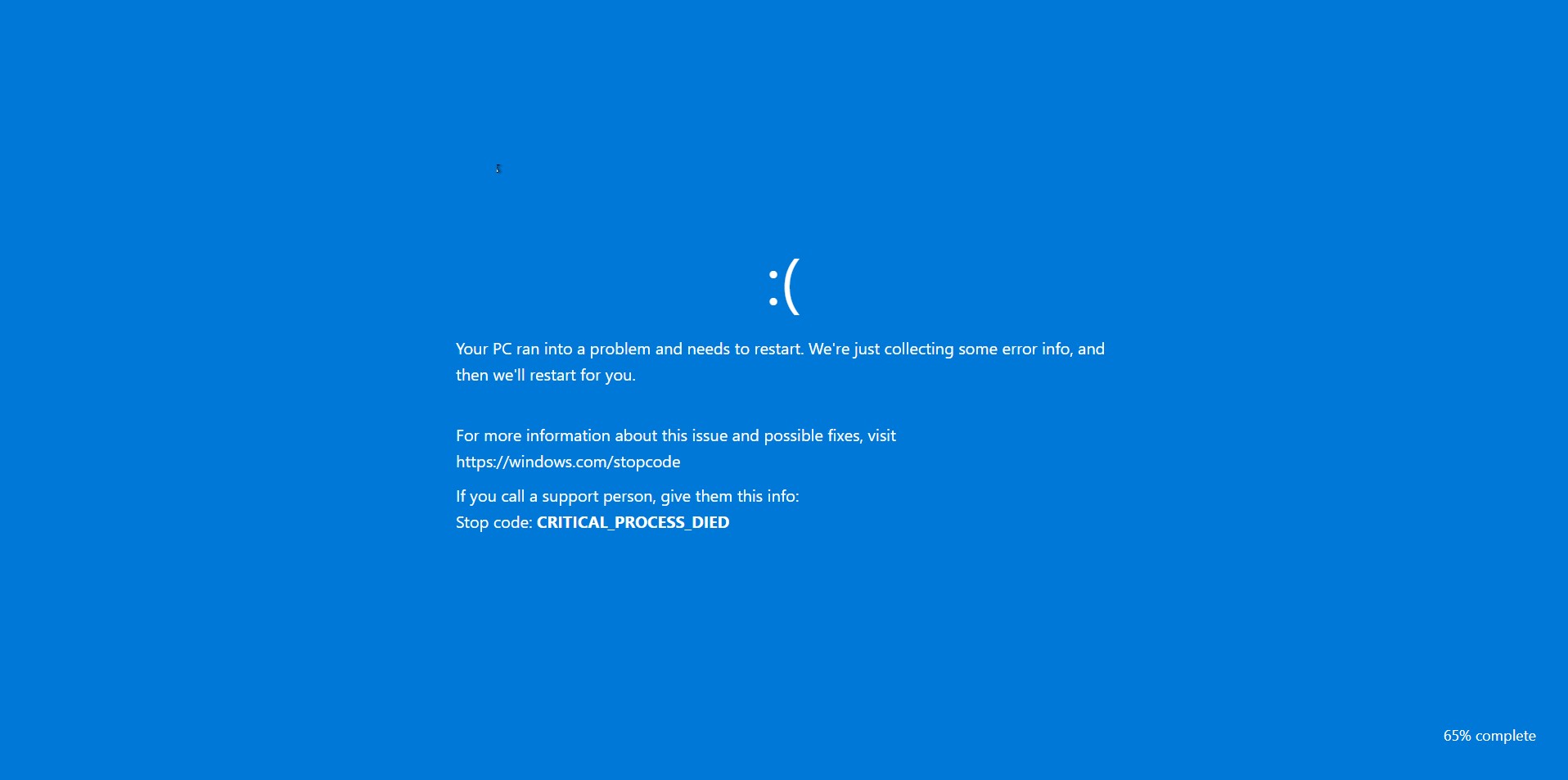
As the fake scan concludes, the browser abruptly switches to a full screen Blue Screen of Death. The screen displays a familiar Windows-style error message along with a stop code such as CRITICAL_PROCESS_DIED.

At this point, many users believe their system has fully crashed. The BSOD serves as the final confirmation in the victim’s mind that the threat is real and severe. Panic often peaks here, making victims far more likely to follow the instructions they were shown earlier, including calling the fake support number.
Full Walkthrough Video of the Scam Behavior

To provide a complete and transparent view of how this scam operates in real time, I have recorded a full walkthrough video capturing the entire sequence from the initial URL access and redirect chain to the fake security alerts, command prompt scan, and final BSOD.

This video shows how quickly the page escalates from a seemingly harmless link into an aggressive and convincing system-failure scenario. Watching the full flow helps illustrate why non-technical users and older individuals are particularly vulnerable, as the page leaves very little room to pause or think critically once the process begins.

Video of the Scam Behavior

Browser Lock-In and JavaScript Abuse

What makes this scam effective isn’t a vulnerability exploit it’s how aggressively it traps the user in the browser and makes the experience feel “system level”. The JavaScript focuses on three high impact goals, force full screen, restrict user input, and block escape/navigation, while adding audio pressure to increase panic.

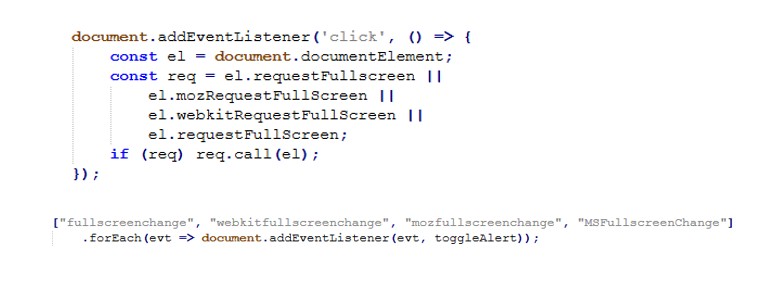
Fullscreen hijack

The page repeatedly requests full screen as soon as the user clicks, and monitors full screen state to keep the scam overlay behavior consistent.
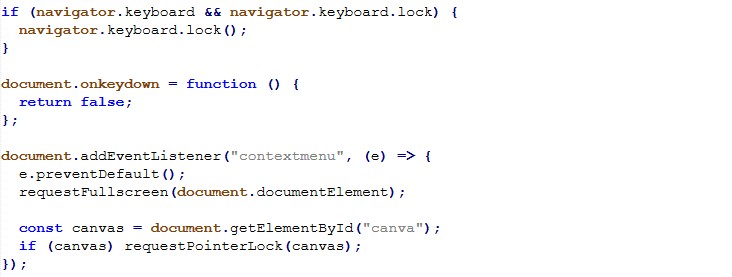
Input restriction

To reduce the victim’s ability to regain control, the script disables keyboard input broadly and blocks right-click/context menu.
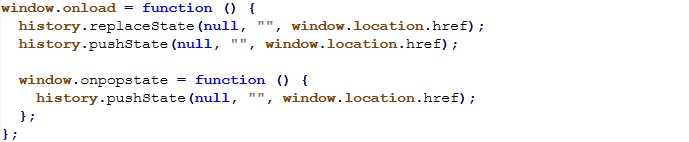
Back-button / navigation trap

The page manipulates history to make the back button ineffective an especially effective trap for non-technical users who instinctively try “Back” to escape.
Script cleanup / evasion

This short script searches loaded <script> tags and removes any whose src matches a Base64 decoded pattern. It’s consistent with “cleaning” unwanted third party scripts (or selectively disabling components) during runtime.

This activity represents a confirmed tech support scam using modern browser based deception techniques. It demonstrates how convincingly attackers can simulate Windows failures using nothing more than HTML, JavaScript, and social engineering.

The absence of malware does not reduce the threat. The intent is clearly fraudulent, and the potential impact on victims especially non technical and older users is severe.

Indicators of Compromise (IOCs)

Initial Access & Redirect Infrastructure

  • acrossthesea/.it
  • afuvy.prevardy/.my/.id
  • rekimalosheblomoglub/.afterselves/.my/.id
  • kavesivatrala/.afterselves.my/.id

Fingerprinting / Geo-IP Service

  • ipwho.org

Phone Scam Indicator

  • +1 855-829-1289

Interesting Strings

These strings were observed in page content and scripts and may be useful for content based detection, sandboxing, or threat hunting.

Fake Security Messaging

  • Microsoft Windows Security Alert
  • Your PC is infected
  • Access to this PC has been blocked
  • Trojan detected
  • Petya
  • Emotet
  • Call Microsoft Support

Fake System Activity Indicators

  • Scanning system files
  • Initializing diagnostic module
  • Checking Windows Update
  • Threat detected

JavaScript

  • requestFullscreen
  • requestPointerLock
  • navigator.keyboard.lock
  • document.onkeydown = function(){ return false }
  • history.pushState
  • onpopstate

Beware of “Your Account Has Been Hacked. You need to unlock” Scam Emails: Stay Safe Online

Scam emails claiming that your account has been hacked are alarmingly common. These emails exploit fear, embarrassment, and urgency to pressure victims into transferring money, often in the form of cryptocurrency. A common scam starts with the subject line: “Your account has been hacked. You need to unlock.”

What Does the Scam Look Like?

Subject: Your account has been hacked. You need to unlock

Sender: Billy Harrington <info@azurepavillion>

Hello!

I have to share bad news with you. Approximately a few months ago, I gained access to your devices, which you use for internet browsing. After that, I have started tracking your internet activities.

Here is the sequence of events:

Some time ago, I purchased access to email accounts from hackers (nowadays, it is quite simple to buy it online).

I have easily managed to log in to your email account. One week later, I have already installed the Cobalt Strike "Malware" on the Operating Systems of all the devices you use to access your email.

It was not hard at all (since you were following the links from your inbox emails). All ingenious is simple.

This software provides me with access to all your devices controllers (e.g., your microphone, video camera, and all on it).

I have downloaded all your information, data, photos, videos, documents, files, web browsing history to my servers.

I have access to all your messengers, social networks, emails, chat history, and contacts list.

My virus continuously refreshes the signatures (it is driver-based) and hence remains invisible for antivirus software.

Likewise, I guess by now you understand why I have stayed undetected until this letter.

While gathering information about you, I have discovered that you are a big fan of adult websites.

You love visiting porn websites and watching exciting videos while enduring an enormous amount of pleasure.

Well, I have managed to record a number of your dirty scenes and montaged a few videos, which show how you masturbate and reach orgasms.

If you have doubts, I can make a few clicks of my mouse, and all your videos will be shared with your friends, family, and relatives.

Considering the specificity of the videos you like to watch (you perfectly know what I mean), it will cause a real catastrophe for you. I also have no issue at all with making them available for public access (leaked and exposed all data).

General Data Protection Regulation (GDPR): Under the rules of the law, you face a heavy fine or arrest. I guess you do not want that to happen.

Here is what you need to do - transfer the Bitcoin equivalent of 12000 USD to my Bitcoin account (that is rather a simple process, which you can check out online in case if you do not know how to do that).

Below is the Bitcoin account information (Bitcoin wallet):
1HLn1GNBvENxZH5r2mNAgEVwjySyRTZGKQ

Once the required amount is transferred to my account, I will proceed with deleting all those videos and disappear from your life once and for all.

Kindly ensure you complete the abovementioned transfer within 50 hours (2 days +).

I will receive a notification right after you open this email, hence the countdown will start.

Trust me, I am very careful, calculative and never make mistakes. If I discover that you shared this message with others, I will straight away proceed with making your private videos public.

Good luck!

  1. Fake Claims of Hacking
    The scammer alleges that they have gained access to your email account and devices through malware or by purchasing access from other hackers.
  2. Threats to Expose Sensitive Information
    They claim to have recorded compromising activities (often fabricated) using your webcam or other devices and threaten to share this material with your contacts.
  3. Demand for Payment
    The email demands a payment, typically in Bitcoin, to prevent the supposed release of your private information. A countdown is often given to create urgency.
  4. Technical Details to Appear Credible
    The email may mention malware like “Cobalt Strike” or other tools to intimidate recipients and make the threat seem legitimate.
  5. Warnings Against Reporting
    Scammers caution victims against sharing the email with anyone, claiming they will release the sensitive information if the email is reported.

What is Cobalt Strike?

Cobalt Strike is a cybersecurity tool designed for penetration testing. It helps security professionals simulate real-world cyberattacks to test the resilience of networks. The software provides features like payload generation, command and control (C2) communication, and post-exploitation tools to mimic the actions of hackers.

However, cybercriminals often misuse it for malicious purposes. They use Cobalt Strike to deliver malware, maintain access to compromised systems, and exfiltrate data. Its stealth features, such as evading detection by antivirus software, make it a popular choice among attackers. Originally meant for ethical hacking, it highlights the fine line between testing defenses and exploiting vulnerabilities.

Email Header Analysis

Understanding email headers is crucial for identifying the source of scam emails. Here’s an analysis of the header details from the scam email:

Source Server: The email originated from static-185-95-84-74.sunucuhub.com with the IP address 185.95.84.74. This server appears to belong to a suspicious or unverified host.

Helo Address: The sender’s system introduced itself as static-84-74.corelux.net, which may be a fake or compromised server.

Relaying Server: The email was relayed through vps2.webfruit.space using secure email transmission (esmtpsa) with TLS encryption (TLS1.2).

Envelope Sender: The email claims to be from <info@azurpavillon.com>, but this could easily be spoofed.

Sender IP address VirusTotal Score: 8/94

The sender’s IP address, 185.95.84.74, has a VirusTotal score of 8/94, indicating that 8 out of 94 security vendors flagged it as malicious or suspicious. A score of 8 is a strong indication that this IP is associated with potentially harmful activities, such as phishing or malware distribution. This reinforces the likelihood that the email is part of a scam. Always verify suspicious IP addresses using tools like VirusTotal to assess their reputation and avoid engaging with emails originating from flagged sources.

Why You Shouldn’t Fall for It

  1. No Evidence of Actual Hacking
    The email lacks concrete proof, such as a specific password or verifiable detail about you. The threats are generic and designed to instill fear.
  2. Claims Are Technically Improbable
    • Modern operating systems and antivirus software make it difficult for malware to remain undetected for months as described.
    • Webcam access typically requires explicit permission, making the claims of recorded activities suspect.
  3. Bitcoin Transactions Are Irrecoverable
    Scammers use cryptocurrency because it is hard to trace and impossible to reverse once sent.

What to Do If You Receive Such an Email

Step 1: Do Not Panic
Remember, this email is likely a phishing attempt and not evidence of an actual security breach.

Step 2: Do Not Reply or Pay
Responding or paying only validates your email address as active, making you a target for future scams.

Step 3: Verify Your Account Security

  • Change your email password and enable two-factor authentication (2FA).
  • Scan your devices with updated antivirus software to ensure no malware is present.

Step 4: Blog the Sender
Mark the email as spam and block the sender’s address.

Bitcoin Wallet Address

The Bitcoin address provided in the scam email has been verified and shows no transactions to date. This suggests that the scammer’s attempt to extort money may not have been successful yet. It is also possible that the scammer is using this address as part of a broader campaign, hoping to intimidate multiple victims into making payments. The absence of transactions does not diminish the threat, as such tactics are designed to exploit fear and urgency. Verifying cryptocurrency addresses can provide insights into scam campaigns, and reporting them helps prevent potential victims from falling into the trap.

Final Thoughts

Scam emails like “Your account has been hacked. You need to unlock” prey on fear and lack of technical knowledge. Staying calm, taking practical steps, and understanding how these scams operate can protect you from falling victim. Always prioritise account security, and never hesitate to report scams to the authorities. Stay safe online!