Tycoon 2FA Campaign Abusing *.contractors Domains for Gmail and Microsoft 365 Credential Harvesting

Overview

Over the past few weeks, I have been tracking a credential harvesting campaign that repeatedly abuses newly registered *.contractors domains to deliver Gmail and Microsoft 365/Outlook phishing pages.

While the social engineering lures vary including ICANN email verification, document sharing, and account security prompts. The underlying infrastructure, tooling, and execution flow remain consistent

Based on analysis of the phishing HTML, JavaScript, and runtime behavior, this activity can be attributed with high confidence to the Tycoon 2FA phishing kit, based on its distinctive MFA aware execution flow, client side obfuscation, and anti-analysis tradecraft.

This attribution is supported by distinctive Tycoon specific client side tradecraft, including MFA aware flows, advanced anti-analysis logic, and encrypted runtime loaders, as shown below.

Technical Evidence Supporting Tycoon 2FA Attribution

Analysis of the extracted HTML and JavaScript reveals multiple Tycoon 2FA specific behaviors that go beyond generic phishing kits.

Anti-Analysis & Sandbox Evasion Logic

The phishing pages actively detect analysis environments and developer tools, immediately terminating execution or redirecting the user if detected:

Additional protections disable common inspection techniques:

This multi-layered anti-analysis logic is a well known characteristic of Tycoon 2FA deployments, commonly observed across multiple campaigns leveraging this phishing-as-a-service (PhaaS) framework.

Runtime Debugger Detection & Forced Redirect

The kit also employs debugger timing detection to identify active inspection and force redirection:

This technique is specifically used by Tycoon based phishing frameworks to evade dynamic analysis and sandbox detonation.

ICANN Email Verification Lure

One of the more recent samples impersonates ICANN (Internet Corporation for Assigned Names and Numbers) and claims that the recipient’s email address must be verified to avoid domain-related disruption.

The email states that:

  • The recipient’s email is listed as the owner contact for a domain
  • The address is allegedly unverified or inactive
  • Failure to verify may result in email suspension

A verification link is provided, styled to appear ICANN-related. However, hovering over the link reveals that it actually points to attacker controlled infrastructure hosted outside of any legitimate ICANN or registrar domain. In this case, the observed link resolved to

hxxps://recontact252.bluvias.de/572pectoral/$anurag@malwr-analysis.com

The URL embeds the recipient’s email address directly in the path, a common personalization technique used in targeted phishing campaigns to increase credibility and successful credential submission.

Redirection Flow: CAPTCHA as an Anti-Analysis Gate

Clicking the verification link does not immediately present a login page.

Instead, victims are routed through a fake CAPTCHA / “confirm you’re human” page, which serves as a deliberate execution delay.

This delay is important for two reasons:

  • Automated sandbox services (e.g., URLScan) often complete scanning before the CAPTCHA stage is reached, meaning the actual phishing payload is never rendered during automated analysis.
  • User interaction is required to proceed, filtering out non-human traffic and reducing detection rates.

Final Payload: Gmail & Microsoft 365 Tycoon 2FA Lures

After CAPTCHA completion, victims are redirected to high-fidelity Gmail or Microsoft 365 / Outlook login pages, depending on the campaign variant.

Observed behaviors include:

  • Accurate UI and branding replication
  • Email address prefilled or dynamically referenced
  • Transition into multi-step authentication flows
  • MFA approval interception and credential capture

Despite branding differences, both lures share identical loader logic, obfuscation patterns, and runtime behavior, confirming they are part of the same Tycoon 2FA campaign.

Infrastructure Reuse: *.contractors Domains

Across all observed samples, the campaign consistently abuses freshly registered .contractors domains, often using randomized subdomains and long URL paths.

Examples observed include:

Outlook 

hxxps://datacenter.lonaihoo.contractors/i!2zDbFPEvdm/

hxxps://pytorch.hithomu.contractors/Hik3GWNtRtmoaf@Ul5FNuB3/$bmVzZS5ndW5lckBlZ29uemVobmRlci5jb20=

hxxps://bigbluebutton.seacrevea.contractors/nGPI9ensbX@Y/

hxxps://redoc.kaidaisoo.contractors/Yi@9yUWrVO/

hxxps://firewall.tiostemio.contractors/nu2ATGWco@GZ/

hxxps://pulumi.kaidaisoo.contractors/QBQG4CC@30W/
Gmail 

hxxps://cdnedge.kirosoo.contractors/UyHX5Z5NJWj!i6VTZW5/

hxxps://bscscan.kirosoo.contractors/KQccgiv0@RRZ4xeCQMfRJbnT/

hxxps://copytrade.kirosoo.contractors/m8WqmrYb6lVk7C@9o1Yio/

hxxps://dist.draidatroo.contractors/4!OMtEFiKRQ/

hxxps://boot.lizojea.contractors

hxxps://hashid.draidatroo.contractors/ey!z5jV2w/

Benign Page

hxxps://ide.pishathi.contractors

hxxps://ide.niramio.contractors/

hxxps://js.hithomu.contractors/

hxxps://substack.wifupu.contractors/

hxxps://swap.lizojea.contractors/

hxxps://bandwidth.kioboumu.contractors/tO3v!7gw

hxxps://zip.lucadru.contractors/

Common characteristics observed across these campaigns include domains registered very recently, most notably on 07 January 2026 and 14 January 2026 along with randomized URL paths and identifiers designed to evade detection. Victim email addresses are embedded directly within the URLs to personalize lures and enable tracking.

Observed Evasion via Decoy Landing Pages

When analysis is detected or when execution fails, the infrastructure does not return an error page.

Instead, victims or scanners are redirected to to benign decoy landing page templates, including:

  • Finquick
  • Flowguide
  • Desio Copilot

These templates act as decoy content, helping:

  • Evade automated detection
  • Reduce suspicion during manual review
  • Prolong domain lifespan

This fallback behavior has been repeatedly observed in Tycoon-based phishing campaigns.

Campaign Scope: *.contractors Domains Observed on URLScan

During this investigation, I identified multiple .contractors domains associated with this campaign through URLScan submissions and pivoting.

A consolidated list of all observed .contractors domains, along with scan links and timestamps, will be provided below for reference and detection purposes.

https://urlscan.io/result/019c0245-d376-75f6-9cb1-61ea3d390d5b/

https://urlscan.io/result/019c03c8-00f8-718f-b45a-af4fd080112e/

https://urlscan.io/result/019c046b-012c-740e-b96a-cf111e169b0a/

https://urlscan.io/result/019bc8b1-63f4-765c-96a1-46d406426c1e/

https://urlscan.io/result/019bfa8b-127e-7718-abad-b1390d3c9e08/

https://urlscan.io/result/019bec78-0eaf-70c9-bbda-d839444f8120/

https://urlscan.io/result/019bfeea-9343-713f-8cf8-cd62c3f10a01

https://urlscan.io/result/019bd770-5232-7789-807b-127ca1422e2b

https://urlscan.io/result/019c0616-3df5-7178-a87a-f80358df27b0/


This activity represents a coordinated, MFA aware phishing campaign, not isolated incidents.

While this analysis identifies multiple .contractors domains and consistent infrastructure patterns, it is likely that additional domains and variants are in use beyond those documented here. The findings in this post are based on artifacts and infrastructure observed within the scope of URLScan, and the full extent of the campaign may be broader.

Additional Infrastructure Observed

During continued investigation, I identified additional, distinct domains serving the same Microsoft 365 / Outlook Tycoon 2FA lure, indicating broader infrastructure reuse beyond the initially observed .contractors clusters.

These domains exhibit the same execution flow, CAPTCHA gating, MFA-aware login sequence, and post-authentication behavior, confirming they are part of the same phishing operation, rather than unrelated or opportunistic reuse.

URLScan.io hash search

Note on Campaign Scale

The domains and infrastructure documented above represent only a subset of the total activity observed during this investigation. While many additional domains and variants were identified, listing all of them would significantly expand the scope of this post.

For the purposes of this write-up, I will leave the analysis here, focusing on representative samples that clearly demonstrate the campaign’s tradecraft and attribution.

Fake “PNB MetLife Payment Gateway” Page Stealing Customer Details and Redirecting Victims to UPI Payments

Overview

While actively hunting for phishing site, I came across multiple web pages impersonating PNB MetLife Insurance and presenting themselves as official policy premium payment gateways. This activity highlights how scammers deliberately target reputed and widely trusted brands to exploit existing customer trust and increase the likelihood of successful financial fraud. Although the pages claim to offer legitimate premium payment and policy servicing options, analysis of the underlying HTML and JavaScript shows that no real payment processing or backend validation is involved at any stage.

The pages are optimized for mobile devices, both in layout and interaction design. This strongly suggests that victims are likely being lured via SMS messages, although delivery via email, social media platforms, or messaging apps cannot be ruled out.

Fake PNB MetLife Payment Gateway – Initial Landing Page

The first template presents a mobile-friendly page branded as “PNB MetLife Payment Gateway”. It immediately prompts users to enter their name, policy number and mobile number, claiming these details are required to proceed with premium payment.

What is immediately noticeable is that the page does not validate any of the entered information. Any arbitrary values are accepted, and the user is allowed to proceed to the next step without verification.

hxxps://pnb-metlife-g-shiv-1aad8zgyup.edgeone.app/

Stealthy Data Exfiltration via Telegram Bots

Once the user submits the first form, the entered details are silently exfiltrated using the Telegram Bot API. Instead of communicating with a legitimate payment backend, the page sends captured information directly to Telegram, where it can be monitored in real time by the attacker.

The stolen data includes the victim’s name, policy number, and mobile number. Hardcoded Telegram bot tokens and chat IDs are embedded directly in the page’s JavaScript, leaving no ambiguity about the intent of the page.

During investigation, multiple Telegram bots and operator accounts were observed across related samples. Bots such as pnbmetlifesbot and goldenxspy_bot are used to collect victim data, while operator accounts including darkdevil_pnb and prabhatspy appear to receive and monitor these submissions.

Payment Amount Collection and Transition to UPI Flow

After the initial data theft, victims are taken to a second page asking them to enter the payment amount. Again, there is no backend validation or policy lookup. Any amount can be entered, and once submitted, this value is also sent to Telegram.

Immediately after this step, the page transitions into a UPI-based payment flow. The form disappears, and the victim is shown a QR code along with a countdown timer, creating urgency and psychological pressure.

QR Code Based UPI Payment Redirection

Once the victim submits the payment amount, the page dynamically switches to a QR based UPI payment flow. At this stage, no real payment gateway is involved. Instead, the JavaScript generates a UPI payment URI, renders it as a QR code, and pushes the victim toward completing the transaction inside a legitimate UPI app.

The following JavaScript snippet, extracted from the page, shows how the attacker generates the UPI QR code on the client side:

This code constructs a upi://pay URI and renders it as a QR code directly in the browser. Notably, the amount parameter is omitted or set to zero, forcing the victim to manually enter the amount in their UPI app.

Clipboard Abuse and Forced App Redirection

In addition to QR based payments, the page also includes direct buttons for PhonePe and Paytm. Clicking these buttons triggers JavaScript that silently copies the attacker controlled UPI ID to the clipboard and then redirects the victim to a payment app deep link.

The following snippet highlights this behavior:

This technique ensures that even if the victim does not scan the QR code, the UPI ID is already copied and ready to be pasted inside the payment app. Redirecting users into real UPI applications significantly lowers suspicion and increases the likelihood of successful fraud.

Second Phishing Template – Premium Update and Bank/Card Harvesting

In addition to the basic payment-only template, a more advanced variant was also observed. This second template follows a slightly different flow and is significantly more dangerous, as it escalates from payment fraud to full banking and card data theft.

The landing page again impersonates PNB MetLife and asks for name, policy number, and mobile number. After this, the victim is presented with multiple options such as Update Amount, Refund Your Amount, and Add AutoDebit System, creating the illusion of legitimate policy servicing.

hxxps://pnb-metlife-web-india-2025-pvt-xi0ogr8l7-2fhp3fxm5e.edgeone.app/

When the victim selects “Update Amount,” they are taken to a page prompting them to enter a new premium amount. After submitting the amount, the page displays a confirmation screen showing the entered policy number and amount, along with a button labeled “Complete Update.”

Bank and Card Details Harvesting

The next stage is where the attack becomes significantly more severe. The victim is presented with a Bank Details for Verification page.

The page claims this information is required for secure verification. Once submitted, all entered banking and card details are exfiltrated to Telegram using the goldenxspy_bot, with the data delivered to the Telegram user prabhatspy.

This confirms that the second template is not just payment fraud but a full scale financial credential harvesting operation.

Abuse of Free Hosting Platforms

Multiple variants of these phishing templates were observed hosted on EdgeOne Pages, which provides free hosting. This allows attackers to deploy and rotate phishing pages rapidly with minimal effort.

Across different deployments, the visual structure and JavaScript logic remain largely the same, while UPI IDs, mobile numbers, and Telegram bots change.

URLScan analysis shows multiple deployments of the same phishing kit, with identical client-side JavaScript logic and minor configuration changes such as UPI IDs, Telegram bots, and subdomain names.

https://urlscan.io/result/019bdbf6-dc98-7159-8a8b-45f4d97fe002/

https://urlscan.io/result/019bdabf-41f2-7613-81c0-1e99f27b3557/

https://urlscan.io/result/019bd9b5-431e-75b1-836b-ee5d50faaff0/

https://urlscan.io/result/019bd953-decb-72ae-aa3c-0693fdeac605/

https://urlscan.io/result/019bd950-f84f-718c-8b5e-b04f152e8898/

https://urlscan.io/result/019bd94d-3881-75ac-87ef-db3a317c8ff9/

https://urlscan.io/result/019bd5bb-d242-72bf-9f2f-52d5cab3894c/

https://urlscan.io/result/019b20cf-96e3-734b-bdb8-ef9aed13d27d/

https://urlscan.io/result/019b20cd-704f-763e-b7a7-67bccda9bda7/


User Advisory

Awareness and verification remain the most effective defenses against payment based phishing and fraud.

Fake “Fast Ray VPN” Site on Cloudflare Pages Leading to PUA Downloads

While reviewing historical scans on URLScan, I came across a VPN-themed website hosted on Cloudflare Pages

hxxps://fast-ray-vpn.pages.dev/

At first glance, the site looks like a harmless VPN review blog. It features clean formatting, long-form written content, fake ratings, and well-structured download sections. Nothing immediately stands out as malicious, which is likely why the site has remained accessible for months.

What makes this case notable is that URLScan shows this domain has been publicly reachable for at least eight months, with multiple scans recorded over time. This is not a short lived phishing page or a throwaway redirect, it appears to be stable infrastructure.
A Convincing VPN Review That Builds False Trust

The landing page presents itself as a review article titled “Fast Ray VPN Review: Secure & Fast Mobile VPN?”. It includes a star rating of 4.8, all designed to look credible.

Download Links That Don’t Deliver a VPN

Near the bottom of the page, two links are presented as:

“Download via Link 1”
“Download via Link 2”

Clicking either of these does not lead to an app store, an official vendor site, or even a branded installer page. Instead, users are redirected to a third-party domain:

hxxps://normallydemandedalter[.]com

The URLs include long query strings with tracking keys, strongly suggesting affiliate or traffic broker infrastructure rather than software hosting.

In many cases, the redirect lands on a generic page stating

“Your File Download Is Ready!”

There is no mention of a VPN, no vendor name, no file hash, and no explanation of what is about to be downloaded.

As shown in the above screenshot, one such redirect path leads to insecthoney[.]xyz, where clicking the download button results in OperaSetup.exe being delivered. While Opera itself is legitimate software, the context is deceptive. Users are led to believe they are downloading a VPN client, but instead receive an unrelated browser installer distributed.

This OperaSetup.exe is getting delivered through below domains:

  • insecthoney[.]xyz
  • valueeye[.]xyz

Pixelsee PUA Delivered Through One Redirect Path

During sandbox testing, both redirect paths associated with the two download links were observed delivering a PUA payload, including the Pixelsee sample previously referenced. However, the behavior was not consistent. The same URLs did not always result in a file download and, in several cases, redirected to unrelated advertising or affiliate destinations instead. This indicates that payload delivery is randomized or condition-based, likely controlled by backend traffic distribution logic rather than being tied to a single fixed URL.

1. hxxps://normallydemandedalter.com/y4gw4zmhi3?key=14baee5d6a64addb406346147543b508

2. hxxps://normallydemandedalter.com/bhb7puzj?key=13033e82c537ba388cf82fed63dcfc88

That file is already flagged on VirusTotal and detected as Pixelsee PUA. The Pixelsee site itself again presents a clean, minimal download page with a prominent “Download” button and almost no transparency about the software’s purpose.

File Hash: 3856355ad00016cf21e0492fc5db2fd6
File Name: PixelSee_id1604692id.exe
File Size: 4.35MB
File Type: PE32

Inconsistent Outcomes and Traffic Monetization

Revisiting the same download URLs does not consistently result in the same behavior.

In multiple attempts, instead of receiving a file, the browser was redirected to completely unrelated destinations, including:

  • TikTok video pages
  • XM trading platform landing pages
  • Ad-related sites such as adzilla/.meme
  • Adult-themed click-through domains like best-girls-around/.com

This inconsistency strongly indicates the use of a traffic distribution system (TDS). Depending on conditions such as IP reputation.

VPN and Sandbox Detection Blocking Visibility

When accessing normallydemandedalter[.]com through a VPN or sandbox environment, the site responds with a simple message

“Anonymous Proxy detected.”

Once this message appears, no further redirects or downloads occur. This behavior effectively blocks

  • VPN users
  • Cloud-based sandboxes
  • Automated analysis systems

This explains why the site can remain live for months while still evading deeper inspection. The actual payload delivery only happens when the visitor appears to be a “real” user.

Visibility in Google Search Results

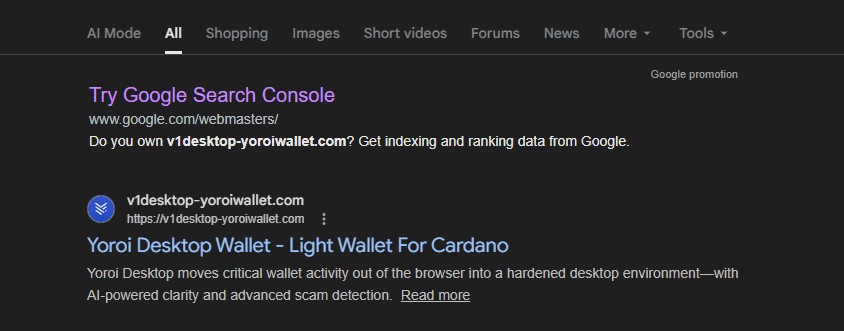
An additional point worth highlighting is that the Fast Ray VPN site is not buried or obscure. A simple Google search for “fast ray vpn” currently surfaces the Cloudflare Pages site within the top search results, appearing alongside legitimate Google Play and Apple App Store listings. This positioning significantly increases the likelihood of real users landing on the page organically, especially those searching for a VPN by name and expecting an official or review-based result. Combined with the site’s long uptime and clean presentation, this search visibility further amplifies its effectiveness as a traffic funnel.
Indicators of Compromise (IOCs)

The following indicators were observed during hands-on analysis and sandbox testing. They are linked to a deceptive VPN-themed page that redirects users through third-party infrastructure and, in some cases, delivers potentially unwanted applications. The redirects do not behave consistently. Sometimes a file is downloaded, other times users are sent to unrelated advertising or affiliate pages. This kind of behavior suggests traffic is being routed and monetized dynamically rather than through a single, fixed download path.

Domains

  • fast-ray-vpn.pages.dev
  • normallydemandedalter.com
  • insecthoney.xyz
  • valueeye.xyz
  • pixel-see.com
  • adzilla.meme
  • best-girls-around.com
  • xm.com

URL’s

  • hxxps://fast-ray-vpn.pages.dev/
  • hxxps://normallydemandedalter[.]com/y4gw4zmhi3?key=14baee5d6a64addb406346147543b508
  • hxxps://normallydemandedalter[.]com/bhb7puzj?key=13033e82c537ba388cf82fed63dcfc88
  • hxxps://insecthoney.xyz/?affId=2266&o=519&title…
  • hxxps://valueeye[.]xyz/?affId=2266&o=473&title=SETUPFILE&t=download_s1…..

File Hashes (PUA)

MD5: 3856355ad00016cf21e0492fc5db2fd6

The Fast Ray VPN site is not a legitimate VPN service and not a genuine review platform. It functions as a persistent traffic lure, redirecting users into affiliate and PUA distribution chains while actively blocking VPNs and sandboxes.

Its long lifespan suggests an effective design that prioritizes persistence and user reach while avoiding signals that typically lead to rapid takedown.

Fake Windows Update and BSOD Alerts Used in a Tech Support Scam

Overview

While reviewing submissions received through the WordPress feedback form on my website, I came across a URL that initially appeared unremarkable. Such submissions are common and often contain benign questions or comments, but this particular link stood out enough to warrant closer inspection.

I opened the URL in a controlled analysis environment, and almost immediately it became clear that it was not legitimate. What followed was a carefully staged sequence of browser based deception designed to convince users that their Windows system was infected and about to fail.

This blog documents the full behavior of the page, the redirection flow, and how simple yet aggressive JavaScript techniques are abused to convincingly imitate Windows system failures. Although no actual malware is dropped, the psychological manipulation is significant. The attack is clearly designed to exploit fear and urgency, making it especially effective against non technical users and older individuals who may not be familiar with how modern browsers can convincingly mimic system level alerts.

Initial Entry Point and Redirect Chain

hxxps://www.acrossthesea[.]it/?75k3n4
Sender IP: 64.190.76.4

Opening this link immediately triggered a series of automatic redirects across multiple domains. Each hop appeared intentional, either to fingerprint the visitor or to prepare the final scam payload.

The traffic was first redirected to a .my.id domain, followed by another redirect to a randomly generated subdomain hosted under afterselves.my.id. From there, the browser was briefly sent to ipwho.org, a legitimate IP intelligence service, where information such as IP address, browser type, operating system, and user-agent was collected. After fingerprinting, the user was redirected again to the final landing page.

The last page loaded a /win/index.php endpoint with a long Base64-encoded parameter. This encoded value likely controls dynamic behavior such as scam messaging, phone numbers, or localization logic.

At no point during this flow was user interaction required, which makes this attack particularly effective against unsuspecting users.

Landing Page Behavior and Visual Deception

Once the final page loads, the scam begins immediately. The user is presented with a screen that closely resembles a legitimate Windows Update notification. A dialog appears stating that the system will restart in five minutes to complete updates, complete with a live countdown timer.

For many users, especially older or less technical individuals, this looks completely normal. Years of exposure to genuine Windows update prompts have conditioned users to trust this type of messaging without question.

Fake Microsoft Security Alert and Phone Scam

Before any visible “scan” begins, a Windows Security themed popup suddenly appears on top of the page. It claims that serious threats such as Petya and Emotet have been detected on the system and that access has been blocked for security reasons.

The message urges the user to immediately contact “Microsoft Windows Support” using a prominently displayed phone number (+1 855-829-1289). At the same time, the browser becomes increasingly difficult to close or navigate away from.

This is the most critical stage of the scam. The attackers are attempting to push the victim into immediate action while fear is still fresh. Non-technical users and elderly individuals are especially vulnerable here, as the alert looks authoritative and urgent, and many are unaware that Microsoft does not issue security alerts or support instructions via browser popups.

Fake Command Prompt Malware Scan

Shortly after the security alert appears, the page transitions into what looks like a Windows Command Prompt window. Text begins scrolling automatically, claiming that a diagnostic scan is running. Messages such as “Initializing diagnostic module,” “Scanning system processes,” and “Checking Windows Update” are displayed alongside fake process names and memory usage values.

Although nothing is actually being scanned, the timing and presentation make it appear as though the system is actively analyzing a severe infection. This step is designed to reinforce the legitimacy of the earlier security alert and convince the user that the threat is real and ongoing.

Simulated Blue Screen of Death (BSOD)

As the fake scan concludes, the browser abruptly switches to a full screen Blue Screen of Death. The screen displays a familiar Windows-style error message along with a stop code such as CRITICAL_PROCESS_DIED.

At this point, many users believe their system has fully crashed. The BSOD serves as the final confirmation in the victim’s mind that the threat is real and severe. Panic often peaks here, making victims far more likely to follow the instructions they were shown earlier, including calling the fake support number.
Full Walkthrough Video of the Scam Behavior

To provide a complete and transparent view of how this scam operates in real time, I have recorded a full walkthrough video capturing the entire sequence from the initial URL access and redirect chain to the fake security alerts, command prompt scan, and final BSOD.

This video shows how quickly the page escalates from a seemingly harmless link into an aggressive and convincing system-failure scenario. Watching the full flow helps illustrate why non-technical users and older individuals are particularly vulnerable, as the page leaves very little room to pause or think critically once the process begins.

Video of the Scam Behavior

Browser Lock-In and JavaScript Abuse

What makes this scam effective isn’t a vulnerability exploit it’s how aggressively it traps the user in the browser and makes the experience feel “system level”. The JavaScript focuses on three high impact goals, force full screen, restrict user input, and block escape/navigation, while adding audio pressure to increase panic.

Fullscreen hijack

The page repeatedly requests full screen as soon as the user clicks, and monitors full screen state to keep the scam overlay behavior consistent.

Input restriction

To reduce the victim’s ability to regain control, the script disables keyboard input broadly and blocks right-click/context menu.

Back-button / navigation trap

The page manipulates history to make the back button ineffective an especially effective trap for non-technical users who instinctively try “Back” to escape.
Script cleanup / evasion

This short script searches loaded <script> tags and removes any whose src matches a Base64 decoded pattern. It’s consistent with “cleaning” unwanted third party scripts (or selectively disabling components) during runtime.
This activity represents a confirmed tech support scam using modern browser based deception techniques. It demonstrates how convincingly attackers can simulate Windows failures using nothing more than HTML, JavaScript, and social engineering.

The absence of malware does not reduce the threat. The intent is clearly fraudulent, and the potential impact on victims especially non technical and older users is severe.

Indicators of Compromise (IOCs)

Initial Access & Redirect Infrastructure

  • acrossthesea/.it
  • afuvy.prevardy/.my/.id
  • rekimalosheblomoglub/.afterselves/.my/.id
  • kavesivatrala/.afterselves.my/.id

Fingerprinting / Geo-IP Service

  • ipwho.org

Phone Scam Indicator

  • +1 855-829-1289

Interesting Strings

These strings were observed in page content and scripts and may be useful for content based detection, sandboxing, or threat hunting.

Fake Security Messaging

  • Microsoft Windows Security Alert
  • Your PC is infected
  • Access to this PC has been blocked
  • Trojan detected
  • Petya
  • Emotet
  • Call Microsoft Support

Fake System Activity Indicators

  • Scanning system files
  • Initializing diagnostic module
  • Checking Windows Update
  • Threat detected

JavaScript

  • requestFullscreen
  • requestPointerLock
  • navigator.keyboard.lock
  • document.onkeydown = function(){ return false }
  • history.pushState
  • onpopstate